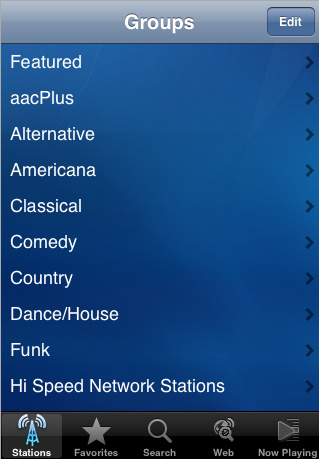
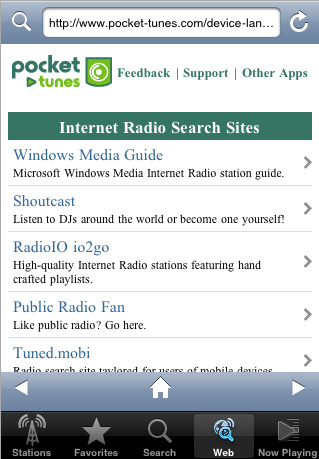
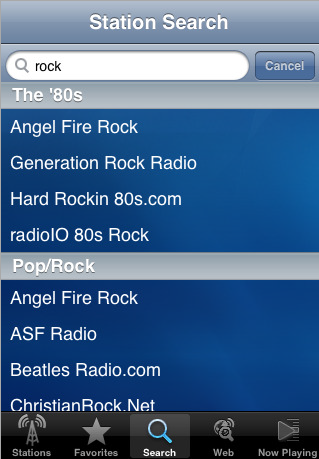
NormSoft, Inc. today announced the availability of Pocket Tunes Radio, bringing the Internet radio features of their Pocket Tunes application to the iPhone and iPod touch. Pocket Tunes Radio provides access to thousands of stations by browsing the web or the built-in catalog and supports the most popular and highest-quality streaming formats: aacPlus v2, WMA, and MP3.
The application is designed for easy station selection without sacrificing the flexibility to choose and save your favorites. Pocket Tunes Radio pioneers the ability to browse the web and select exactly the stations that you want to hear by simply tapping on the radio link, while also including a large pre-populated catalog of stations for convenience. The integrated browser also frees the user, allowing for general purpose web browsing while listening to radio on their device.
"Pocket Tunes Radio provides an unprecedented level of selection of high-quality radio stations on the iPhone and iPod Touch," said Tim Norman, Founder of NormSoft. "Pocket Tunes customers have been listening to radio on their phones for over five years now, and we're excited to bring this capability to the iPhone and iPod touch. Our years of experience with Pocket Tunes have allowed us to create a robust, elegant, and fully-featured application."
Pocket Tunes Radio can be purchased from the iPhone's App Store and works on any iPhone or iPod touch with firmware 2.1 or later.
Get the iClarified Daily Newsletter
Apple news, rumors, tutorials, price drop alerts, in your inbox every evening, free.
Unsubscribe at any time.
Success!
You have been subscribed.
Add Comment
Would you like to be notified when someone replies or adds a new comment?
Yes (All Threads)
Yes (This Thread Only)
No
Notifications
Would you like to be notified when we post a new Apple news article or tutorial?
Yes
No
Comments (1)
Comments are closed for this article.
0
BRIKZ - December 25, 2008 at 9:50am
Yo Cyber Mafia,
I know i have asked this before but i never got a response. After i download this and attempt to transfer it from my computer to my phone, what folder do i put it in when i ssh, or diskaid, transfer it over. ex. root,var,mobile? If i put it in the wrong folder it won't recognize it right?
Thanks in advance,
Brikz




![Apple Says iPhone Duo's Folding Display Has a Replaceable Cover Layer [Video]](/images/news/102525/102525/102525-160.jpg "Apple Says iPhone Duo's Folding Display Has a Replaceable Cover Layer [Video]")
![Touchscreen OLED MacBook Pro Could Debut as Early as October [Gurman]](/images/news/102519/102519/102519-160.jpg "Touchscreen OLED MacBook Pro Could Debut as Early as October [Gurman]")
![iPhone 18 Pro Sales Rise 12% in China as Apple Leads Weekly Smartphone Market [Report]](/images/news/102522/102522/102522-160.jpg "iPhone 18 Pro Sales Rise 12% in China as Apple Leads Weekly Smartphone Market [Report]")
![Apple TV Shares Trailer for 'Awkwafina: The Unlikely Cook' [Video]](/images/news/102513/102513/102513-160.jpg "Apple TV Shares Trailer for 'Awkwafina: The Unlikely Cook' [Video]")



![How To Find Your iPhone IMEI Number [Video]](/images/tutorials/83557/83557/83557-160.jpg "How To Find Your iPhone IMEI Number [Video]")




![16-Inch M5 Max MacBook Pro Drops $900 to New Low of $3,499 [Deal]](/images/news/102438/102438/102438-160.jpg "16-Inch M5 Max MacBook Pro Drops $900 to New Low of $3,499 [Deal]")
![Magic Keyboard for iPad Air Drops to $200 on Amazon [Deal]](/images/news/102402/102402/102402-160.jpg "Magic Keyboard for iPad Air Drops to $200 on Amazon [Deal]")
![13-Inch M5 MacBook Air With 1TB Drops to $1,449 on Amazon [Deal]](/images/news/102345/102345/102345-160.jpg "13-Inch M5 MacBook Air With 1TB Drops to $1,449 on Amazon [Deal]")
