Reminders for Messages for iOS is a Josh Tucker concept that's been made into a manually installable tweak.
Describing the original concept, Tucker writes, "We've all encountered a situation where we forget to respond to a text message from someone. Myself included. Here's a potential solution (concept)."
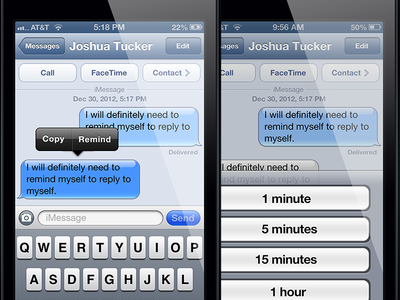
In a conversation in Messages, hold down on a specific message to reveal the "Remind" option. Tapping it gives you the option to set a reminder for the following times: - 1 minute - 5 minutes - 15 minutes - 1 hour - (and of course there's a Cancel button at the bottom)
Once you've chosen a time, a notification bulletin is added into Notification Center which will re-alert you after the selected time.
Unfortunately, the tweak is not yet available via Cydia; however, there is an implementation by Jonathan Bailey that can installed via GitHub.
Instructions: 1) Open Safari on your device and enter this URL: https://github.com/Jon889/smsremind 2) Tap on the folder link called "build" 3) Tap on the file link "com.jbp.smsremind_0.0.1-1_iphoneos-arm.deb 4) Tap the link "View Raw" 5) Tap "Open in iFile" 6) Tap "Installer" 7) Tap "Done" 8) Respring your device 9) Voila










![How To Change Wallpaper on Mac [Video]](/images/tutorials/90512/90512/90512-160.jpg "How To Change Wallpaper on Mac [Video]")
![How To Turn Off Always On Display on iPhone [Video]](/images/tutorials/87524/87524/87524-160.jpg "How To Turn Off Always On Display on iPhone [Video]")





![16-Inch M5 Max MacBook Pro Drops $900 to New Low of $3,499 [Deal]](/images/news/102438/102438/102438-160.jpg "16-Inch M5 Max MacBook Pro Drops $900 to New Low of $3,499 [Deal]")
![Magic Keyboard for iPad Air Drops to $200 on Amazon [Deal]](/images/news/102402/102402/102402-160.jpg "Magic Keyboard for iPad Air Drops to $200 on Amazon [Deal]")
