This tutorial will show you how to jailbreak your 3G iPhone by creating a custom ipsw that can automatically jailbreak, install applications, and add your own boot logos.
To learn how to use PwnageTool to unlock/jailbreak a 2G iPhone you can use the tutorial which is here or for the iPhone 3GS click here
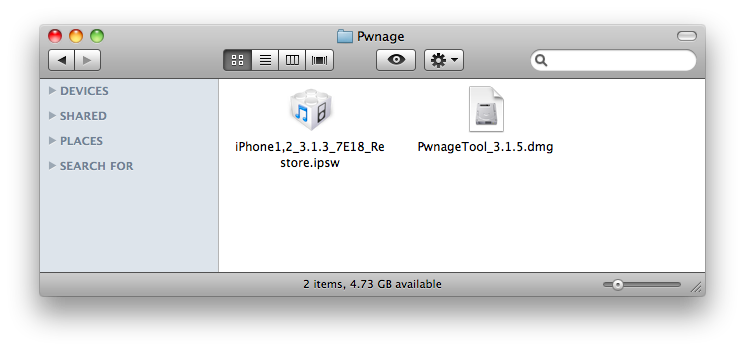
Step One Make a folder called "Pwnage" on the desktop. In it, you will need a couple of things. PwnageTool 3.1.5, found PwnageTool_3.1.5.dmg.torrent download no longer available
When downloading the IPSW file, it is best to download it with Firefox since Safari often auto extracts it!
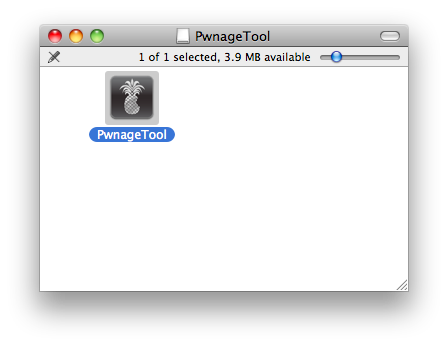
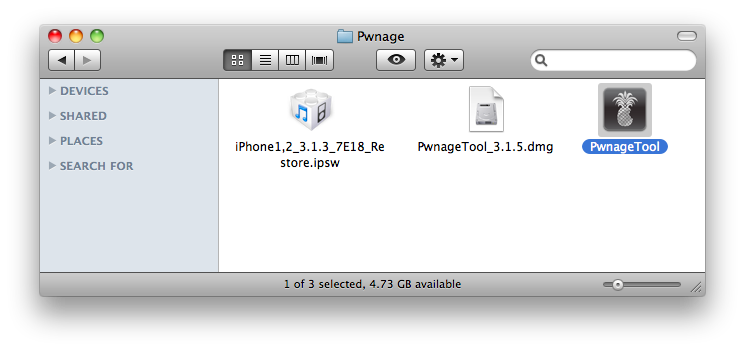
Step Two Double click to mount PwnageTool 3.1.5 then drag the PwnageTool icon into the Pwnage folder.
Then from the Pwnage folder double click to launch the PwnageTool application.
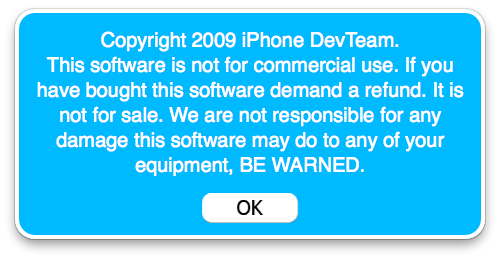
Click Ok if presented with a warning.
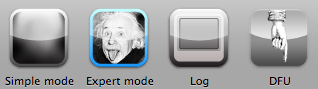
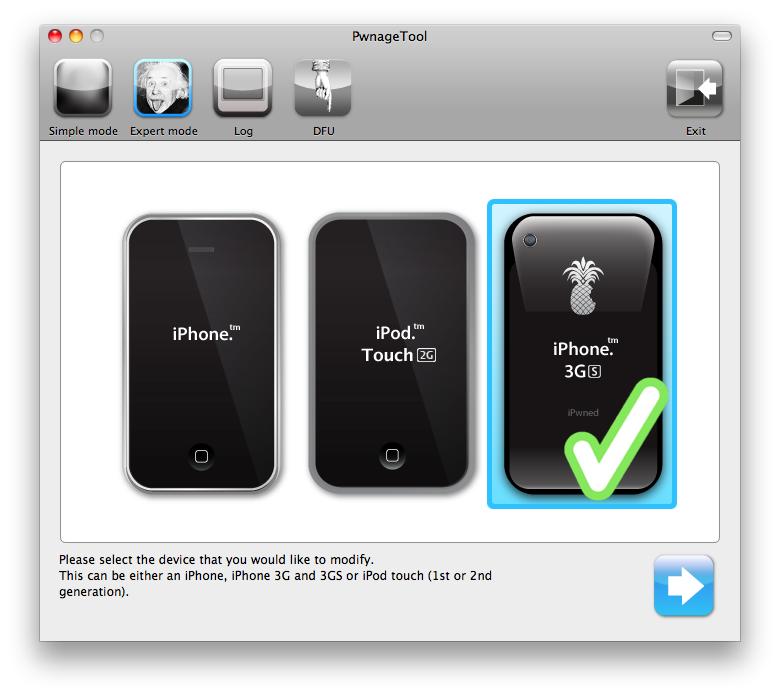
Step Three Click to select Expert Mode from the top menu bar
Step Four Click to select your iPhone. A check-mark will appear over the image of the phone.
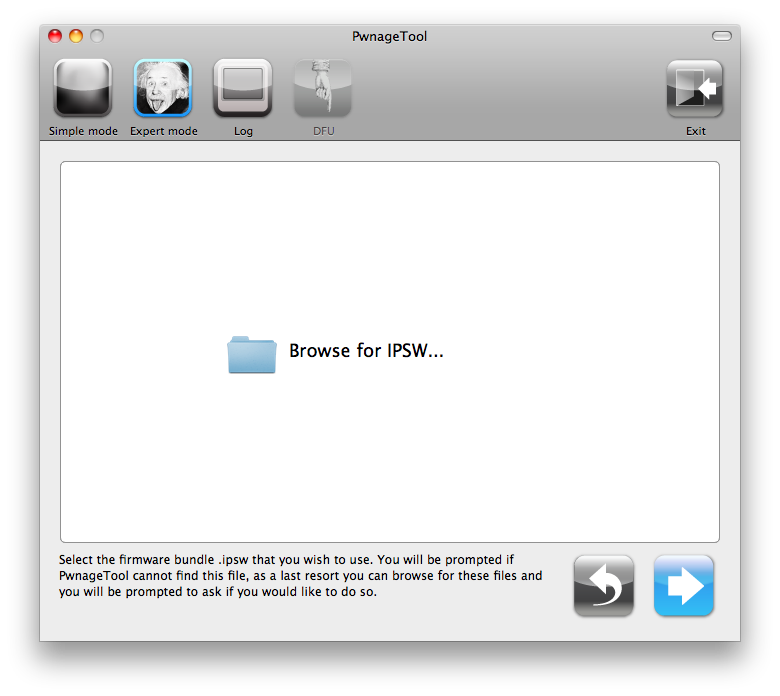
Step Five Click the blue arrow button to continue. You will be brought to the "Browse for IPSW" page. On my laptop, it automatically found the IPSW. If PwnageTool doesn't automatically find the ipsw file you can click Browse for IPSW....
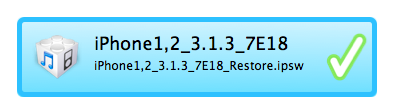
Click to select the found IPSW file, a checkmark will appear next to it. Then click the blue arrow button to continue.
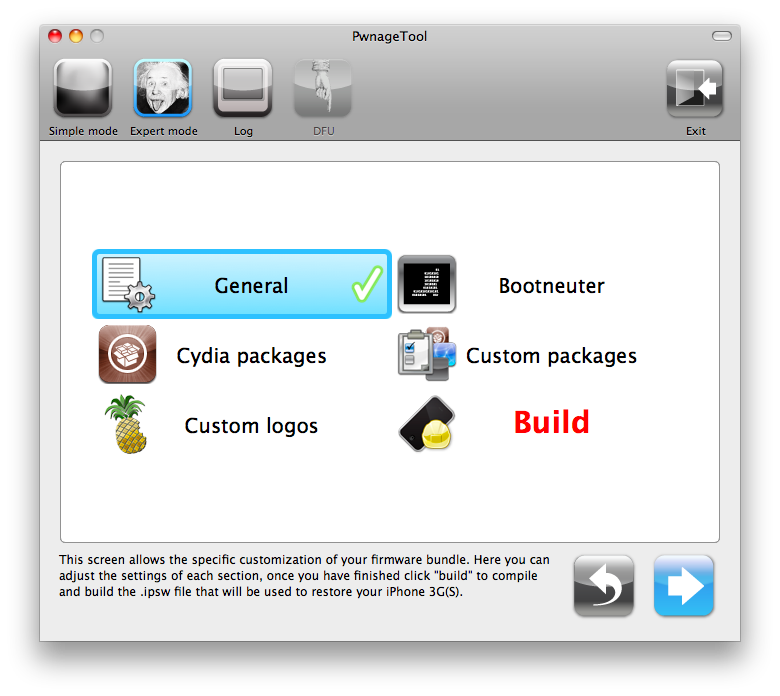
Step Six You will then be brought to a menu with 7 choices. Click to select General then click the blue arrow button.
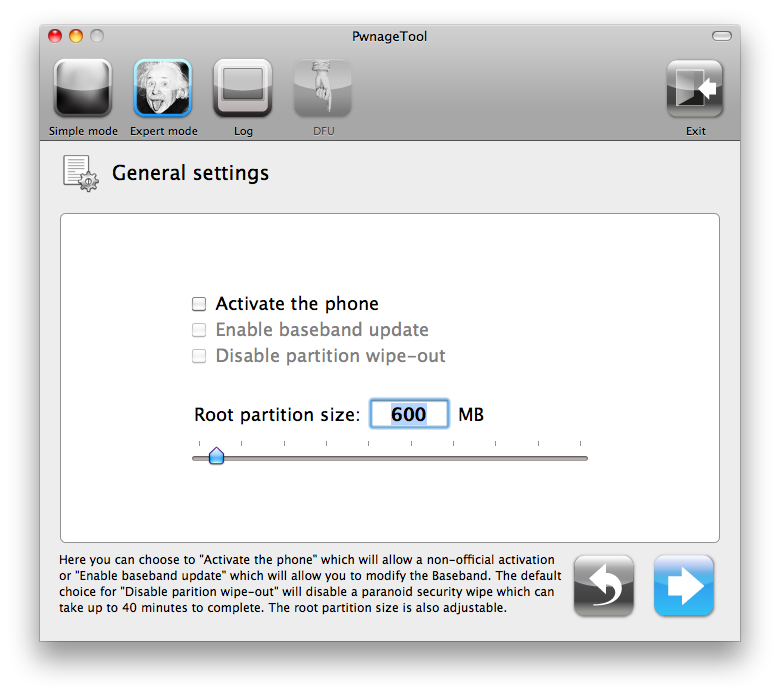
The General settings allows you to decide the partition size. Check Activate the phone if you are not with an official carrier then click the blue arrow button.
NOTE*: Deselect Activate if you have an iPhone legitimately activated on an official carrier. NOTE*: You may need to increase the size of the root partition slightly. My first attempt failed at creating the IPSW until I increased the size to about 695 MB.
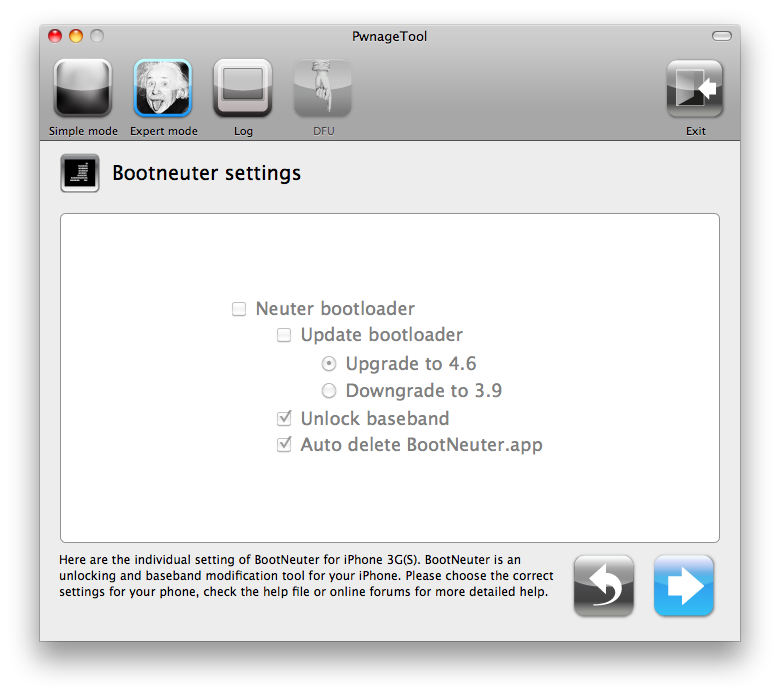
The Bootneuter settings are greyed out for the 3G iPhone. Click the blue arrow button.
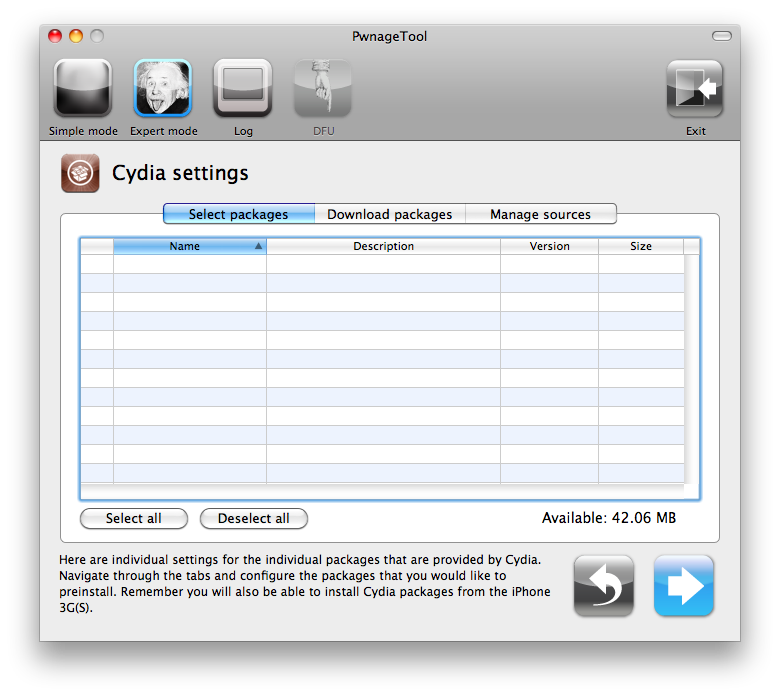
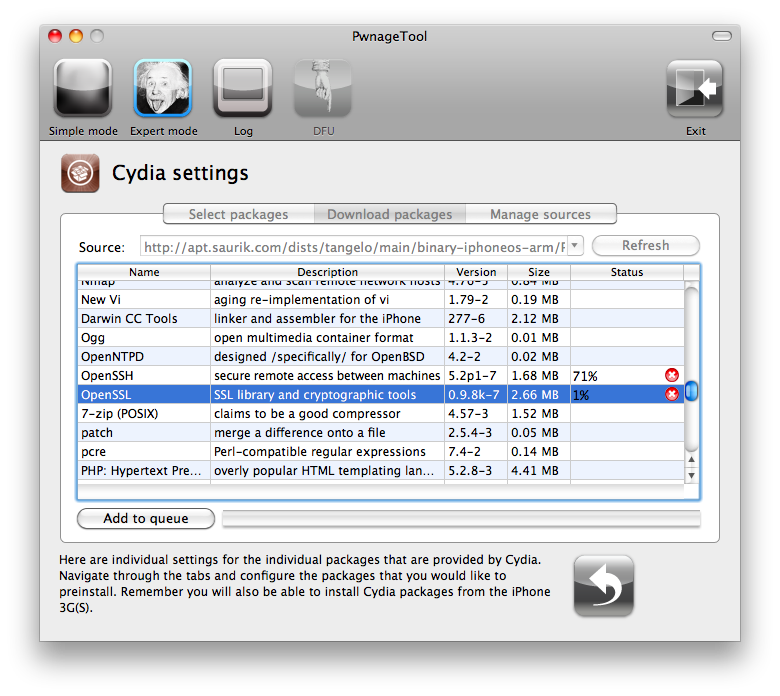
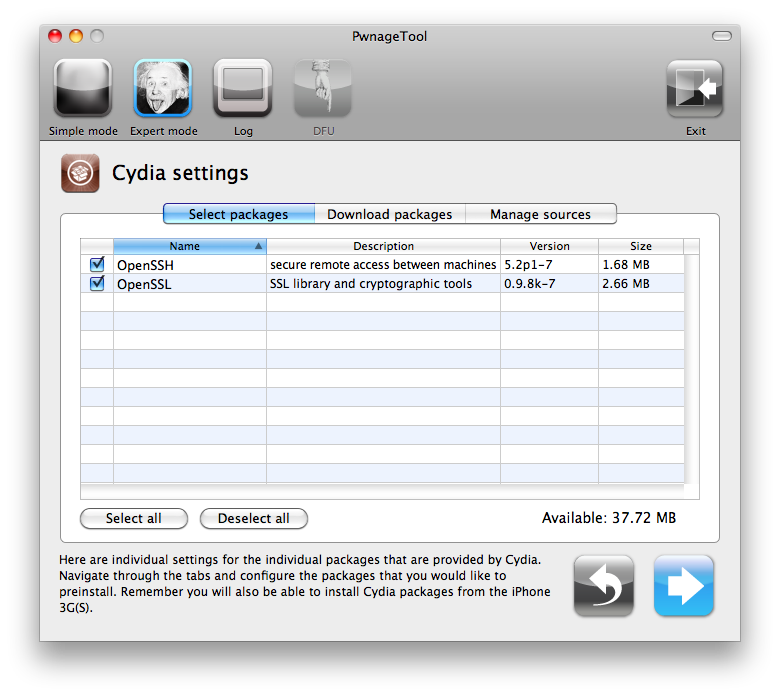
The Cydia settings menu allows you to create custom packages so you do not have to manually install the necessary them later.
Click to select the Download packages tab. Then click the Refresh button to display all the available packages. Double clicking the package you want will download it and make it available in the Select Packages tab.
Checkmark the ones you want then Click the blue arrow button.
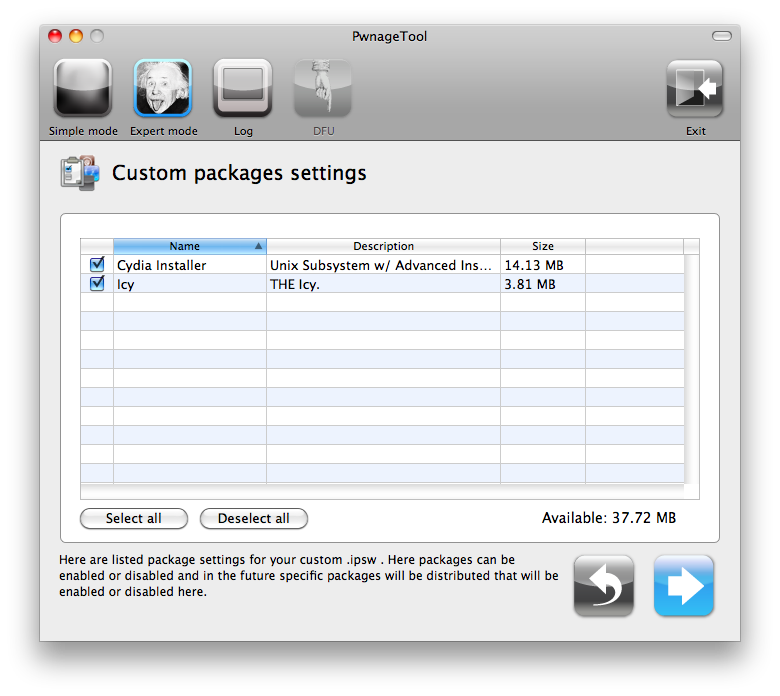
The Custom Packages Settings menu displays listed package settings for your custom IPSW. For know leave these settings as is. Click the blue arrow button to continue.
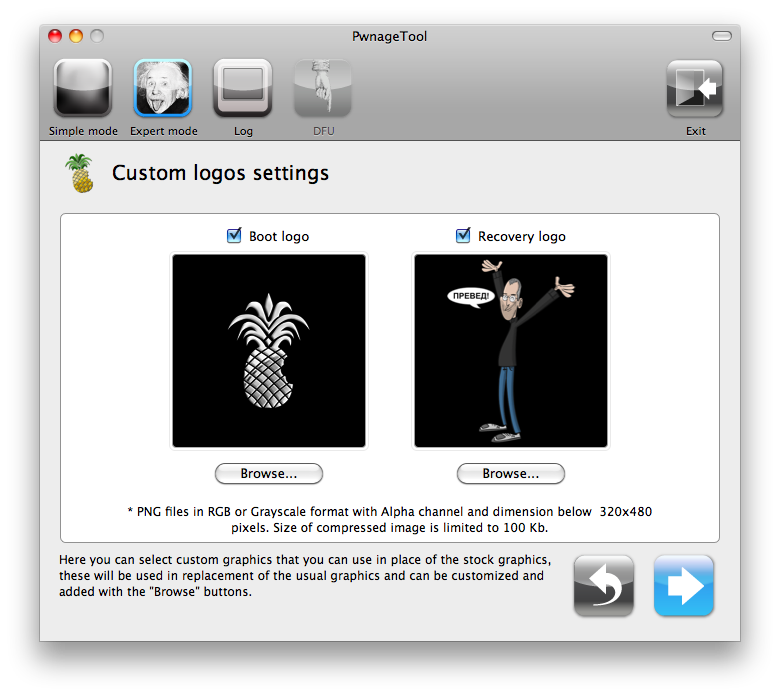
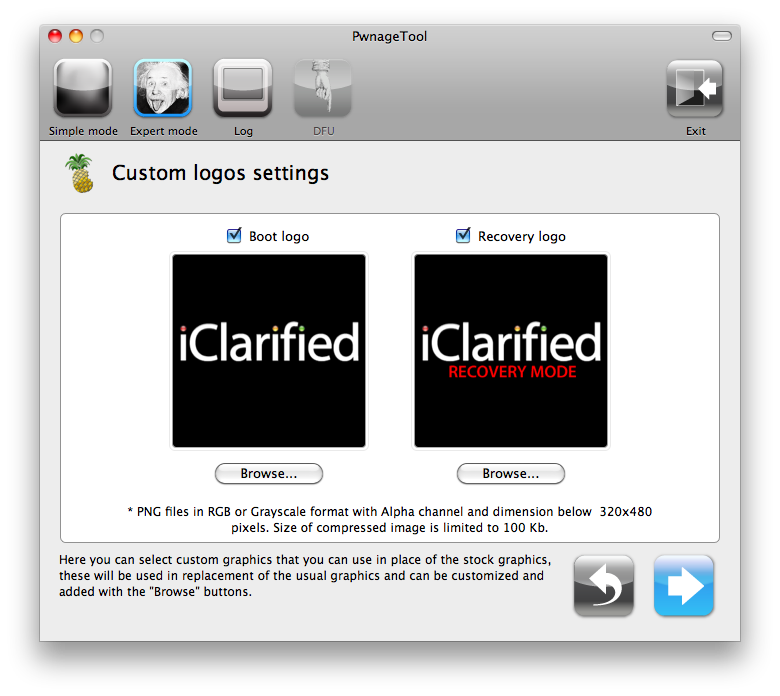
The Custom Logos Settings menu allows you to add your own images as boot logos. Click the Browse button to select your Boot logo and Recovery logo. If you would like to use the iClarified ones they can be found here: Boot Logo, Recovery Logo
Remember the rules for them: RGB or Grayscale format with Alpha channel and dimension bellow 320x480...
Click the blue arrow button to continue.
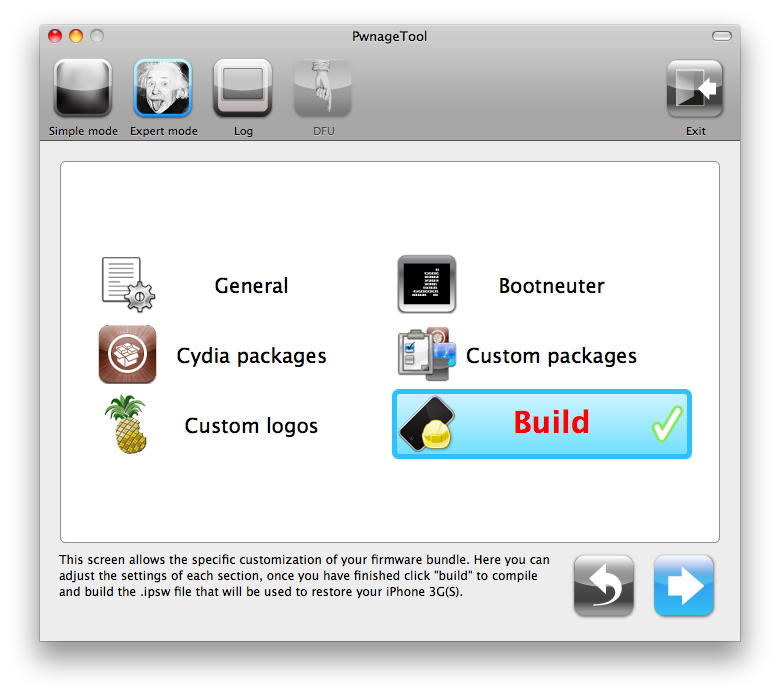
Step Seven You are now ready to begin the pwnage process! Click the Build button to select it then click the Blue arrow button to begin.
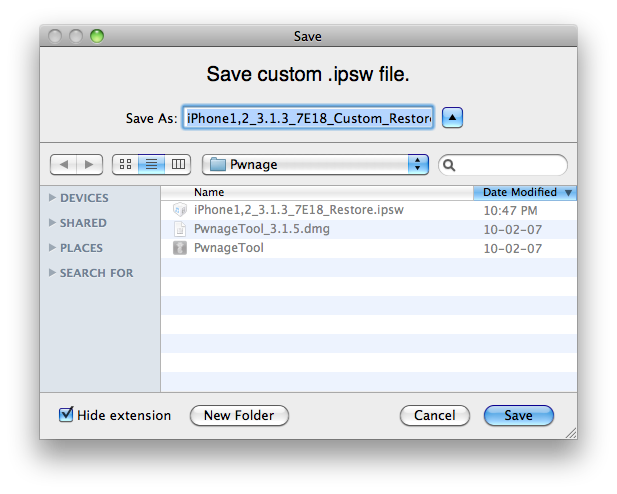
Step Eight You will be asked to save your custom .ipsw file. Save it to your Pwnage folder you created on your Desktop.
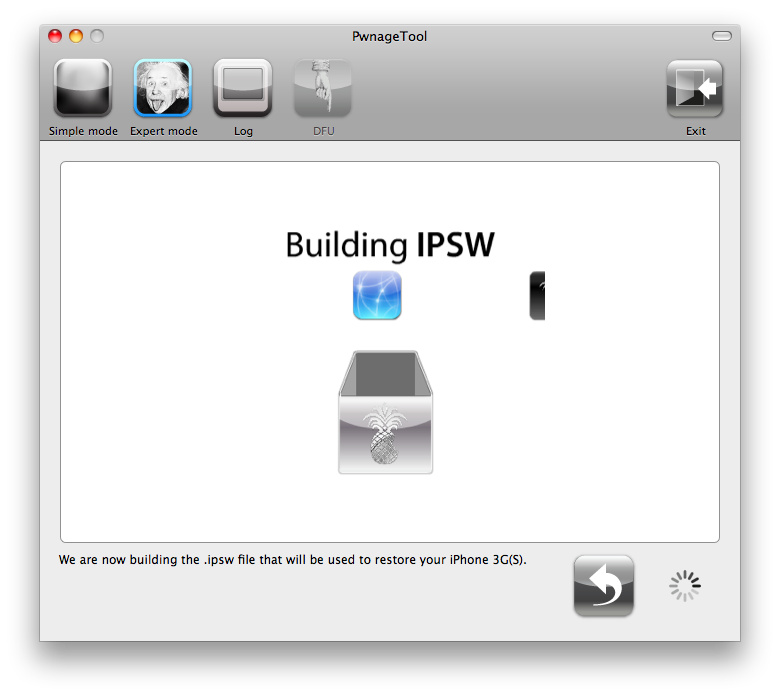
Your IPSW is not being built. Please allow up to 10 minutes.
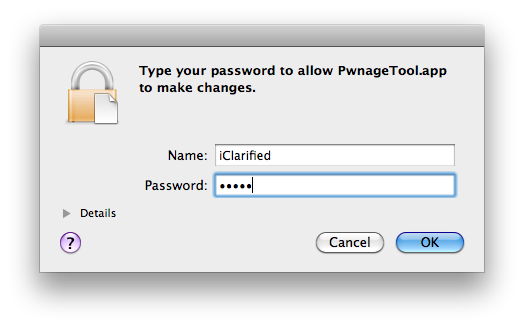
You will be asked to enter your administrator password. Do this then click the OK button.
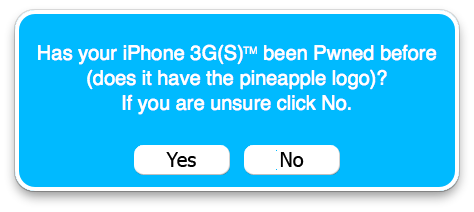
When prompted if your iPhone has been Pwned before, we clicked No. It allows for a more thorough restore.
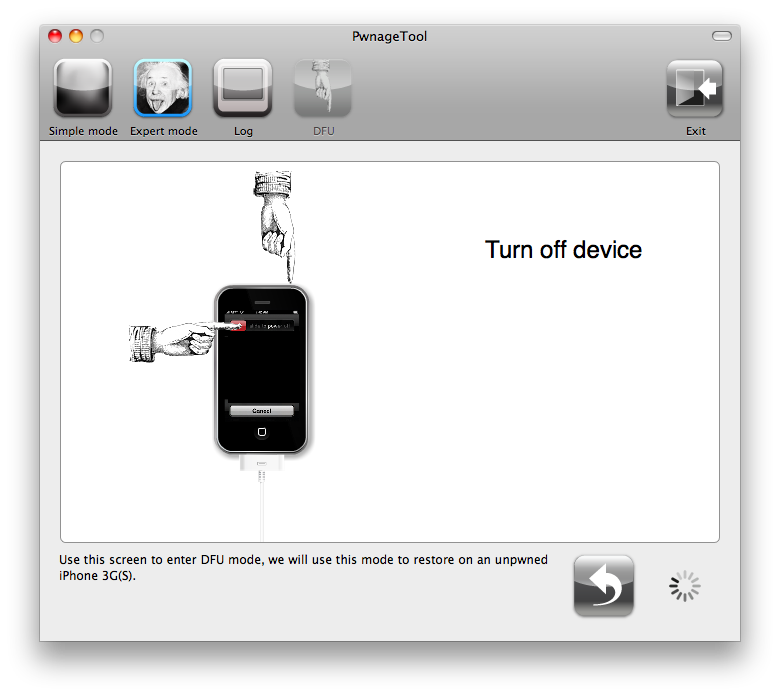
You will be asked to turn off the device. Make sure it is connected to the USB port.
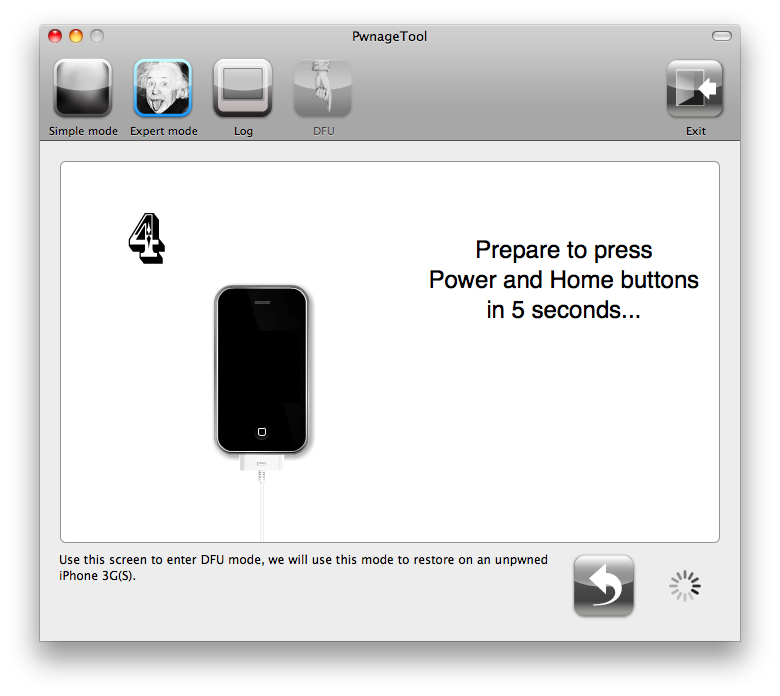
Step Nine Be ready to follow directions now. It will ask you to hold the home button and the power button for 10 seconds. Then, you will have to release the power button and hold the home button for 10 seconds to enter DFU.
If you fail, it will show you a message. Click Yes. Unplug the iPhone from the USB. Turn it off, then turn it back on. Plug it back into the USB and turn off the iPhone when prompted.
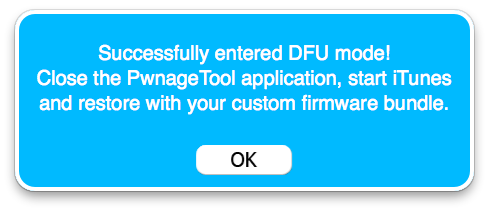
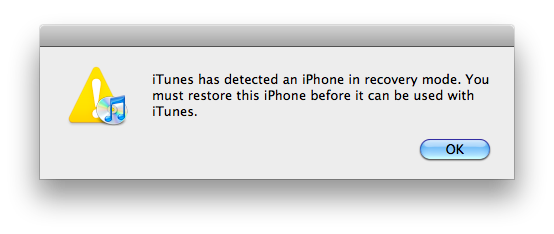
When done correctly, PwnageTool will display a message telling your that it successfully entered DFU mode. iTunes will also pop-up.
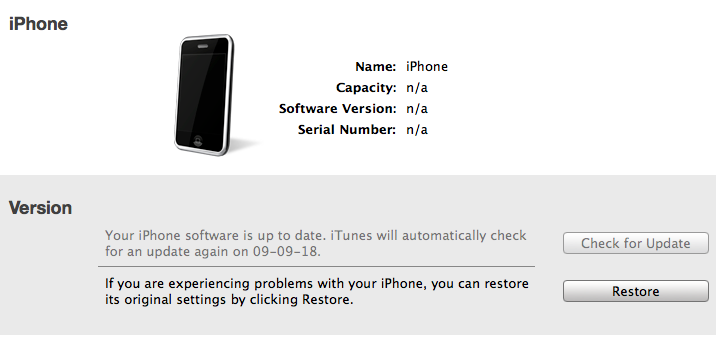
Step Ten In iTunes, hold the Alt/Option key and click Restore.
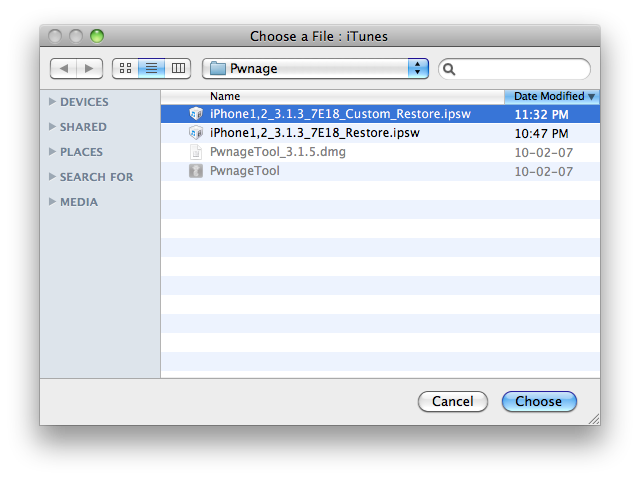
Step Eleven Navigate to the Pwnage folder on your desktop using the dialog window that appears. Select the custom IPSW that was created (iPhone1,2_3.1.3_7E18_Custom_Restore.ipsw) and click the Open button.
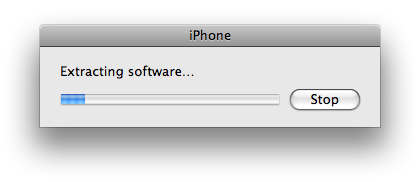
Step Twelve iTunes will now restore the firmware on your iPhone. This can also take up to 10 minutes.
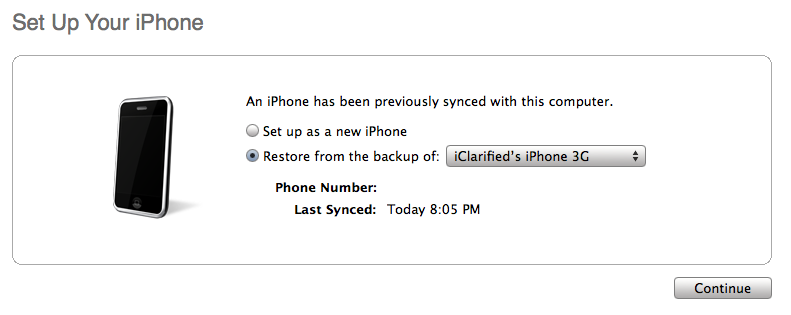
If you so desire you may restore from a previous backup to keep all your settings or set your iPhone up fresh.
Step Thirteen Once the restore is completed your iPhone will reboot and you will notice Cydia is present on the SpringBoard!
Get the iClarified Daily Newsletter
Apple news, rumors, tutorials, price drop alerts, in your inbox every evening, free.
Unsubscribe at any time.
Success!
You have been subscribed.
Add Comment
Would you like to be notified when someone replies or adds a new comment?
Yes (All Threads)
Yes (This Thread Only)
No
Notifications
Would you like to be notified when we post a new Apple news article or tutorial?
Many thanks for the precise tutorial. Worked flawlessly for me and I have android successfully working on my iPhone 3g which has 3.1.3. However, I am unable to get data working in android. Can someone help please? Should I setup an APN manually?
I've one this process with ease with my iPhone 2G. I'm now trying doing the same with my iPhone 3G. All is fine apart from the DFU mode. I have tried times and times again, leaving it a little less than 10 sec, leaving a little more than 10 sec, right on the dot on 10 sec... Not having any luck.
I have tuned the device off, disconnected, turn back on again, wait, and connect again between each time.
Anybody can help?
Thanks
I get a torrent file instead of 'PwnageTool_3.1.5.dmg' and when I double click it it asks me to choose an application to open it. And I'm stucked. I tried to rename the folder by deleting it's last part but it's not working. Please help !!!!
I did the JB on a 3G with a custom restore file on 4.2.1 on a BB 6.15.00. Worked flawlessly BUT when i wanted to unlock Cydia crashed. I can not unlock without Cydia!!!! What should i do? can somebody help me ? Thanks in advance
Laurent
Hi .. Followed the instructions prslieecy and I successfully Jail Break and updates IOS to 4.3.3 [ custom firmware ]Now strangely the legit sim stop working ans when I ve used ultrasnow it stays in searching and then display no signalAt present it is at 4.3.3 /05.14.02 help required as I cannot use my phone with its legit simI have repeated the process three four time also rest network setting , rebooting nothing works
I bought an unlocked phone in Hong Kong. At that point it was 3.1.3, I made the fatal mistake of trying to upgrade it to OS4. Now all I get is the emergency restore icon. I followed the steps with pwnagetool but I get a 1600 error when i try to restore it. Is there something Im doing wrong? I noticed that the pwnagetool doesnt have a 3G so I picked the 3G(S) one, is that correct? Will this process even help me with my problem?
Please advise. Thank you!
hello everybody, i have an iphone 3gs FW 3.1.3 and it is stuck on the emergency screen message!!!!!! Can pwnage tool 3.1.5 Activate it ??? Or there is no way yet to hactivate iphone 3gs on 3.1.3 ?? thanks in advance
i did the jailbreak according tp the tutorial but am stuck now at not having a network. i did twice once with the activate your phone option checked and once without.
Can anyone help me with the unlocking part... Funny thing thing is prior to this round i have never had the problem of unlocking the phone because it is a unlocked phone when it was purchased...
Please help
Thanks
on jb iphone i had no wifi signal... I upgraded to 3.1.3 with itunes :( and it's dead now! I can turn it on but cannot activate it event with an ATT card (phone not bought here in US)... I tried the pwnage steps but it stops at where it says connects w USB and nothing happens... please help... m
OK Sorry if this a rookie question but I need some help. I downloaded the pwnage tools but it asks what to open it with. WHat do I do, it does not show the disk image (mac) so I am not sure hot to open this file. The restore file i downloaded seems to be recognized, any help would be appreciated. Thanks
It's the third time that I try to jailbreak my iPhone 3G 3.1.3 with Pwnage Tool 3.1.5.
I am following iClarified manuel indications and everything is going just as well as indicate till the iPhone reboot.
Then I am only able to use it as an iPod ! The reception signal became flat, and I can't make or receive call anymore, same with messages.
General information indicate there is no operator.
The same simCard still working with an other cellphone.
I am using an indonesian operator ProXL.
What going wrong ?
Is your carrier authorized by Apple??... remember that this tutorial is only for jailbreak... If you don't have any signal or carrier recognized maybe it's because you haven't installed the software unlock.....
Follow the unlock tutorials
My phone is unlock. At least I believe it, it's why the guy from the shop where I bought it told me.
I bought it in Italy and use it in Indonesia with a different provider.
What strange anyway is that UNLOCK tutorial says "Before you can follow these instructions you must have a jailbroken iPhone" !!!!
How could many people and I, have an unlock iPhone not Jailbroken then !
dude ur talking about activation, your iphone is activated and jailbroken but not unlocked
to unlock it go to cydia>search>ultrasn0w...and install it :)
Its gonna unlock ur iphone to any baseband
I'm having the same problem and thanks for the response Ahmad. I didn't install any of the cydia files the first time. Which ones do I install to do this? I don't have cydia on my phone right now.
iphone 3g
3.1.3(7E18)
05.12.01
every time i try to run pwnage tool, i get to the browse for ipsw, select the 'iPhone1,2_3.1.3_7E18_Restore.ipsw' file and get a "wrong firmware bundle selected" message
what am i doing wrong?
I keep getting the message "wrong firmware bundle selected" I have and iphone 3G it's running 3.1.3 and i'm using iPhone1,2_3.1.3_7E18_Restore.ipsw to jailbreak. but i keep getting that messege. I see that some people have said to use the custom version, but i don't understand that and i don't know where to get that. please help.
You are probably doing what I did, which was to choose the image on the left of 'iPhone' rather than 'iPhone 3Gs'. I know that you have a 3G, but the 3GS covers both.
Every thing ok but when installing firmware with iTune, I get an error (2600 or similar), do I need to use a particular version of iTunes? (got 9.0.3) or is there any possibility that the bootloaders I get on the net are corrupted (the one on the tutorial is not available from here) Thanks.



![Apple Stores Get iPhone Scanner to Fight Return Fraud [Report]](/images/news/103029/103029/103029-160.jpg "Apple Stores Get iPhone Scanner to Fight Return Fraud [Report]")
![Apple TV Shares 'Full Throttle' With F1 Drivers and Vince Young Ahead of U.S. Grand Prix [Video]](/images/news/103023/103023/103023-160.jpg "Apple TV Shares 'Full Throttle' With F1 Drivers and Vince Young Ahead of U.S. Grand Prix [Video]")
![MacBook Neo Helps Apple Gain PC Market Share Despite Shipment Decline [Report]](/images/news/103020/103020/103020-160.jpg "MacBook Neo Helps Apple Gain PC Market Share Despite Shipment Decline [Report]")
![iPhone Duo Teardowns Reveal Dual-Battery Design and Repair Challenges [Video]](/images/news/103014/103014/103014-160.jpg "iPhone Duo Teardowns Reveal Dual-Battery Design and Repair Challenges [Video]")

![How To Back Up Your iPhone to an External Drive on Mac [Video]](/images/tutorials/72786/72786/72786-160.jpg "How To Back Up Your iPhone to an External Drive on Mac [Video]")

![How To Find Your IP Address on iPhone [Video]](/images/tutorials/496/496/496-160.jpg "How To Find Your IP Address on iPhone [Video]")

![Beats Headphones, Earbuds, and Pill Speaker Are Up to 41% Off [Deal]](/images/news/103026/103026/103026-160.jpg "Beats Headphones, Earbuds, and Pill Speaker Are Up to 41% Off [Deal]")
![New Fire TV Stick 4K Drops to $29.99 (50% Off) [Deal]](/images/news/102984/102984/102984-160.jpg "New Fire TV Stick 4K Drops to $29.99 (50% Off) [Deal]")
![Apple's iPhone 18 Pro and Pro Max Cases Are Up to 37% Off [Deal]](/images/news/102978/102978/102978-160.jpg "Apple's iPhone 18 Pro and Pro Max Cases Are Up to 37% Off [Deal]")
![16-Inch MacBook Pro With M5 Pro Drops to $2,429 ($570 Off), Lowest Price We've Seen [Deal]](/images/news/102957/102957/102957-160.jpg "16-Inch MacBook Pro With M5 Pro Drops to $2,429 ($570 Off), Lowest Price We've Seen [Deal]")
