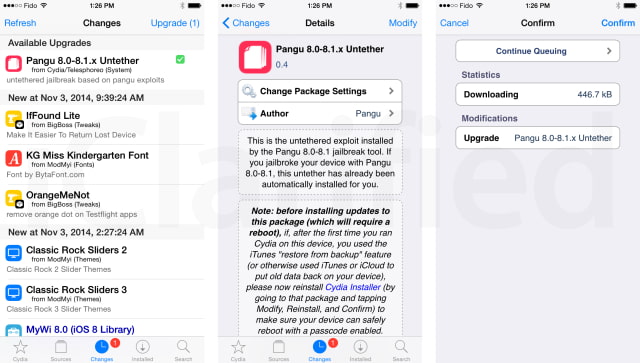
The PanguTeam has released an updated version of its untether for the iOS 8.0 - 8.1 jailbreak, fixing an issue which could cause applications (particularly Safari) to randomly crash.
This is the untethered exploit installed by the Pangu 8.0-8.1 jailbreak tool. If you jailbroke your device with Pangu 8.0-8.1, this untether has already been automatically installed for you.
What's New: Version 0.4 of this package fixes the issue where, on 32-bit devies (iPod 5, iPhone 4S/5, iPad 2/3/4, iPad Mini 1), applications (particularly Safari) would randomly crash while being used.
Important: Note: before installing updates to this package (which will require a reboot), if, after the first time you ran Cydia on this device, you used the iTunes "restore from backup" feature (or otherwise used iTunes or iCloud to put old data back on you device), please now reinstall Cydia Installer (by going to that package and tapping Modify, Reinstall, and Confirm) to make sure your device can safely reboot with a passcode enabled.
You can update your Pangu Untether from Cydia. If you haven't jailbroken already, you can be instruction on how to jailbreak your specific device via the iClarified Jailbreak Wizard.
Please follow iClarified on X, Facebook, or RSS for more updates.
Get the iClarified Daily Newsletter
Apple news, rumors, tutorials, price drop alerts, in your inbox every evening, free.
Unsubscribe at any time.
Success!
You have been subscribed.
Add Comment
Would you like to be notified when someone replies or adds a new comment?
Yes (All Threads)
Yes (This Thread Only)
No
Notifications
Would you like to be notified when we post a new Apple news article or tutorial?
Yes
No
Comments (20)
Comments are closed for this article.
0
NotSoHappy - November 5, 2014 at 11:25am
my iPad 2 Runs Perfectly With the new jailbreak And Its Fast And easier
0
YouCan'tHandleTheTruth - November 5, 2014 at 2:52am
My prior issue with my iPad 2 and iPhone 6 rebooting into safe mode repeatedly got fixed :).
I did another fresh restore then re-jailbreak. Runs perfect now
0
teenjojo - November 4, 2014 at 4:49pm
i jailbreak my iphone 5s yesterday 11/04/2014 everything works fine except that when i play any video or something i recorded when i press the volume up or down it crashes it closes the video so i have to set up the volume before watching a video any suggestion thanks.
0
tng - November 4, 2014 at 3:46am
Why don't you get Kodi on all your devices and laptop? Works just fine
0
YouCan'tHandleTheTruth - November 4, 2014 at 2:11am
I used the latest Pangu jailbreak on both my Iphone 6 and ipad 2. I followed the instructions on here and the jailbreak was successful. Thank you Team Pangu, I appreciate getting this jailbreak. I have a problem since doing it on the 30th. Both of my 2 devices upon trying open any app, the devices keep restarting in safe mode. Can anyone offer some solid advice on fixing this please.
0
Techno - November 4, 2014 at 3:43am
Check to see if you updated everything on Cydia no what you last installed?
0
Jeremy - November 4, 2014 at 1:58am
I have calls going straight to voicemail since the jailbreak and have reboot my phone to watch videos on facebook
0
Guest - November 3, 2014 at 10:23pm
Hmmmz... the patch does not fix crash-issue on iPad Mini l ;-(
0
Ketones - November 3, 2014 at 9:12pm
Actually, I did not red the red box..LoL
But it says to reinstall Cydia if you use the iTunes backup, but for me it did not have modify or reinstall option. So, I did not know how to install Cydia.
After I updated to 0.3 one, the device reboot but it stay on infinity loop Apple screen. I restored from iTunes and fine. I tried to install the Pangu 1.0.1 version, but it pops up a blue message box that I don't know what says. I think because there is a newer version of Pangu.
0
Ketones - November 3, 2014 at 9:13pm
i did not read the red box
0
Jake - November 3, 2014 at 6:39pm
Can somebody help me? really confused about pangu8. I'm on stock 8.1, with all my data. I've backed up. So, can I jailbreak, set up Cydia and then restore my backup? cause I don't want a jailbroken phone without my data. I'm confused as to whether or not it will put me in a bootloop as that's already happened to me once. thanks
0
Jake - November 3, 2014 at 6:40pm
I'm using a 5s by the way
0
helping out - November 3, 2014 at 6:49pm
all you need to do is jailbreak and you're fine. no need to restore form backup after you jailbreak because you'll already have all your data on there
0
Jake - November 3, 2014 at 7:00pm
How will I have my data after a restore?
0
Atomic Adam - November 3, 2014 at 7:03pm
You don't have to restore. You can just plug in your phone and have it hack it if you're already on the right version.
If you do not currently have a jail break, then restore to the current version and wipe the phone (best practice) then you do that first, and restore your data with your computer or iCloud and then jailbreak your device.
If you were jailbroken before on an earlier version and you wish for your jailbroken apps to come back in with your restore (backup to the computer is best way (select backup all)) then backup your phone, restore the lastest ios, then jailbreak the device before you restore from iCloud or iTunes.
0
Jake - November 3, 2014 at 7:13pm
Alright. so i don't need to restore my phone to jailbreak I can just do it right now? that's weird because ever other jailbreak EVER has required a fresh restore first. I'm a bit skeptical about it to be honest
0
Jaime Losa - November 3, 2014 at 7:31pm
Jake, first backup (just in case). Then jailbreak following instructions meticulously, like disabling passcode, etc. Then jailbreak.
If it fails (happened to me the first time), then YOU MUST RESTORE to a fresh 8.1 WHITOUT restoring your backup yet. Then jailbreak, and execute Cydia for the first time. And finally, restore your backup from itunes. It won´t delete the jailbreak.
0
Ketones - November 3, 2014 at 9:37pm
Does it work if you install the 0.3 or 0.4 updates and with passcode? Because I updated and it had passcode, then I stucked on infinity bootloop.Thanks
0
Random User - November 3, 2014 at 11:20pm
Reboot the iphone and hold the UP volume key. This will bypass the plugins and you can update to 0.4
0
Ketones - November 4, 2014 at 5:07pm
It did not work, does it take much to pass it? Cheers mate!!










![How To Change Wallpaper on Mac [Video]](/images/tutorials/90512/90512/90512-160.jpg "How To Change Wallpaper on Mac [Video]")
![How To Turn Off Always On Display on iPhone [Video]](/images/tutorials/87524/87524/87524-160.jpg "How To Turn Off Always On Display on iPhone [Video]")





![16-Inch M5 Max MacBook Pro Drops $900 to New Low of $3,499 [Deal]](/images/news/102438/102438/102438-160.jpg "16-Inch M5 Max MacBook Pro Drops $900 to New Low of $3,499 [Deal]")
![Magic Keyboard for iPad Air Drops to $200 on Amazon [Deal]](/images/news/102402/102402/102402-160.jpg "Magic Keyboard for iPad Air Drops to $200 on Amazon [Deal]")
