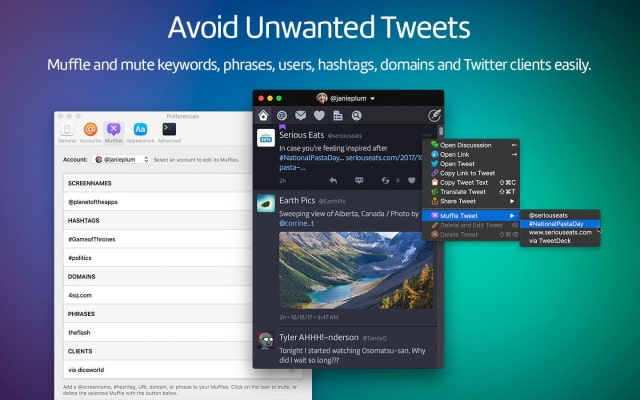
The brand new Twitterrific 5 for Mac application has already received a big update with Muffle and Mutes, Automatic Scrolling, Status indicators for new mentions or messages, and more.
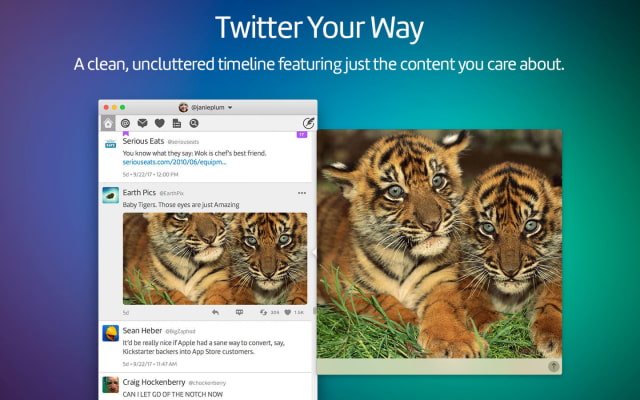
Re-imagined from the ground up to be the Mac's most friendly, powerful and modern Twitter client. Twitterrific makes Twitter fun.
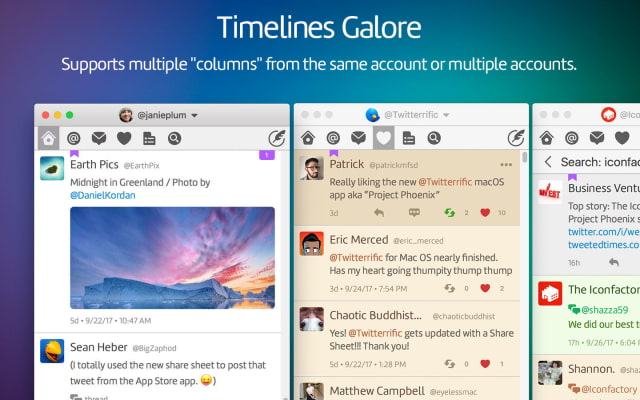
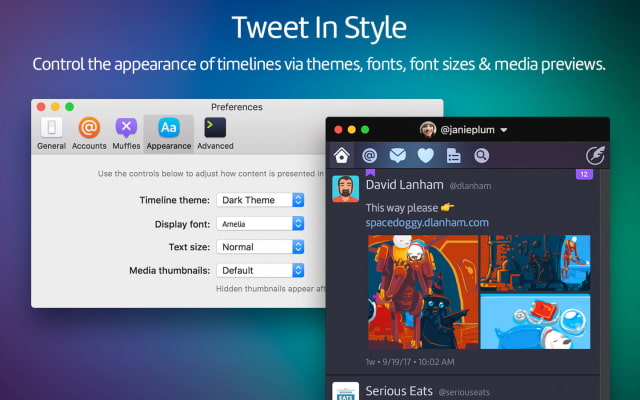
FULL FEATURE LIST: • Simple to use, easy to understand • True multi-account/multi-window support • View mentions, messages, and favorites quickly and easily • Timeline syncing of reading position across all platforms via iCloud • System-wide alerts for mentions & direct messages via Notification Center • Fully accessible via VoiceOver • Support for Retweet (RT) & Quoted tweets • Quick access to Emoji when composing new tweets • Autocompletion of usernames & hashtags while editing tweets • View Twitter saved searches and lists • Check out global and local trending topics • Browse conversation threads between users • Support for tweet storms & chained tweet threads • Quickly Delete & Edit your own tweets • Translate tweets to your native language • Helpful color-coding of tweet types • In-app media viewing for images, animated GIFs, Instagram & more • Share a tweet with actions for email, Messages, Safari Reading List & more • Muffles & mutes synced from Twitterrific for iOS via iCloud • Robust in-app media viewer with detachable popovers • Customize the appearance of media in the timeline or hide it completely • View user profiles including past tweets, likes & mentions • Follow and unfollow other users directly from their user profile • Block and report spammers with a single click • Theme control (light or dark) • Font size & type face control • Robust keyboard control
WHAT'S NEW IN THIS VERSION: Added our two most popular feature requests: management for muffles & mutes and a setting for keeping timelines scrolled to the top. Tons of other smaller improvements, too!
NEW FEATURES • Muffle and Mutes: - Select a tweet then "Muffle Tweet" in the ⋯ Action menu to create one - Any selected text in the tweet appears as a choice in the menu - Twitter clients can be muffled by selecting the "via" item in the menu - Use the Muffles panel in Preferences to manage your muffle and mutes - Changes are automatically synced between macOS and iOS • Automatic scrolling: - In General preferences, select "Keep timeline pinned to top" - Scroll a timeline to the newest tweet at the top - Any new tweets will then automatically scroll into view • Status indicators for new mentions or messages: - A dot is displayed in the menu bar icon - A badge is displayed on the Dock icon - System Preferences > Notifications can be used to turn off Dock badge • ¡Demos la bienvenida al Diablo Azul! - Obtendrás un premio especial si eres paciente durante los créditos - Tu premio aparecerá en las preferencias avanzadas - Muchísimas gracias a nuestros patrocinadores en Kickstarter - Help > Show Release Notes para ayuda
IMPROVEMENTS • Right-click on Direct Message thread to mark as read or delete • Optimized timeline scrolling and update performance • Selected text in a tweet will no longer be deselected after the timeline refreshes • Improved image caching for better display performance and memory usage • Added a new, smaller text size setting called "Miniature" • Added new, lighter display fonts: "System Light" and "Avenir Light" • Lovers of the best text editor rejoice: HJKL keys navigate timeline • Media viewer saves with unique image names (like screen shots) • Use Option-1 to 9 for switching account of the selected Timeline • Hover over timestamp for a tooltip showing the app used to post • Updated several icons throughout the app for greater clarity • The text entry for long direct messages will now scroll as needed • The ⋯ Action menu displays keyboard shortcuts for reference • Added more common functions to the tweet's ⋯ Action menu • Relative timestamps on tweets now update continuously • Added "Jump To Marker" and "Jump To Last Unread" to the Timeline menu
BUG FIXES • Changing appearance settings now updates the message threads correctly • Fixed an issue that could cause tweets to flicker • The thread indicator on the tweet no longer disappears when you retweet • Fixed issues preventing the timeline from updating immediately when muffle rules were added or removed • Links to Vimeo are now directed to the browser instead of a static image in the media viewer
You can purchase Twitterrific 5 from the Mac App Store for $19.99.
Get the iClarified Daily Newsletter
Apple news, rumors, tutorials, price drop alerts, in your inbox every evening, free.
Unsubscribe at any time.
Success!
You have been subscribed.
Add Comment
Would you like to be notified when someone replies or adds a new comment?
Yes (All Threads)
Yes (This Thread Only)
No
Notifications
Would you like to be notified when we post a new Apple news article or tutorial?





![Mac mini With M6 and M5 Pro Review Roundup [Video]](/images/news/102318/102318/102318-160.jpg "Mac mini With M6 and M5 Pro Review Roundup [Video]")
![Apple Releases macOS 27.2 Golden Gate Beta 2 to Developers [Download]](/images/news/102327/102327/102327-160.jpg "Apple Releases macOS 27.2 Golden Gate Beta 2 to Developers [Download]")
![Apple Seeds Second Betas of watchOS 27.2, tvOS 27.2, and visionOS 27.2 to Developers [Download]](/images/news/102324/102324/102324-160.jpg "Apple Seeds Second Betas of watchOS 27.2, tvOS 27.2, and visionOS 27.2 to Developers [Download]")
![Apple Releases iOS 27.2 Beta 2 and iPadOS 27.2 Beta 2 to Developers [Download]](/images/news/102321/102321/102321-160.jpg "Apple Releases iOS 27.2 Beta 2 and iPadOS 27.2 Beta 2 to Developers [Download]")









![Apple Studio Display XDR Hits All-Time Low of $2,969.99 ($329 Off) [Deal]](/images/news/101976/101976/101976-160.jpg "Apple Studio Display XDR Hits All-Time Low of $2,969.99 ($329 Off) [Deal]")
