

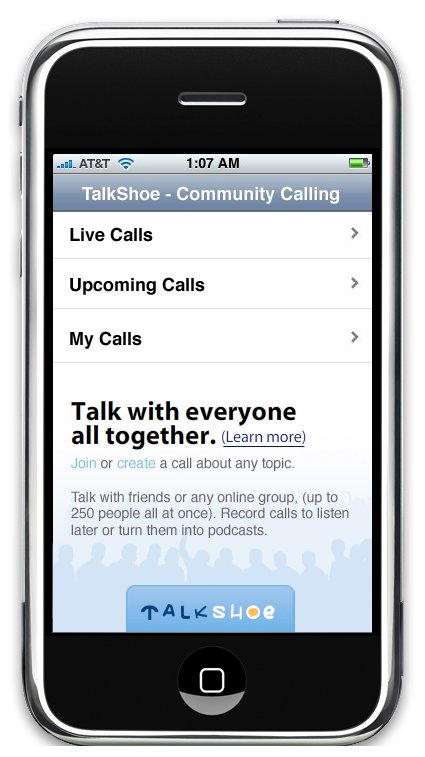
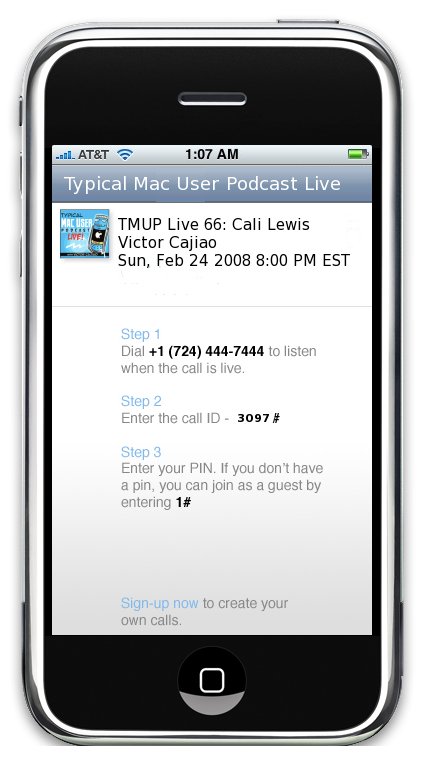
TalkShoe today unveiled an iPhone application that allows mobile users to participate on a call with just their iPhone. The iPhone web application was designed specifically for the iPhone and displays all live TalkShoe community calls, which allow people to join calls of interest with one click.
Community calls are being hosted constantly and bring together people to discuss topics such as sports, the latest in Mac innovations, pop culture, home winemaking, tips on financial matters, politics, religion, automotive trends and more. Now iPhone users can simply go to iphone.talkshoe.com, view the live and upcoming shows and join the call.
iPhone users do not need to register to participate in community calls, however registered TalkShoe users can now use their iPhone to conduct or manage their own community call episodes.
News Highlights:
● iPhone users can join live calls and view upcoming calls they may want to participate in
● The iPhone application provides a one click link to auto dial-in and participate in a call. Up to 250 people can join and talk all together at once
● Hosts can create public or unlisted community call episodes and manage them through their iPhone
● TalkShoe members can follow specific calls, which can then be viewed from their iPhone or be notified via email or SMS when they start
● Features were built using TalkShoe's publicly available APIs at Carnegie Mellon University
● New features showcase the flexibility of TalkShoe's web platform in working with open API's
● Calls can be recorded for later listening or turned into a podcast
● The iPhone application makes it very easy to record a podcast right from your phone
● In addition to participating through iPhone, anyone can also participate via phone, mobile phone, Skype, or VoIP via the talkshoe.com website
Read More
Community calls are being hosted constantly and bring together people to discuss topics such as sports, the latest in Mac innovations, pop culture, home winemaking, tips on financial matters, politics, religion, automotive trends and more. Now iPhone users can simply go to iphone.talkshoe.com, view the live and upcoming shows and join the call.
iPhone users do not need to register to participate in community calls, however registered TalkShoe users can now use their iPhone to conduct or manage their own community call episodes.
News Highlights:
● iPhone users can join live calls and view upcoming calls they may want to participate in
● The iPhone application provides a one click link to auto dial-in and participate in a call. Up to 250 people can join and talk all together at once
● Hosts can create public or unlisted community call episodes and manage them through their iPhone
● TalkShoe members can follow specific calls, which can then be viewed from their iPhone or be notified via email or SMS when they start
● Features were built using TalkShoe's publicly available APIs at Carnegie Mellon University
● New features showcase the flexibility of TalkShoe's web platform in working with open API's
● Calls can be recorded for later listening or turned into a podcast
● The iPhone application makes it very easy to record a podcast right from your phone
● In addition to participating through iPhone, anyone can also participate via phone, mobile phone, Skype, or VoIP via the talkshoe.com website
Read More
;)
;)


![Apple Says iPhone Duo's Folding Display Has a Replaceable Cover Layer [Video]](/images/news/102525/102525/102525-160.jpg "Apple Says iPhone Duo's Folding Display Has a Replaceable Cover Layer [Video]")
![Touchscreen OLED MacBook Pro Could Debut as Early as October [Gurman]](/images/news/102519/102519/102519-160.jpg "Touchscreen OLED MacBook Pro Could Debut as Early as October [Gurman]")
![iPhone 18 Pro Sales Rise 12% in China as Apple Leads Weekly Smartphone Market [Report]](/images/news/102522/102522/102522-160.jpg "iPhone 18 Pro Sales Rise 12% in China as Apple Leads Weekly Smartphone Market [Report]")
![Apple TV Shares Trailer for 'Awkwafina: The Unlikely Cook' [Video]](/images/news/102513/102513/102513-160.jpg "Apple TV Shares Trailer for 'Awkwafina: The Unlikely Cook' [Video]")

![How To Find Your iPhone IMEI Number [Video]](/images/tutorials/83557/83557/83557-160.jpg "How To Find Your iPhone IMEI Number [Video]")
![How To Change Wallpaper on Mac [Video]](/images/tutorials/90512/90512/90512-160.jpg "How To Change Wallpaper on Mac [Video]")




![16-Inch M5 Max MacBook Pro Drops $900 to New Low of $3,499 [Deal]](/images/news/102438/102438/102438-160.jpg "16-Inch M5 Max MacBook Pro Drops $900 to New Low of $3,499 [Deal]")
![Magic Keyboard for iPad Air Drops to $200 on Amazon [Deal]](/images/news/102402/102402/102402-160.jpg "Magic Keyboard for iPad Air Drops to $200 on Amazon [Deal]")
![13-Inch M5 MacBook Air With 1TB Drops to $1,449 on Amazon [Deal]](/images/news/102345/102345/102345-160.jpg "13-Inch M5 MacBook Air With 1TB Drops to $1,449 on Amazon [Deal]")
