Touch Mouse by Logitech turns your iPhone or iPod touch into a wireless trackpad and keyboard for your computer.
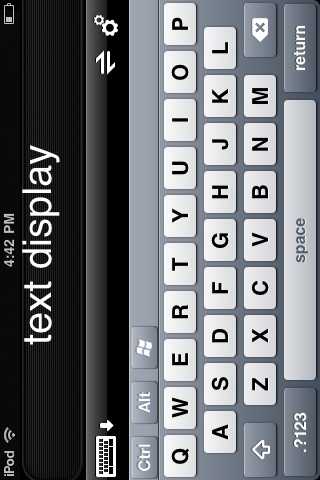
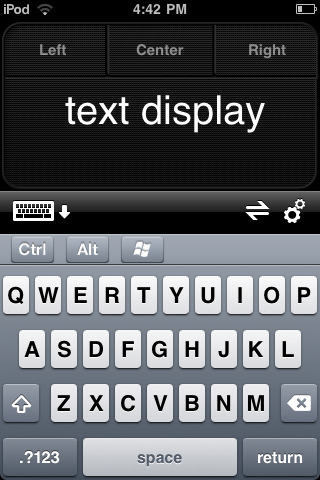
Touch Mouse works over Wi-Fi, so you can use it anywhere in the house. And to make typing easier, text is displayed on the screen of your iPhone or iPod touch as you type, so you can see what you're doing without having to continually look up and down.
FEATURES - Multi-touch trackpad with option for two or three buttons - Two-finger scrolling - Keyboard with modifier keys - On-screen text display while typing - Show or hide the keyboard at any time - Trackpad and keyboard are available in landscape and portrait modes
To make Touch Mouse work, you will need to download the Touch Mouse Server software from www.logitech.com/touchmouse and install it on your Mac or PC. This software enables the Touch Mouse app on your iPhone or iPod touch to find your computer and communicate with it.
You can download Touch Mouse from the App Store for free.
[via HardMac]
Get the iClarified Daily Newsletter
Apple news, rumors, tutorials, price drop alerts, in your inbox every evening, free.
Unsubscribe at any time.
Success!
You have been subscribed.
Add Comment
Would you like to be notified when someone replies or adds a new comment?
Yes (All Threads)
Yes (This Thread Only)
No
Notifications
Would you like to be notified when we post a new Apple news article or tutorial?
Yes
No
Comments (4)
Comments are closed for this article.
0
Mohamed - November 6, 2011 at 5:00pm
Merci beaucoup
0
Mohamed - November 6, 2011 at 4:59pm
Merci
0
DNA64 - January 20, 2010 at 2:36am
I'm curious as to why they felt the need to install the Windows key....?










![Apple Targets October 13 for Smart Home Hub, New HomePod mini and Apple TV [Gurman]](/images/news/102501/102501/102501-160.jpg "Apple Targets October 13 for Smart Home Hub, New HomePod mini and Apple TV [Gurman]")



![How To Find Your iPhone IMEI Number [Video]](/images/tutorials/83557/83557/83557-160.jpg "How To Find Your iPhone IMEI Number [Video]")



![16-Inch M5 Max MacBook Pro Drops $900 to New Low of $3,499 [Deal]](/images/news/102438/102438/102438-160.jpg "16-Inch M5 Max MacBook Pro Drops $900 to New Low of $3,499 [Deal]")
![Magic Keyboard for iPad Air Drops to $200 on Amazon [Deal]](/images/news/102402/102402/102402-160.jpg "Magic Keyboard for iPad Air Drops to $200 on Amazon [Deal]")
![13-Inch M5 MacBook Air With 1TB Drops to $1,449 on Amazon [Deal]](/images/news/102345/102345/102345-160.jpg "13-Inch M5 MacBook Air With 1TB Drops to $1,449 on Amazon [Deal]")

