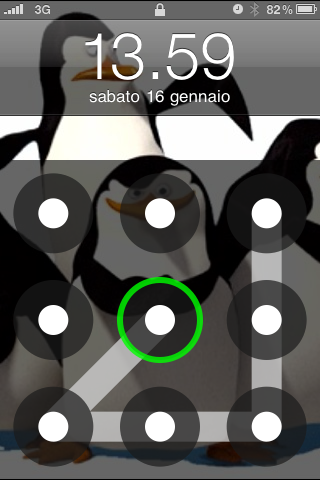
AndroidLock lets you set a custom pattern you must draw to unlock your iPhone lockscreen.
An Android-like lockscreen where you have to draw the correct pattern to unlock.
After installing it, go to Settings > AndroidLock to set the pattern. Requires 4 or more dots to be used.
You can download and install AndroidLock from the Big Boss Cydia repository.
Get the iClarified Daily Newsletter
Apple news, rumors, tutorials, price drop alerts, in your inbox every evening, free.
Unsubscribe at any time.
Success!
You have been subscribed.
Add Comment
Would you like to be notified when someone replies or adds a new comment?
Yes (All Threads)
Yes (This Thread Only)
No
Notifications
Would you like to be notified when we post a new Apple news article or tutorial?
Yes
No
Comments (4)
Comments are closed for this article.
0
tang03 - January 26, 2010 at 2:40pm
I also read that theres a crack to it. If you call the phone and push the home button you get into the phone without inputting any pattern whatsoever. Now imagine if your phone were to get stolen, or maybe you misplaced it and you called your phone to see if anyone picks up. hmmm?
0
dt - January 26, 2010 at 2:58pm
Wrong. I just tried it and you have to slide to answer.
0
dsi - January 26, 2010 at 2:12pm
Seems to crash when i try to wake it from the sleep button but works fine with the home button.
0
nkgneto - January 26, 2010 at 12:32pm
Be sure to remember any goofy patterns made cause you can't reset the pattern unless you go to a specific directory.
If you have lockinfo you may have issues with this tweak! I don't use it so no issues for me.
It needs a setting with in itself to reset the pattern.
It needs an on/off switch in settings.
IMO when unlocking the pattern should not be visible (just my 2 cents)
-To just disable androidock you need to go to:
Using diskaid, go into your iPhone's root file system and into the root go into library/MobileSubstrate/DynamicLibraries and change AndroidLock.dylib to AndroidLock.disabled
-To reset the pattern:
log in via ssh to your iPhone and type:
rm /private/var/mobile/Library/Preferences/com.zmaster.AndroidLock.plist
killall SpringBoard
What I did is that I went to the same folder but deleted the com.zmaster.AndroidLock.plist file. Doing it this way caused my iphone to go into safe mode a couple times this was corrected with a restart.







![Apple Targets October 13 for Smart Home Hub, New HomePod mini and Apple TV [Gurman]](/images/news/102501/102501/102501-160.jpg "Apple Targets October 13 for Smart Home Hub, New HomePod mini and Apple TV [Gurman]")


![How To Find Your iPhone IMEI Number [Video]](/images/tutorials/83557/83557/83557-160.jpg "How To Find Your iPhone IMEI Number [Video]")



![16-Inch M5 Max MacBook Pro Drops $900 to New Low of $3,499 [Deal]](/images/news/102438/102438/102438-160.jpg "16-Inch M5 Max MacBook Pro Drops $900 to New Low of $3,499 [Deal]")
![Magic Keyboard for iPad Air Drops to $200 on Amazon [Deal]](/images/news/102402/102402/102402-160.jpg "Magic Keyboard for iPad Air Drops to $200 on Amazon [Deal]")
![13-Inch M5 MacBook Air With 1TB Drops to $1,449 on Amazon [Deal]](/images/news/102345/102345/102345-160.jpg "13-Inch M5 MacBook Air With 1TB Drops to $1,449 on Amazon [Deal]")

