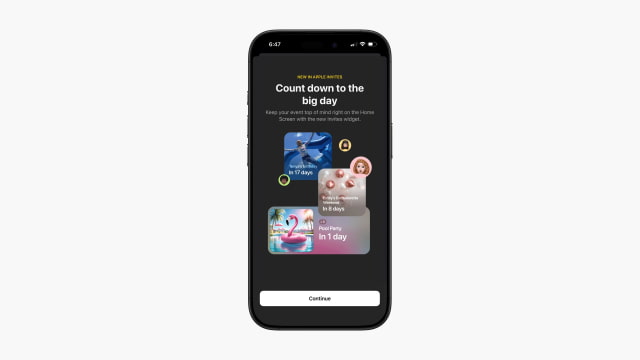
Apple has updated its Invites app with a new count down widget.
Count down to the big day Keep your event top of mind right on the Home Screen with the new Invites widget.
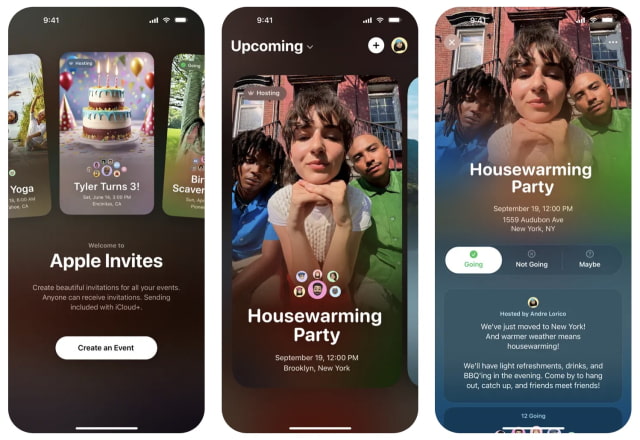
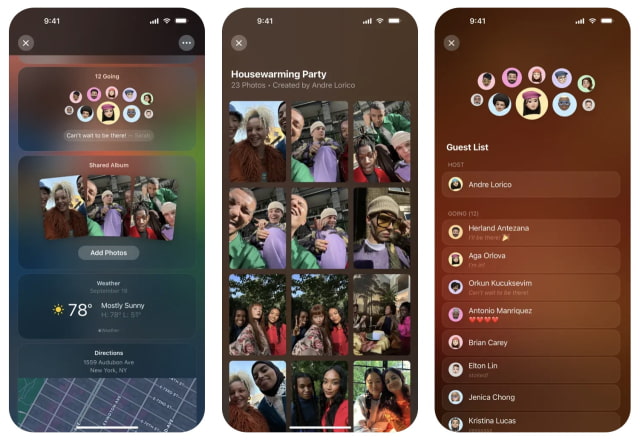
Apple Invites lets users create unique invitations and bring people together for life's most exciting moments. You can customize the background of an invitation with a photo from your library or select from a curated set of designs, including emoji themes. Fonts can be adjusted for the right look, and Maps and Weather are automatically included so guests have all the details.
RSVPs are handled directly in the iPhone app or on the web, with invitations easily shared through a simple link on any messaging platform. Hosts can also keep attendees updated by posting event messages. For entertainment, collaborative Apple Music playlists let everyone add songs, while Shared Albums make it easy to relive the event by gathering everyone's photos in one place.
Event creation requires an iCloud+ subscription, but anyone can RSVP, even without an Apple device. Access to collaborative playlists requires an Apple Music subscription. Apple Invites works on all iPhone models running iOS 18 or later.
What's New In This Version: ● New Invites widget helps you countdown to your next event right on your Home Screen.
You can download Apple Invites from the App Store for free.



![Mac mini With M6 and M5 Pro Review Roundup [Video]](/images/news/102318/102318/102318-160.jpg "Mac mini With M6 and M5 Pro Review Roundup [Video]")
![Apple Releases macOS 27.2 Golden Gate Beta 2 to Developers [Download]](/images/news/102327/102327/102327-160.jpg "Apple Releases macOS 27.2 Golden Gate Beta 2 to Developers [Download]")
![Apple Seeds Second Betas of watchOS 27.2, tvOS 27.2, and visionOS 27.2 to Developers [Download]](/images/news/102324/102324/102324-160.jpg "Apple Seeds Second Betas of watchOS 27.2, tvOS 27.2, and visionOS 27.2 to Developers [Download]")
![Apple Releases iOS 27.2 Beta 2 and iPadOS 27.2 Beta 2 to Developers [Download]](/images/news/102321/102321/102321-160.jpg "Apple Releases iOS 27.2 Beta 2 and iPadOS 27.2 Beta 2 to Developers [Download]")
![Mac Studio With M5 Max and M5 Ultra Review Roundup [Video]](/images/news/102315/102315/102315-160.jpg "Mac Studio With M5 Max and M5 Ultra Review Roundup [Video]")









![Apple Studio Display XDR Hits All-Time Low of $2,969.99 ($329 Off) [Deal]](/images/news/101976/101976/101976-160.jpg "Apple Studio Display XDR Hits All-Time Low of $2,969.99 ($329 Off) [Deal]")
