Apple has added a new built-in option in iOS 26.3 beta 1 that makes it easier for users to move from an iPhone to an Android device. The feature, labeled "Transfer to Android," appears directly in system settings, offering a path similar to Apple's long-standing tools for switching to iPhone.
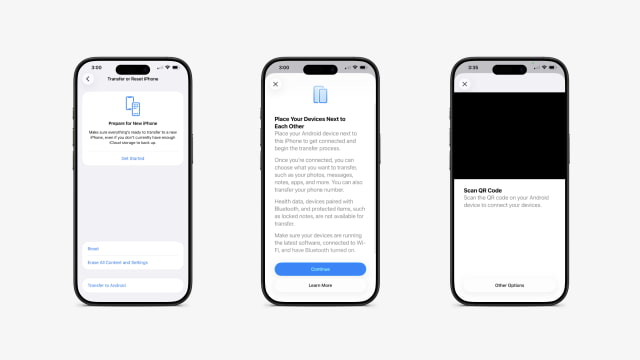
The option can be found under Settings > General > Transfer or Reset iPhone, where it now appears as a new button at the bottom of the screen, just below Erase All Content and Settings.
Selecting the option launches a guided setup flow that establishes a secure, device-to-device wireless connection. By default, users are prompted to scan a QR code displayed on the Android device to link the two phones.
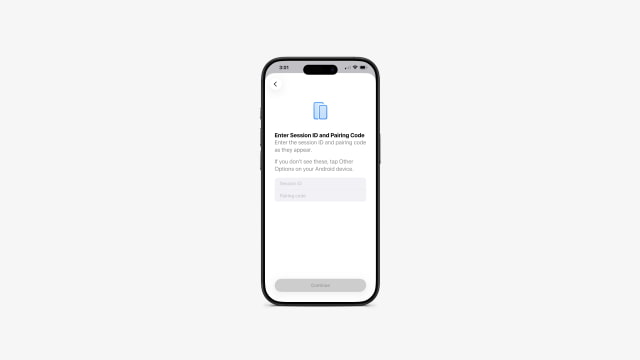
If scanning isn't possible, tapping Other Options reveals a manual pairing screen where a Session ID and Pairing Code can be entered to complete the connection.
According to the on-screen description, the transfer supports: • Photos • Messages • Notes • Apps • Phone number
Apple notes that some data can't be moved due to platform and privacy limitations. Health data, Bluetooth-paired devices, and protected items like locked notes are excluded.
Google has long offered a Switch to Android app on the App Store, but this is the first time Apple has placed an Android migration option directly inside iOS settings. The change likely ties back to the European Union's Digital Markets Act, which requires large platform owners to reduce friction when users move their data to competing ecosystems.
The feature is currently available to developers in iOS 26.3 beta 1 and is expected to reach the public in a future update.



![iPhone Duo Teardowns Reveal Dual-Battery Design and Repair Challenges [Video]](/images/news/103014/103014/103014-160.jpg "iPhone Duo Teardowns Reveal Dual-Battery Design and Repair Challenges [Video]")

![Calif Demonstrates iPhone Duo Jailbreak on Launch Day [Video]](/images/news/103008/103008/103008-160.jpg "Calif Demonstrates iPhone Duo Jailbreak on Launch Day [Video]")


![How To Back Up Your iPhone to an External Drive on Mac [Video]](/images/tutorials/72786/72786/72786-160.jpg "How To Back Up Your iPhone to an External Drive on Mac [Video]")

![How To Find Your IP Address on iPhone [Video]](/images/tutorials/496/496/496-160.jpg "How To Find Your IP Address on iPhone [Video]")


![New Fire TV Stick 4K Drops to $29.99 (50% Off) [Deal]](/images/news/102984/102984/102984-160.jpg "New Fire TV Stick 4K Drops to $29.99 (50% Off) [Deal]")
![Apple's iPhone 18 Pro and Pro Max Cases Are Up to 37% Off [Deal]](/images/news/102978/102978/102978-160.jpg "Apple's iPhone 18 Pro and Pro Max Cases Are Up to 37% Off [Deal]")
![16-Inch MacBook Pro With M5 Pro Drops to $2,429 ($570 Off), Lowest Price We've Seen [Deal]](/images/news/102957/102957/102957-160.jpg "16-Inch MacBook Pro With M5 Pro Drops to $2,429 ($570 Off), Lowest Price We've Seen [Deal]")