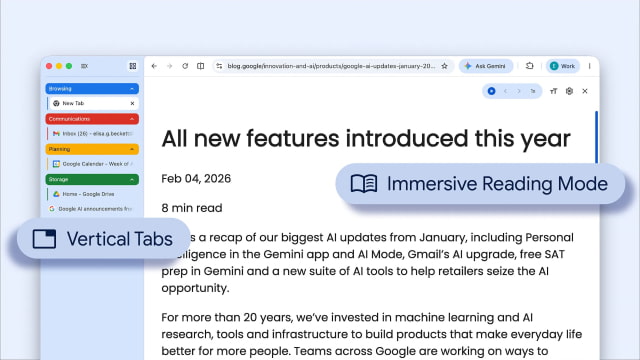
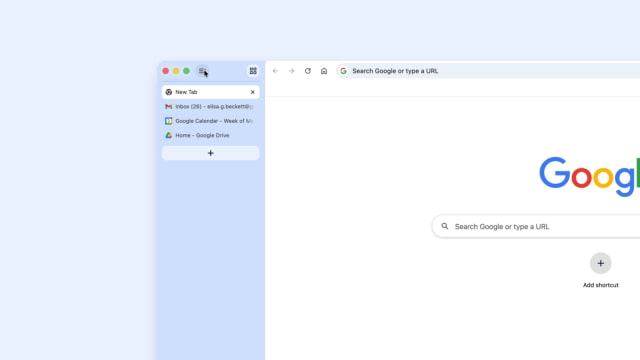
Chrome users can now move their tab bar to the side of the window with a new vertical layout option. The update, which is beginning to roll out today, also brings an updated reading mode, turning busy webpages into a clean, full-page view for better focus.
The vertical tabs option is accessible by right-clicking any Chrome window and selecting "Show Tabs Vertically." Moving the tabs to the side makes it easier to read full page titles and manage tab groups when you have a large number of sites open. This added flexibility for desktop users follows a broader trend in browser design, such as the compact tab bar that Apple recently brought back to Safari on the Mac.
Google is also updating its reading mode with a new full-page interface. By right-clicking a page and selecting "Open in reading mode," Chrome turns the site into a text-focused view that removes ads and other visual clutter. The result is a full-page layout that makes long articles and research easier to read without distractions.
These updates come as Google continues its transition away from macOS 12 Monterey support. Mac users who want to keep getting the latest Chrome features and security updates will need to be running macOS 13 Ventura or newer. The rollout is happening globally and the latest version is available directly from Google.










![How To Change Wallpaper on Mac [Video]](/images/tutorials/90512/90512/90512-160.jpg "How To Change Wallpaper on Mac [Video]")
![How To Turn Off Always On Display on iPhone [Video]](/images/tutorials/87524/87524/87524-160.jpg "How To Turn Off Always On Display on iPhone [Video]")





![16-Inch M5 Max MacBook Pro Drops $900 to New Low of $3,499 [Deal]](/images/news/102438/102438/102438-160.jpg "16-Inch M5 Max MacBook Pro Drops $900 to New Low of $3,499 [Deal]")
![Magic Keyboard for iPad Air Drops to $200 on Amazon [Deal]](/images/news/102402/102402/102402-160.jpg "Magic Keyboard for iPad Air Drops to $200 on Amazon [Deal]")
