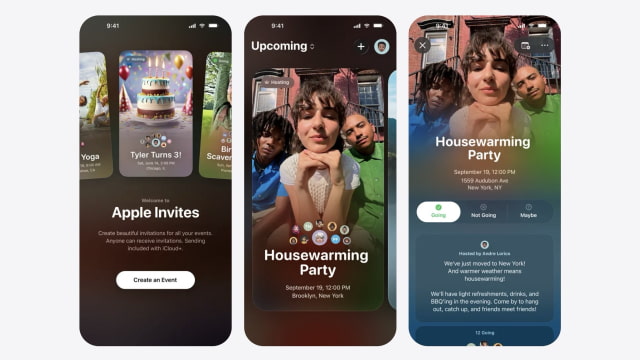
Apple has updated its Apple Invites app to version 1.8.0, adding new management tools and expanding its use of generative image features for event creation. The app, which requires an iCloud+ subscription to create invitations, adds several new tools for managing and sharing events.
The most notable addition is support for Image Playground themes within the backgrounds gallery. Hosts can now generate original images to match the style of their event directly inside the app. Apple has also added a new option to download or share an image of an invite card, making it easier to post invitations on social media.
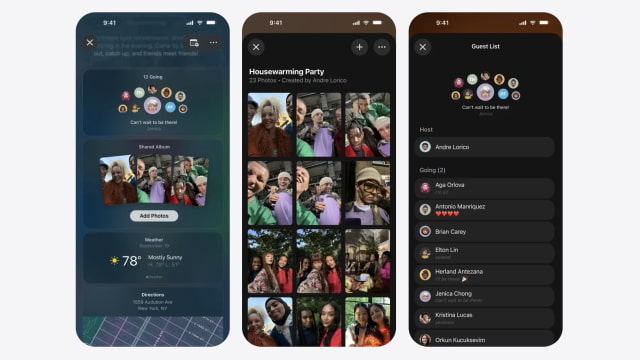
Event sharing and management have also been improved. A new Invites iMessage app lets users quickly share existing invitations without leaving Messages. Within the main app, a new All Events view provides a single place to browse both upcoming and past events. Hosts can now manually edit guest lists, update RSVP responses, adjust additional guest counts, and specify a timezone for their event.
The update also enhances music integration. The Apple Music Shared Playlist tile now offers personalized playlist suggestions based on listening history, along with more searchable playlists to help set the soundtrack. Guests automatically get access to shared playlists and any linked Shared Albums tied to the event.
Apple Invites requires an iPhone running iOS 18 or later. Anyone can receive and respond to invitations using the app or the web, but creating events requires an iCloud+ subscription. Access to collaborative playlists requires an active Apple Music subscription.
You can download Apple Invites from the App Store at the link below.









![How To Change Wallpaper on Mac [Video]](/images/tutorials/90512/90512/90512-160.jpg "How To Change Wallpaper on Mac [Video]")
![How To Turn Off Always On Display on iPhone [Video]](/images/tutorials/87524/87524/87524-160.jpg "How To Turn Off Always On Display on iPhone [Video]")




![16-Inch M5 Max MacBook Pro Drops $900 to New Low of $3,499 [Deal]](/images/news/102438/102438/102438-160.jpg "16-Inch M5 Max MacBook Pro Drops $900 to New Low of $3,499 [Deal]")
![Magic Keyboard for iPad Air Drops to $200 on Amazon [Deal]](/images/news/102402/102402/102402-160.jpg "Magic Keyboard for iPad Air Drops to $200 on Amazon [Deal]")
![13-Inch M5 MacBook Air With 1TB Drops to $1,449 on Amazon [Deal]](/images/news/102345/102345/102345-160.jpg "13-Inch M5 MacBook Air With 1TB Drops to $1,449 on Amazon [Deal]")
