Apple has released the second developer beta of iOS 27, bringing a collection of Siri AI enhancements, RCS messaging improvements, Wallet additions, and numerous of smaller interface refinements across the operating system.
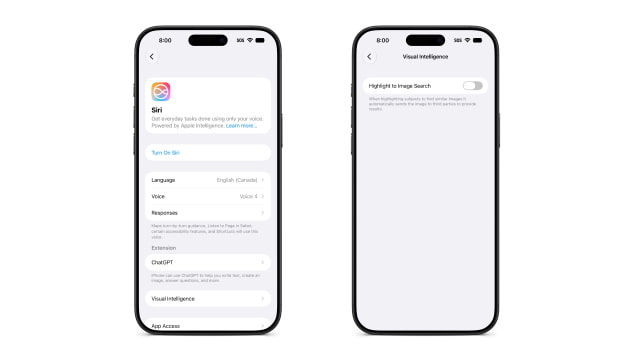
The Siri AI integration continues to evolve across the system. Apple added a dedicated "Write with Siri" button directly above the keyboard. Previously, the feature was only available after selecting text. In the standalone Siri app, users can now select and delete multiple conversations at once. Apple has also added a new "Highlight to Image Search" toggle under Visual Intelligence settings. The option is disabled by default and Apple says enabling it will automatically send images to third-party services when searching for similar content. Additionally, the AI editing tools in the Photos app now support RAW image files. Apple also now labels Siri's new Pace and Expressivity voice customization controls as "Coming Soon."
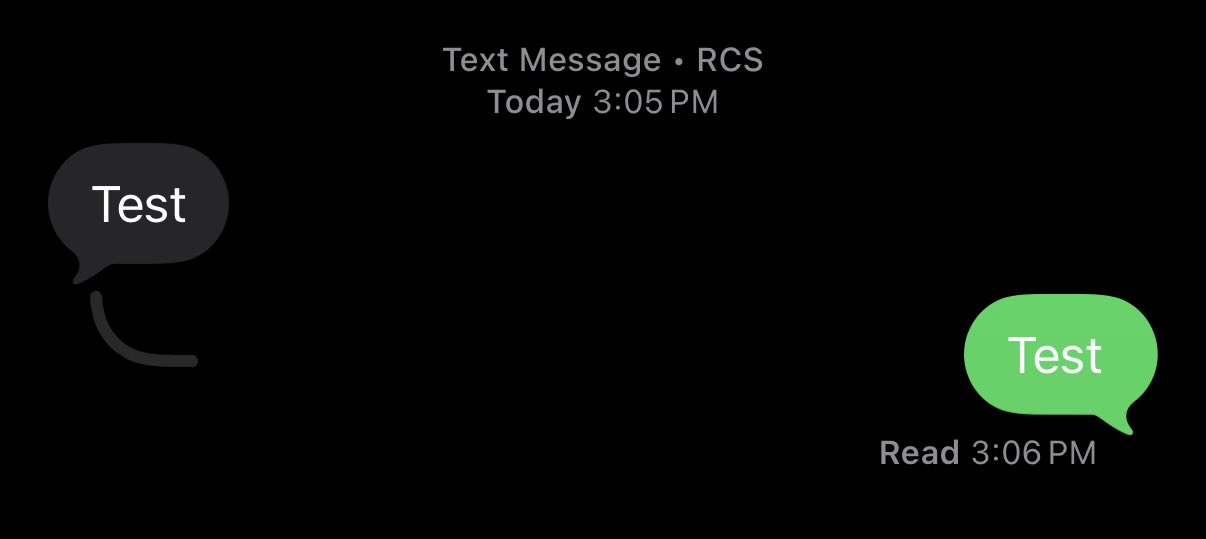
Cross-platform messaging gets a upgrade in this build. RCS conversations now support inline replies, bringing them more in line with the experience already available in iMessage. Tapback reactions on Android-sent images and videos also display correctly on the media itself, rather than appearing as a separate text descriptor.
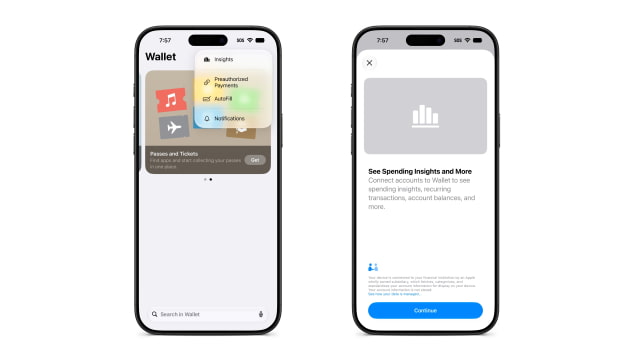
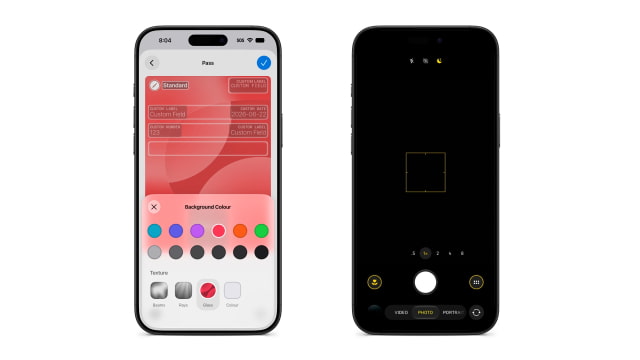
Over in the Wallet app, Apple is laying the groundwork for a new Insights feature. A splash screen indicates the tool will soon connect to financial institutions to track spending, account balances, recurring transactions, and more, though the feature isn't fully active yet. Apple says account information will be fetched, categorized, and standardized by an Apple-owned subsidiary for display on the user's device and is not stored. When creating a custom Wallet pass, users can now choose from a variety of texture options when selecting a color.
The Home app gains several useful improvements in this release. Users can now remotely update a connected Apple TV, matching the existing behavior for HomePods. You can also long-press incoming notifications from HomeKit Secure Video cameras to watch the motion alert and quickly turn on nearby lights. Apple has also resolved a bug that left certain accessories, including Philips Hue lights, unresponsive in the previous beta.
Several smaller quality-of-life adjustments are scattered throughout the update. The Weather app now uses brighter blue text for precipitation, condition, and wind information, improving readability. Lock Screen media controls have been made persistent while playback is active. In the Camera app, a yellow highlight now surrounds the tools button whenever a hidden setting, such as exposure adjustment, is enabled. Apple's release notes also indicate that AirPort Utility will no longer be available for new downloads from the App Store, though users who previously downloaded the app will still be able to re-download it.
You can find the full build details and instructions on how to install the software in our iOS 27 beta 2 download post.
Get the iClarified Daily Newsletter
Apple news, rumors, tutorials, price drop alerts, in your inbox every evening, free.
Unsubscribe at any time.
Success!
You have been subscribed.
Add Comment
Would you like to be notified when someone replies or adds a new comment?
Yes (All Threads)
Yes (This Thread Only)
No
Notifications
Would you like to be notified when we post a new Apple news article or tutorial?





![Beats 360 Headphones Debut With Swappable Cushions, IPX4 Rating for $349.99 [Video]](/images/news/102342/102342/102342-160.jpg "Beats 360 Headphones Debut With Swappable Cushions, IPX4 Rating for $349.99 [Video]")






![13-Inch M5 MacBook Air With 1TB Drops to $1,449 on Amazon [Deal]](/images/news/102345/102345/102345-160.jpg "13-Inch M5 MacBook Air With 1TB Drops to $1,449 on Amazon [Deal]")




