

Mac OS X Spotlight can now be used as a calculator. This is a quick shortcut that can save you a lot of time. Follow these steps to try it:
Step One
Press Command+Space on your keyboard.
Step Two
Notice a spotlight search field will appear at the top right hand corner of your screen.

Step Three
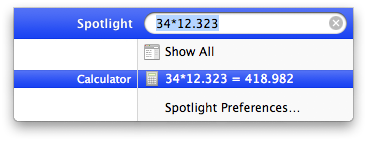
Instead of typing in a search term, type in an equation you would like to calculate.
Step Four
The spotlight popup window will expand lower to show you the answer to your equation.
Step Five
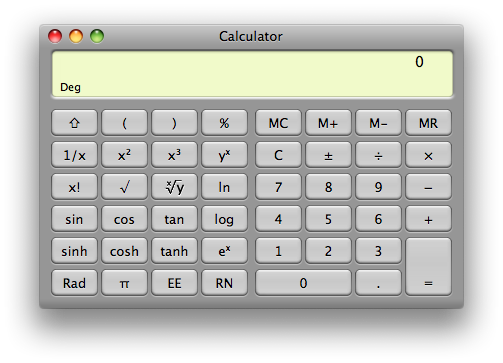
Click the line with the answer and the full calculator application will open.
Step Six
You can hide Spotlight by pressing Command+Space again.
Step One
Press Command+Space on your keyboard.
Step Two
Notice a spotlight search field will appear at the top right hand corner of your screen.
Step Three
Instead of typing in a search term, type in an equation you would like to calculate.
Step Four
The spotlight popup window will expand lower to show you the answer to your equation.
Step Five
Click the line with the answer and the full calculator application will open.
Step Six
You can hide Spotlight by pressing Command+Space again.



![iPhone Duo Launches in Stores Worldwide [Photos]](/images/news/102993/102993/102993-160.jpg "iPhone Duo Launches in Stores Worldwide [Photos]")


![iPhone Duo's Initial 8 Million-Unit Order Extends Into 2027 [Gurman]](/images/news/102975/102975/102975-160.jpg "iPhone Duo's Initial 8 Million-Unit Order Extends Into 2027 [Gurman]")

![How To Back Up Your iPhone to an External Drive on Mac [Video]](/images/tutorials/72786/72786/72786-160.jpg "How To Back Up Your iPhone to an External Drive on Mac [Video]")

![How To Find Your IP Address on iPhone [Video]](/images/tutorials/496/496/496-160.jpg "How To Find Your IP Address on iPhone [Video]")

![New Fire TV Stick 4K Drops to $29.99 (50% Off) [Deal]](/images/news/102984/102984/102984-160.jpg "New Fire TV Stick 4K Drops to $29.99 (50% Off) [Deal]")
![Apple's iPhone 18 Pro and Pro Max Cases Are Up to 37% Off [Deal]](/images/news/102978/102978/102978-160.jpg "Apple's iPhone 18 Pro and Pro Max Cases Are Up to 37% Off [Deal]")
![16-Inch MacBook Pro With M5 Pro Drops to $2,429 ($570 Off), Lowest Price We've Seen [Deal]](/images/news/102957/102957/102957-160.jpg "16-Inch MacBook Pro With M5 Pro Drops to $2,429 ($570 Off), Lowest Price We've Seen [Deal]")

![16-Inch MacBook Pro With M5 Max Drops to $3,499 ($900 Off), Lowest Price We've Seen [Deal]](/images/news/102900/102900/102900-160.jpg "16-Inch MacBook Pro With M5 Max Drops to $3,499 ($900 Off), Lowest Price We've Seen [Deal]")
