The iPhone Dev-Team has released an updated command line utility that can perform a jailbreak of the iPhone 4S and iPad 2 using Windows.
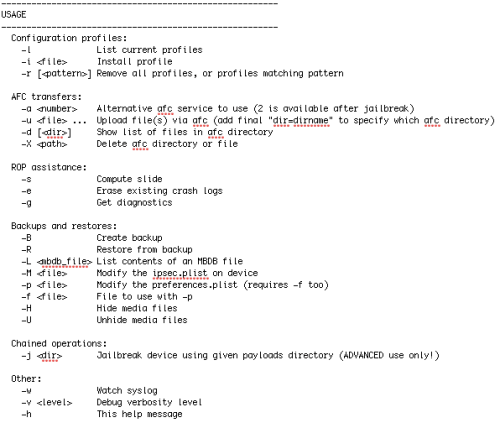
Version 0.4.3 adds support for Windows users. It also makes the "-j" jailbreak option much more functional :) See the README.txt for usage.
The command line interface should only be run by advanced users and is primarily for debugging issues with the jailbreak. Most users should wait for the Chronic Dev-Team to release a Windows version of Absinthe.
If you want to give the CLI a go, you can download it here. Make sure to read the included readme.txt for usage instructions.
cinject -i payloads/jailbreak.mobileconfig cinject -j payloads cinject -w toggle VPN on and look for the "pod2g is in da house!" syslog message
To be notified when Absinthe for Windows is available you can follow us on Twitter, Facebook, RSS, or check out the new iClarified menu bar app and the new HTML 5 web app.
Apple news, rumors, tutorials, price drop alerts, in your inbox every evening, free.
Unsubscribe at any time.
Success!
You have been subscribed.
Add Comment
Would you like to be notified when someone replies or adds a new comment?
Yes (All Threads)
Yes (This Thread Only)
No
Notifications
Would you like to be notified when we post a new Apple news article or tutorial?
Yes
No
Comments (36)
Comments are closed for this article.
0
Dude - January 21, 2012 at 11:06pm
When I open my cydia it just crashes right away it doesn't even open up can anyone help?
0
HEy - January 22, 2012 at 3:53am
I suggest all you should do is rerestore your phone because is still signing it just plug the phone in and hit jailbreak but dont put it into dfu mode just keep it on like normal like slide to unlock it on the home screen open absinthe and hit jailbreak it will show restoring backup as soon is that done and it starts up slide to unlock and hit the absinthe icon and don't do anything it will do the process itself also make sure ur connected to wifi
0
lawl89 - January 21, 2012 at 10:19pm
I'm on the "Creating backup" part for over an hour, is there any safe way to stop and start over? Or is it normal to take this long?
0
help - January 21, 2012 at 8:20pm
guys does it work only for ios 5.0.1
cuz my ipad is on ios 5.0 and the second step "cinject -j payloads" always returns an error.
can anybody confirm if they have been able to run it on ios 5.0 as well.
0
bob53366 - January 21, 2012 at 7:28pm
Sup
i seem to have an issue with cydia when the install is complete and reeboots and i open cydia it closes straight away.
i am going to completley wipe the iiphone and start fresh and see what happens
0
enve19 - January 21, 2012 at 4:14pm
How long is it roughly taking everyone for the backup? currently at about 20 minutes mysellf. im presuming it is doing a complete backup of the phone. Just wondering if anyone can shed some light, as if its merely a few minutes then i know there is something not quite right. Thank you
0
shaq - January 21, 2012 at 3:51pm
if any of you stumble upon any sort of errors..just do a clean restore as a new iphone/ipad..
0
Raheem - January 21, 2012 at 3:37pm
Cinject -j payload does not work for me it saying
Loading slide
Failed
Error
Any suggestions
0
Mr.D - January 21, 2012 at 7:01pm
You have to be on 5.0.1.
CLI doesn't work on 5.0.
0
GRM12 - January 21, 2012 at 8:36pm
I get the same error and it was suggested in this forum to do a fresh firmware installation, which I did!, but still showing the same error message..???
0
nir-hus - January 21, 2012 at 2:21pm
worked great on my iPAD2, great job. worth the wait. thank you.
0
Ab08 - January 21, 2012 at 1:55pm
how long is it takeing for you all when it does the backup please
0
Dave - January 21, 2012 at 1:53pm
There is no password for VPN. I had trouble on my 4S with "FATAL ERROR" I gave up and eventually restored my iPhone to 5.0.1 and set it up as "new iPhone" then carried out the steps above and cydia was installed. I'm now restoring from my back up. Hope this helps.
0
Happy iPhone 4S and iPad 2 Owner - January 21, 2012 at 1:35pm
Thanks, all working on my iPad2, will wait for the the polished Windows application before I do my iPhone 4S.
Thanks lads.
0
Ab08 - January 21, 2012 at 1:41pm
How long did your backup take mate? and do you have alot installed on your ipad?
0
Dibax - January 21, 2012 at 1:30pm
1) Download the file above in step 3, then extract the folder to your Downloads. (Start Menu, your name, then on the left, downloads.)
2) There should now be a folder called: "cinject_0.4.3"
3) Open up CMD and type this (Without "" quotes..): "cd downloads"
4) Then, do: "cd cinject_0.4.3"
5) After so, type this command into cmd.. "cinject.exe -i payloads\/jailbreak.mobileconfig"
6) On your device, click on install, and when prompted to type in a password, just click next, with no password in.
7) After so, type this command: "cinject.exe -j payloads"
8) Just wait a little bit. ( Don't freak out ;) )
9) Now after a few minutes from step 8, now type this command: "execute the command: cinject.exe -w"
10) On your device, after doing step 9, toggle the "VPN" switch on in the settings, in about a few seconds after, it should say error.
11) Wait, then it should restart. Cydia is now installed, and your device is now free!
0
dannipod2010 - January 21, 2012 at 1:42pm
Thanks you're the man.
Keep it up.
0
james harkess - January 21, 2012 at 2:14pm
Hi,
I have tried exactly what you said but keep getting the following
cinject.exe' is not recognized as an internal or external command,
operable program or batch file.
0
Lempo - January 21, 2012 at 2:14pm
Thats how i do it...but after the command cinject -j payloads it gets me the errormessage:
Adding custom com.apple.ipsec.plist to backup Restoring... recv: Bad file descriptor FATAL(__LINE__): Assertion failed (1266): got == sizeof(size) 1266
I have an Iphone 4s, iOS 5.0.1, Baseband 1.0.13
0
james harkess - January 21, 2012 at 2:24pm
IGNORE my last comment, sorted now, thanks very much mate
0
ikidd - January 21, 2012 at 2:37pm
Thanks for the info..Finally got it working after restoring iPhone. Now will just restore from backup
0
ryukagex - January 21, 2012 at 5:31pm
working great after restoring,thank you
0
Carlo - January 21, 2012 at 8:47pm
Thanks man....not that hard!thanks for your instructions.
0
victor - November 26, 2012 at 8:08pm
to james harkess :- how were u able to get rid of cinject.exe or cinject is not recognized as an integral or external command problem. Plz help, would be really thankfull...
0
Ab08 - January 21, 2012 at 1:27pm
Rebooting pohone after every step worked well for me :)
0
unikkatil - January 21, 2012 at 1:23pm
really not to be rude but so unfair to release just for mac version.. i would wait until both versions was ready and release both at the same time.. cuz everyone has donate you guys not just mac users.. have a great weekend all of you out there and maybe windows user get some jailbreake too^^
0
james harkess - January 21, 2012 at 4:11pm
If you follow the steps below you can jailbreak on windows.
Dibax wrote at 2012-01-21 13:30:12
1) Download the file above in step 3, then extract the folder to your Downloads. (Start Menu, your name, then on the left, downloads.) 2) There should now be a folder called: "cinject_0.4.3" 3) Open up CMD and type this (Without "" quotes..): "cd downloads" 4) Then, do: "cd cinject_0.4.3" 5) After so, type this command into cmd.. "cinject.exe -i payloads\/jailbreak.mobileconfig" 6) On your device, click on install, and when prompted to type in a password, just click next, with no password in. 7) After so, type this command: "cinject.exe -j payloads" 8) Just wait a little bit. ( Don't freak out ;) ) 9) Now after a few minutes from step 8, now type this command: "execute the command: cinject.exe -w" 10) On your device, after doing step 9, toggle the "VPN" switch on in the settings, in about a few seconds after, it should say error. 11) Wait, then it should restart. Cydia is now installed, and your device is now free!
0
Lempo - January 21, 2012 at 12:59pm
Now i get this ERROR after using the -j payloads action:
Adding custom com.apple.ipsec.plist to backup
Restoring...
recv: Bad file descriptor
FATAL(__LINE__): Assertion failed (1266): got == sizeof(size)
1266
anyone any idea what this means?
0
shaq - January 21, 2012 at 2:48pm
i'm getting the same error as well..any clues?
0
shaq - January 21, 2012 at 3:31pm
just do a clean restore as a new phone..that should be the trick
0
Mr_Krabbit - January 21, 2012 at 12:54pm
No need for PW.....just click next
0
Lempo - January 21, 2012 at 12:49pm
Hey, anyone got the password for the VPN? it asks me for a password...cant find it in the ReadMe? PLease Help!
THX from Germany!!
0
kevin - January 21, 2012 at 12:51pm
i also need the password do u already have it ??
0
Lempo - January 21, 2012 at 12:55pm
No :( But we have to wait and hope ;)
And again i wish i had an Mac^^
0
Mr.D - January 21, 2012 at 7:03pm
Just hit "next", no password needed.
0
Unknown - January 21, 2012 at 12:45pm
Hey guys do I need to use command prompt for this?







![Apple Debuts 'Nocturne' Trailer Ahead of October 30 Premiere [Video]](/images/news/102471/102471/102471-160.jpg "Apple Debuts 'Nocturne' Trailer Ahead of October 30 Premiere [Video]")



![How To Find Your iPhone IMEI Number [Video]](/images/tutorials/83557/83557/83557-160.jpg "How To Find Your iPhone IMEI Number [Video]")



![16-Inch M5 Max MacBook Pro Drops $900 to New Low of $3,499 [Deal]](/images/news/102438/102438/102438-160.jpg "16-Inch M5 Max MacBook Pro Drops $900 to New Low of $3,499 [Deal]")
![Magic Keyboard for iPad Air Drops to $200 on Amazon [Deal]](/images/news/102402/102402/102402-160.jpg "Magic Keyboard for iPad Air Drops to $200 on Amazon [Deal]")
![13-Inch M5 MacBook Air With 1TB Drops to $1,449 on Amazon [Deal]](/images/news/102345/102345/102345-160.jpg "13-Inch M5 MacBook Air With 1TB Drops to $1,449 on Amazon [Deal]")

