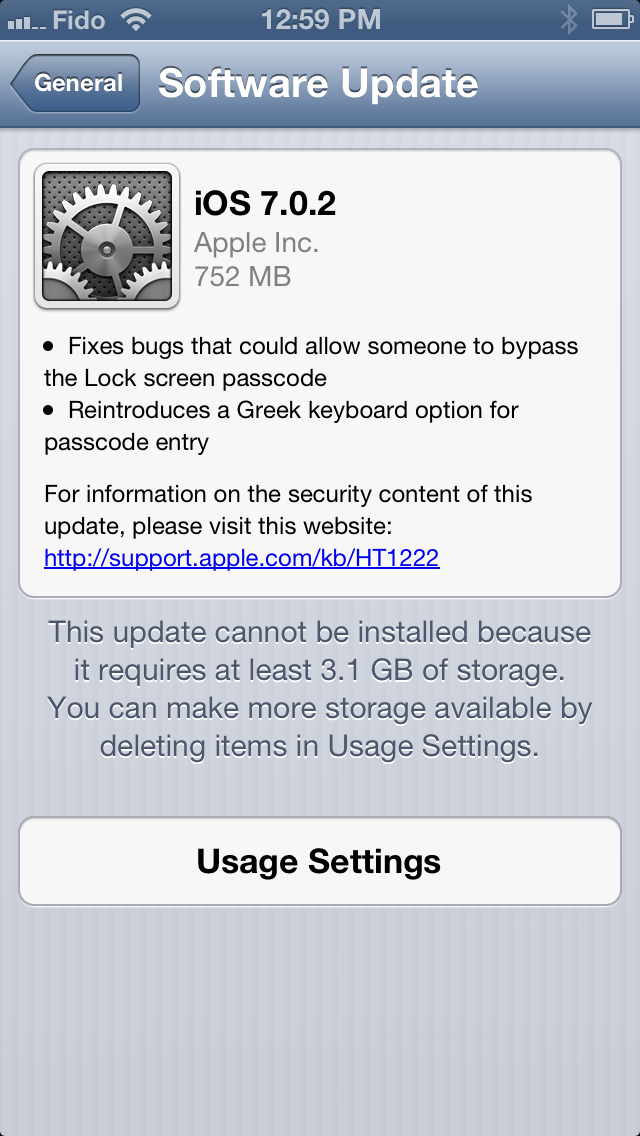
Apple has just released iOS 7.0.2 to fix bugs that could allow someone to bypass the Lock screen passcode.
What's New In This Version: ● Fixes bugs that could allow someone to bypass the Lock screen passcode ● Reintroduces a Greek keyboard option for passcode entry
To be the first to know of any additional improvements to iOS 7 please follow iClarified on X, Facebook, or RSS.
Get the iClarified Daily Newsletter
Apple news, rumors, tutorials, price drop alerts, in your inbox every evening, free.
Unsubscribe at any time.
Success!
You have been subscribed.
Add Comment
Would you like to be notified when someone replies or adds a new comment?
Yes (All Threads)
Yes (This Thread Only)
No
Notifications
Would you like to be notified when we post a new Apple news article or tutorial?
Yes
No
Comments (24)
Comments are closed for this article.
0
aintecho - September 30, 2013 at 7:02pm
iPad 3 battery drain out with 7.0.2, i have notice twice. iPad 3 GSM battery drain out without use.
0
Afework Wondimu - October 18, 2013 at 10:44am
Hi I have difficulty to up date the soft wear of my Apple 4S
0
Monkeyman - September 29, 2013 at 1:06pm
I downloaded ios7 beta5 a while back, i just tried to download ios7.0.2 from evad3rs site and itunes says i dont hav the correct firmware to install this, can any1 tell me how to install it??? i5 gsm
0
Luis - September 28, 2013 at 8:16pm
Try to upgrade os7 delete all my apps. I still can't upgrade says not enough storage what up
0
Rosalee - September 28, 2013 at 7:06am
how do I fix the keypad, so it types when I do in my messages, since I did the upgrade it doesn't respond when I type and takes quite a while to then type my message,
0
Arun Chaudhary - September 28, 2013 at 2:20am
New iOS 7 sucks. I wish if I can roll back to iOS 6 which was thousand times better. Guys old is Gold...
0
gamerscul9870 - September 28, 2013 at 2:24am
Or use my idea below, make a rumor of it if you can because I wish to make it but don't know like the way animated concepts are!
0
xtp - September 27, 2013 at 5:27pm
I recently did a fresh install of 7.0.2 - from recovery mode via iTunes.
I tried to delete an app but no x icon appears over the icons, even though they are shaking. I touch where the x should be an nothing. I can repeat this bug...
0
Sean - September 27, 2013 at 4:41am
Fix video vmail!!! When u delete messages they keep coming back. My box is full and cannot delete to make space!!!!
0
NoTMe - September 27, 2013 at 1:07am
My iphone 5 is stll on 6,1,2 Jailbroken. I will never update it. No way! Id rather have a jailbroken Iphone than running IOS7.
0
Rosalee Bulmer - September 27, 2013 at 12:56am
this has stuffed my phone how do I delete it and go back to version 6, the keypad is slow and it has removed my messages, I don't know what else it has done, can I go to my last back up and reset my phone from there?
0
odedoo1 - September 26, 2013 at 11:57pm
I wonder what else they did because they where working on 7.0.2 before the 2 bugs have been discovered .
0
TheRealNoGoodNick - September 27, 2013 at 12:03am
My idea below, they mainly have to work on that if it fixes the battery problem unless they really would have to work on that anyway!
0
Kamran - September 26, 2013 at 11:39pm
Hi,why apple release 7.0.2 for another iPhone for exp. 5,4S or 4 ???
0
shaundh - September 26, 2013 at 11:14pm
Yea, but the question is, will if fix the lousy battery life? I am so frustrated that I now have to charge my iPad like an Android device. Every freaking day!
0
Riste - September 26, 2013 at 11:06pm
and I use iPhone 5 and this is stell not available for my iPhone 5.
0
Iphone - September 26, 2013 at 9:53pm
Tim, try rebooting the iphone .. That worked for me. Iphone 4s
0
Tim - September 27, 2013 at 2:40pm
I did a reboot, no change. I then did "reset network settings" right before I did the 7.0.2 update and that seemed to work. It also worked after the update. But, a few hours after doing the update, it looks to be intermittent. Sometimes it will work fine. Then a little while later, the controls stop functioning again... Frustrating, but, lets hope Apple addresses it in a future update. Thanks for your help.
0
gamerscul9870 - September 26, 2013 at 8:41pm
Update it (rumor) to add a switch to icons, keyboard, Siri, etc. for switching them to ios 6 versions so we can choose between old and new looks by how we want it while running ios 7, for example- old apps with newer keyboard, both looking like ios 7 or 6 look!
0
iAndy - September 26, 2013 at 6:51pm
The update also fixed the "emergency call" issue where you could dial a number on the emergency call screen, tap the call button multiple times and the screen goes blank, followed by an apple logo and the call still going through........:-)
Is it just me or did they fix a few more things under the hood, but didn't mention it in their update discription? Oh well...:-)
0
Tim - September 26, 2013 at 6:22pm
Does it fix the lock screen audio controls not working?
0
Brian Copeland - September 26, 2013 at 6:49pm
Try just pressing the home button once not twice as in previous iOS versions.
0
Tim - September 26, 2013 at 7:00pm
Brian, I can get the controls no problem....they just don't do anything. You can press the play/pause or ffwd or fbkwd, they will flicker but don't change anything. The volume slider will work, but thats about it. Experiencing same thing with control center... any ideas












![How To Change Wallpaper on Mac [Video]](/images/tutorials/90512/90512/90512-160.jpg "How To Change Wallpaper on Mac [Video]")
![How To Turn Off Always On Display on iPhone [Video]](/images/tutorials/87524/87524/87524-160.jpg "How To Turn Off Always On Display on iPhone [Video]")





![16-Inch M5 Max MacBook Pro Drops $900 to New Low of $3,499 [Deal]](/images/news/102438/102438/102438-160.jpg "16-Inch M5 Max MacBook Pro Drops $900 to New Low of $3,499 [Deal]")
![Magic Keyboard for iPad Air Drops to $200 on Amazon [Deal]](/images/news/102402/102402/102402-160.jpg "Magic Keyboard for iPad Air Drops to $200 on Amazon [Deal]")
