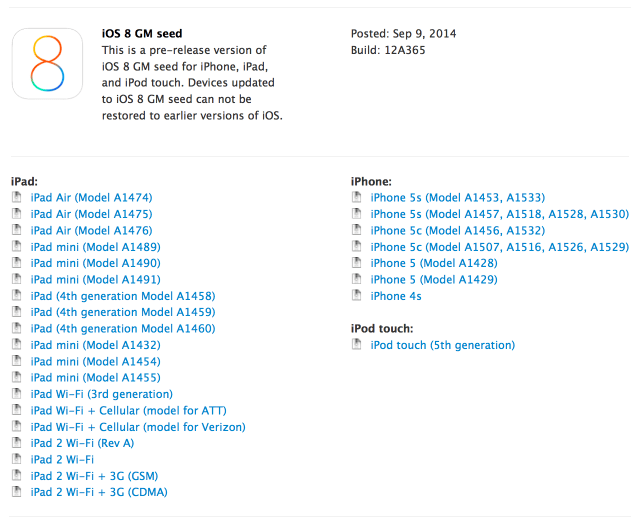
iOS 8 will be available Wednesday, September 17 for everyone, but developers can download the final version of iOS 8, barring any major bugs, today.
The gold master (GM) seed is now available on the Apple Developer website, but remember you cannot update via OTA for a GM seed. With previous gold master seeds, a developer accounts not needed to install iOS, however we have not tested this on iOS 8. Either way, we recommend you wait until the official release on September 17.
The new GM build is 12A365, while the previous seed was 12A4345d.
Please follow iClarified on X, Facebook, or RSS to know exactly when iOS 8 is released to all!
Get the iClarified Daily Newsletter
Apple news, rumors, tutorials, price drop alerts, in your inbox every evening, free.
Unsubscribe at any time.
Success!
You have been subscribed.
Add Comment
Would you like to be notified when someone replies or adds a new comment?
Yes (All Threads)
Yes (This Thread Only)
No
Notifications
Would you like to be notified when we post a new Apple news article or tutorial?
Yes
No
Comments (18)
Comments are closed for this article.
0
Tony - September 12, 2014 at 4:39pm
Thanks for this buddy
0
Sheshagokul Shrinivasan - September 12, 2014 at 1:33am
Is whatsapp still crashing in ios 8 ?
0
iOS lover - September 11, 2014 at 11:53pm
its so slow on the 4s !!
0
callum - September 11, 2014 at 12:21pm
i am using ios 8 gold masters no0w what do i do when the official release is out? do i get an over the air update from gold masters? what will happen and also will it expire
0
Thomas - September 11, 2014 at 3:54pm
How were you able to get iOS 8 GM on the iPhone? I'm still having issues with it.
0
thomas - September 10, 2014 at 7:20pm
I tried on windows 7 and iTunes didn't pick up my phone???????
0
Braulio - September 10, 2014 at 10:44am
The solution for me was:
Plug the iphone to a PC with itunes. Put iphone in DFU. Restore pressing Shift and select the iOS 8 golden master. After that, once installed, plug into my Mac with Yosemite and restore my last backup (from yesterday).
This should work.
Sorry for my english
0
question... - September 10, 2014 at 2:59pm
Do you have a developer account, or anyone can upgrade?
0
Guillermo Martin - September 9, 2014 at 11:23pm
Are any of those new wallpapers out yet on the GM? Flower and other backgrounds?
0
CK - September 10, 2014 at 11:17am
Yes, all those wallpapers are available in GM.
0
Tony - September 9, 2014 at 9:02pm
Syncing apps is being stuck after doing restore from backup.
using Mac OS X 11.9.4 with iTunes 11.3.1.2
0
gamerscul9870 - September 10, 2014 at 2:23am
Mine does fine.
0
Ruben - September 9, 2014 at 8:15pm
I downloaded the GM on my MAC with my developer account, went to itunes to restore and my iphone 5S go stuck on itunes logo and iTunes crashes.
Cant connect my iphone to itunes, it crashes at once
Didnt have any issues with all the previous beta's,
Anyone having same issue?
0
Michael - September 9, 2014 at 9:26pm
I had the same issue I had to use a different computer I use a windows to restore it and then i connected to my mac and restore the previous settings and it work
0
Ruben - September 9, 2014 at 8:15pm
I downloaded the GM on my MAC with my developer account, went to itunes to restore and my iphone 5S go stuck on itunes logo and iTunes crashes.
Cant connect my iphone to itunes, it crashes at once
Didnt have any issues with all the previous beta's,
Anyone having same issue?
0
ammadz - September 9, 2014 at 8:23pm
Exact same issue. Will try to restore using Xcode now.







![How To Force Restart iPhone [Video]](/images/tutorials/95012/95012/95012-160.jpg "How To Force Restart iPhone [Video]")
![How To Turn Off iPhone [Video]](/images/tutorials/94999/94999/94999-160.jpg "How To Turn Off iPhone [Video]")
![How To Back Up Your iPhone to an External Drive on Mac [Video]](/images/tutorials/72786/72786/72786-160.jpg "How To Back Up Your iPhone to an External Drive on Mac [Video]")



![Mac mini Drops to $779.99 for Prime Big Deal Days [Deal]](/images/news/102624/102624/102624-160.jpg "Mac mini Drops to $779.99 for Prime Big Deal Days [Deal]")