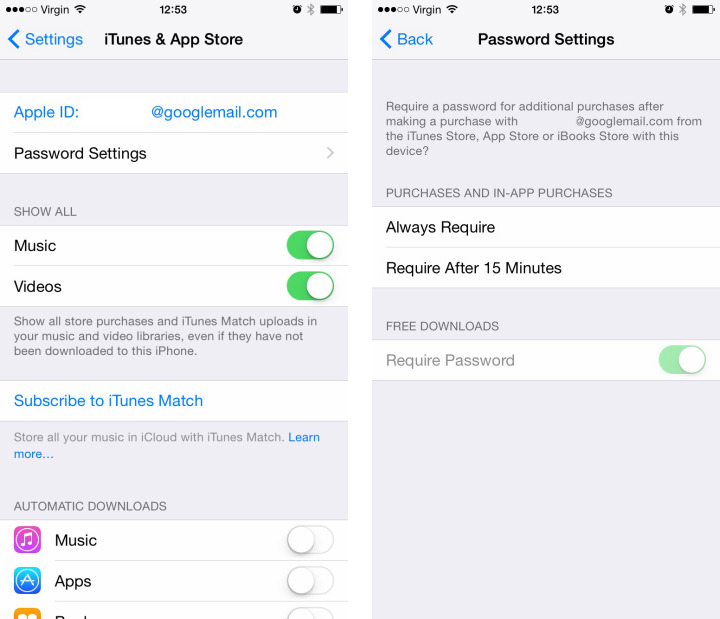
Apple has introduced a new setting in iOS 8.3 beta that lets you choose to enable free downloads without requiring a password.
The setting can be found by going to iTunes & App Store within the Settings app. From here you can access a menu called Password Settings which contains the toggle to switch on and off the password requirement for free downloads.
Currently, the option is not working but presumably it will be functional when iOS 8.3 is released.
The iOS 8.3 Beta includes improved performance, increased stability, bug fixes, and a redesigned Emoji keyboard. This release also supports additional language and country support for Siri: English (India, New Zealand), Danish (Denmark), Dutch (Netherlands), Portuguese (Brazil), Russian (Russia), Swedish (Sweden), Thai (Thailand), Turkish (turkey). This is beta software that is still in development, which means some applications and services may not work as expected. Follow the instructions below to enroll any iOS devices to receive beta updates.
Apple has opened up a public beta of iOS 8.3 for the first time. More details can be found here.
Please follow iClarified on X, Facebook, or RSS for updates.
Apple news, rumors, tutorials, price drop alerts, in your inbox every evening, free.
Unsubscribe at any time.
Success!
You have been subscribed.
Add Comment
Would you like to be notified when someone replies or adds a new comment?
Yes (All Threads)
Yes (This Thread Only)
No
Notifications
Would you like to be notified when we post a new Apple news article or tutorial?
Yes
No
Comments (6)
Comments are closed for this article.
0
Cedeno66 - March 23, 2015 at 3:01pm
It's all great I'm sure but it's no fun unless it remains stable. That should be the main focus of all updates. It hasn't been so with all updates lately.
0
iProService - March 22, 2015 at 8:56pm
Lol.. The title of this article is a bit misleading..




![iFixit Investigates iPhone Duo Screen Failures, Points to Possible Hinge Issue [Video]](/images/news/103038/103038/103038-160.jpg "iFixit Investigates iPhone Duo Screen Failures, Points to Possible Hinge Issue [Video]")
![Apple's Touchscreen MacBook Pro to Cost 'Significantly' More [Gurman]](/images/news/103035/103035/103035-160.jpg "Apple's Touchscreen MacBook Pro to Cost 'Significantly' More [Gurman]")
![Apple Stores Get iPhone Scanner to Fight Return Fraud [Report]](/images/news/103029/103029/103029-160.jpg "Apple Stores Get iPhone Scanner to Fight Return Fraud [Report]")
![Apple TV Shares 'Full Throttle' With F1 Drivers and Vince Young Ahead of U.S. Grand Prix [Video]](/images/news/103023/103023/103023-160.jpg "Apple TV Shares 'Full Throttle' With F1 Drivers and Vince Young Ahead of U.S. Grand Prix [Video]")
![How To Turn Off iPhone [Video]](/images/tutorials/94999/94999/94999-160.jpg "How To Turn Off iPhone [Video]")
![How To Back Up Your iPhone to an External Drive on Mac [Video]](/images/tutorials/72786/72786/72786-160.jpg "How To Back Up Your iPhone to an External Drive on Mac [Video]")

![How To Find Your IP Address on iPhone [Video]](/images/tutorials/496/496/496-160.jpg "How To Find Your IP Address on iPhone [Video]")

![Beats Headphones, Earbuds, and Pill Speaker Are Up to 41% Off [Deal]](/images/news/103026/103026/103026-160.jpg "Beats Headphones, Earbuds, and Pill Speaker Are Up to 41% Off [Deal]")

![New Fire TV Stick 4K Drops to $29.99 (50% Off) [Deal]](/images/news/102984/102984/102984-160.jpg "New Fire TV Stick 4K Drops to $29.99 (50% Off) [Deal]")
![Apple's iPhone 18 Pro and Pro Max Cases Are Up to 37% Off [Deal]](/images/news/102978/102978/102978-160.jpg "Apple's iPhone 18 Pro and Pro Max Cases Are Up to 37% Off [Deal]")
![16-Inch MacBook Pro With M5 Pro Drops to $2,429 ($570 Off), Lowest Price We've Seen [Deal]](/images/news/102957/102957/102957-160.jpg "16-Inch MacBook Pro With M5 Pro Drops to $2,429 ($570 Off), Lowest Price We've Seen [Deal]")
