Apple has introduced the ability to manually connect to Wi-Fi networks in watchOS 5 beta.
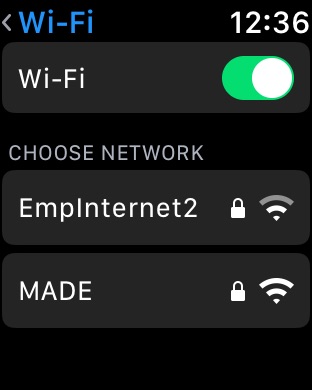
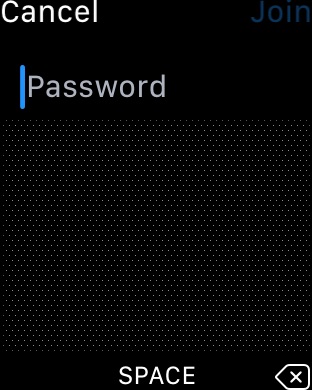
Navigating to Settings > Wi-Fi brings up a list of nearby Wi-Fi networks and a toggle to turn ON and OFF Wi-Fi. Choosing a network will now let you enter in a password using Scribble.
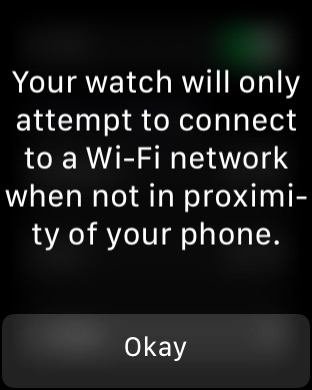
A notice informs users that "Your watch will only attempt to connect to a Wi-Fi network when not in proximity of your phone."
Check out the screenshots below and please follow iClarified on Twitter, Facebook, or RSS for more updates.
Get the iClarified Daily Newsletter
Apple news, rumors, tutorials, price drop alerts, in your inbox every evening, free.
Unsubscribe at any time.
Success!
You have been subscribed.
Add Comment
Would you like to be notified when someone replies or adds a new comment?
Yes (All Threads)
Yes (This Thread Only)
No
Notifications
Would you like to be notified when we post a new Apple news article or tutorial?








![Supply Chain Prepping for Glass-Centric 'iPhone 20' Anniversary Redesign [Rumor]](/images/news/101467/101467/101467-160.jpg "Supply Chain Prepping for Glass-Centric 'iPhone 20' Anniversary Redesign [Rumor]")
![OLED iPad Mini to Feature 8.4-Inch Display and 60Hz Refresh Rate [Rumor]](/images/news/101465/101465/101465-160.jpg "OLED iPad Mini to Feature 8.4-Inch Display and 60Hz Refresh Rate [Rumor]")
![AirPods Pro 3 Back On Sale for $199.99 ($50 Off) [Deal]](/images/news/101451/101451/101451-160.jpg "AirPods Pro 3 Back On Sale for $199.99 ($50 Off) [Deal]")

![Apple Watch Ultra 3 Drops to $659.97 on Amazon, $10 Above Record Low [Deal]](/images/news/101419/101419/101419-160.jpg "Apple Watch Ultra 3 Drops to $659.97 on Amazon, $10 Above Record Low [Deal]")