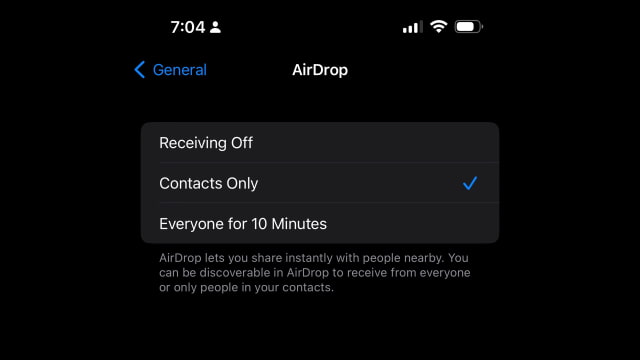
Apple has updated its AirDrop settings in iOS 16.2 RC, limiting the 'Everyone' option to just ten minutes for all users.
By default, AirDrop will only make you visible to contacts; however, in past firmware versions, users could manually select to be visible to 'Everyone'. This feature had been used by protestors in China to share files and get around government censors.
With the release of iOS 16.1.1, Apple limited the 'Everyone' setting for AirDrop to ten minutes in China. After ten minutes, AirDrop would revert back to the 'Contacts Only' setting. Despite upsetting some users, it appears Apple has decided to make this change for all users with the launch of iOS 16.2.
Apple news, rumors, tutorials, price drop alerts, in your inbox every evening, free.
Unsubscribe at any time.
Success!
You have been subscribed.
Add Comment
Would you like to be notified when someone replies or adds a new comment?
Yes (All Threads)
Yes (This Thread Only)
No
Notifications
Would you like to be notified when we post a new Apple news article or tutorial?
Yes
No
Comments (2)
Comments are closed for this article.
0
Raas al Ghul - December 9, 2022 at 1:16pm
This is so stupid we should be able to select whether we want to turn it on permanently or for a select time for all users. It could be default 10 mins but there should be options to change this. What about when transferring large files that take over 10 mins will they stop mid way?
0
dmorg - December 9, 2022 at 7:37am
Why can’t it be OUR choice to leave Airdrop always visible to everyone on our own devices???





![Apple Home Hub With Siri AI in Employee Testing, Could Debut in October [Gurman]](/images/news/102309/102309/102309-160.jpg "Apple Home Hub With Siri AI in Employee Testing, Could Debut in October [Gurman]")

![Apple Cuts Fitness+ Jobs as It Rethinks the Service [Report]](/images/news/102306/102306/102306-160.jpg "Apple Cuts Fitness+ Jobs as It Rethinks the Service [Report]")










![Apple Studio Display XDR Hits All-Time Low of $2,969.99 ($329 Off) [Deal]](/images/news/101976/101976/101976-160.jpg "Apple Studio Display XDR Hits All-Time Low of $2,969.99 ($329 Off) [Deal]")
