The third beta of iOS 26.2, released today, has revealed a new AirDrop feature that lets users share a one-time code for temporary file transfers. The new option allows for sharing between people who are not in each other's contacts without having to open AirDrop to everyone.
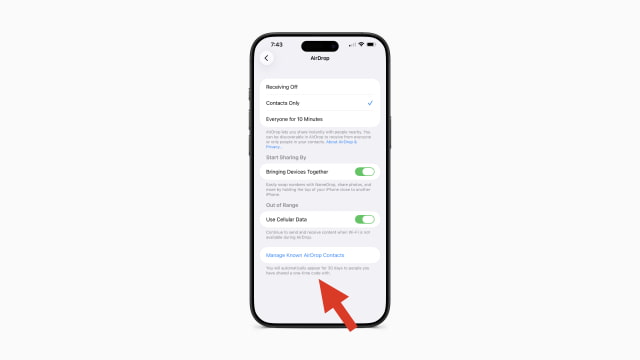
A new section in Settings > General > AirDrop titled "Manage Known AirDrop Contacts" now appears in the beta. Its description reads: "You will automatically appear for 30 days to people you have shared a one-time code with." This will allow two people to share files via AirDrop for a month-long period without needing to add each other as contacts.
The new option provides a middle ground between the existing 'Contacts Only' and 'Everyone for 10 Minutes' settings. It creates a temporary, secure connection with someone you don't want to add to your contacts, without opening up your device to everyone nearby.
Code found in the first beta of iOS 26.2 had already pointed to this feature, with strings mentioning a PIN-based system that would let users find each other for 30 days. While the interface for generating the code is not yet live in the third beta, the addition of the management setting suggests the feature is nearing its public release.







![watchOS 27.0.1 Fixes Unexpected Restarts on Series 12 and Ultra 4 [Download]](/images/news/102378/102378/102378-160.jpg "watchOS 27.0.1 Fixes Unexpected Restarts on Series 12 and Ultra 4 [Download]")





![13-Inch M5 MacBook Air With 1TB Drops to $1,449 on Amazon [Deal]](/images/news/102345/102345/102345-160.jpg "13-Inch M5 MacBook Air With 1TB Drops to $1,449 on Amazon [Deal]")




