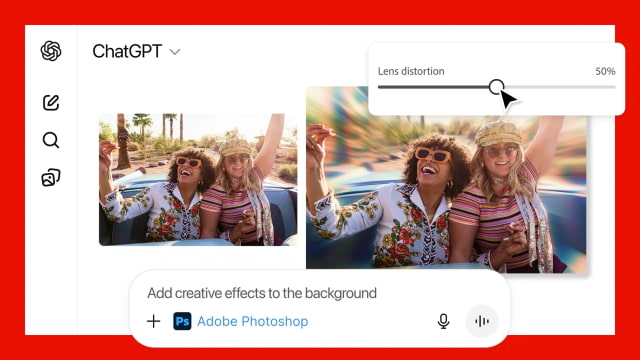
Adobe has launched Photoshop, Adobe Express, and Acrobat inside ChatGPT, giving users a way to edit photos, create designs, and manage documents through simple conversational prompts. The rollout brings Adobe's most widely used tools to ChatGPT's desktop, web, and iOS apps, with Android support expanding over time.
The new integration lets users skip traditional menus and toolbars by describing what they want to do. Typing something like "Adobe Photoshop, help me blur the background of this image" will surface the app within the chat and walk the user through the edit. In Photoshop, it's possible to adjust specific areas of an image, tweak brightness, contrast, or exposure, and apply effects such as Glitch or Glow.
Adobe Express brings its library of templates directly into the chat, letting users create social posts, invitations, flyers, and other designs with minimal setup. The system can fill in text, replace images, and animate elements without leaving the conversation. Acrobat support includes in-chat PDF edits, file compression and conversion, and the ability to extract text or tables. Users can also redact sensitive details by requesting it in plain language.
"We're thrilled to bring Photoshop, Adobe Express and Acrobat directly into ChatGPT, combining our creative innovations with the ease of ChatGPT to make creativity accessible for everyone," said David Wadhwani, president of digital media at Adobe. "Now hundreds of millions of people can edit with Photoshop simply by using their own words, right inside a platform that's already part of their day-to-day."
Adobe apps for ChatGPT are available starting today and are free for all users globally. For projects that need more detailed control, users can move from the chat interface into Adobe's native apps and continue working without losing progress.
Get the iClarified Daily Newsletter
Apple news, rumors, tutorials, price drop alerts, in your inbox every evening, free.
Unsubscribe at any time.
Success!
You have been subscribed.
Add Comment
Would you like to be notified when someone replies or adds a new comment?
Yes (All Threads)
Yes (This Thread Only)
No
Notifications
Would you like to be notified when we post a new Apple news article or tutorial?




![Apple TV Shares 'Full Throttle' With F1 Drivers and Vince Young Ahead of U.S. Grand Prix [Video]](/images/news/103023/103023/103023-160.jpg "Apple TV Shares 'Full Throttle' With F1 Drivers and Vince Young Ahead of U.S. Grand Prix [Video]")
![MacBook Neo Helps Apple Gain PC Market Share Despite Shipment Decline [Report]](/images/news/103020/103020/103020-160.jpg "MacBook Neo Helps Apple Gain PC Market Share Despite Shipment Decline [Report]")
![iPhone Duo Teardowns Reveal Dual-Battery Design and Repair Challenges [Video]](/images/news/103014/103014/103014-160.jpg "iPhone Duo Teardowns Reveal Dual-Battery Design and Repair Challenges [Video]")



![How To Back Up Your iPhone to an External Drive on Mac [Video]](/images/tutorials/72786/72786/72786-160.jpg "How To Back Up Your iPhone to an External Drive on Mac [Video]")

![How To Find Your IP Address on iPhone [Video]](/images/tutorials/496/496/496-160.jpg "How To Find Your IP Address on iPhone [Video]")


![New Fire TV Stick 4K Drops to $29.99 (50% Off) [Deal]](/images/news/102984/102984/102984-160.jpg "New Fire TV Stick 4K Drops to $29.99 (50% Off) [Deal]")
![Apple's iPhone 18 Pro and Pro Max Cases Are Up to 37% Off [Deal]](/images/news/102978/102978/102978-160.jpg "Apple's iPhone 18 Pro and Pro Max Cases Are Up to 37% Off [Deal]")
![16-Inch MacBook Pro With M5 Pro Drops to $2,429 ($570 Off), Lowest Price We've Seen [Deal]](/images/news/102957/102957/102957-160.jpg "16-Inch MacBook Pro With M5 Pro Drops to $2,429 ($570 Off), Lowest Price We've Seen [Deal]")