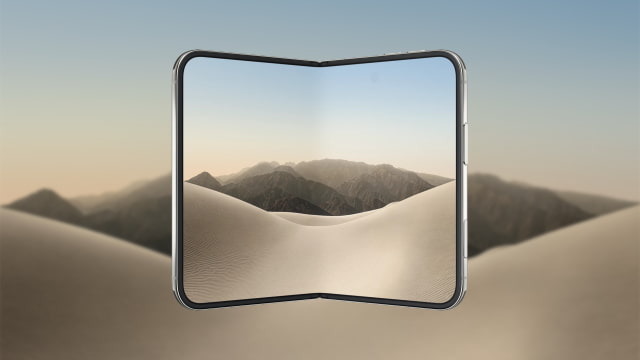
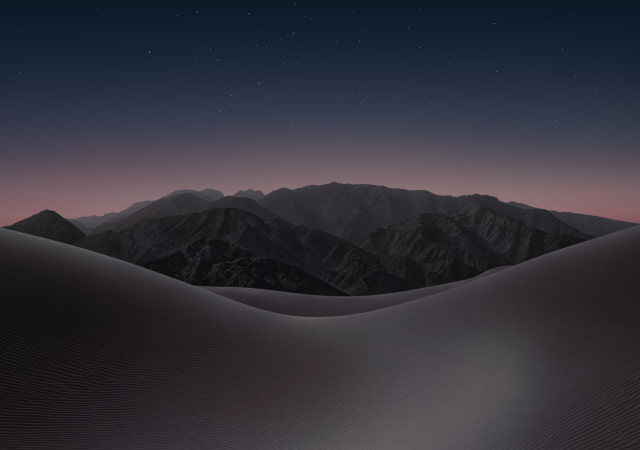
Apple has unveiled iPhone Duo, its first foldable iPhone, with a new desert wallpaper featuring sweeping sand dunes and rugged mountain peaks. We've obtained the official iPhone Duo wallpapers in light and dark versions, with four images available to download for your current iPhone, iPad, or another device.
DOWNLOAD THE OFFICIAL IPHONE DUO WALLPAPER
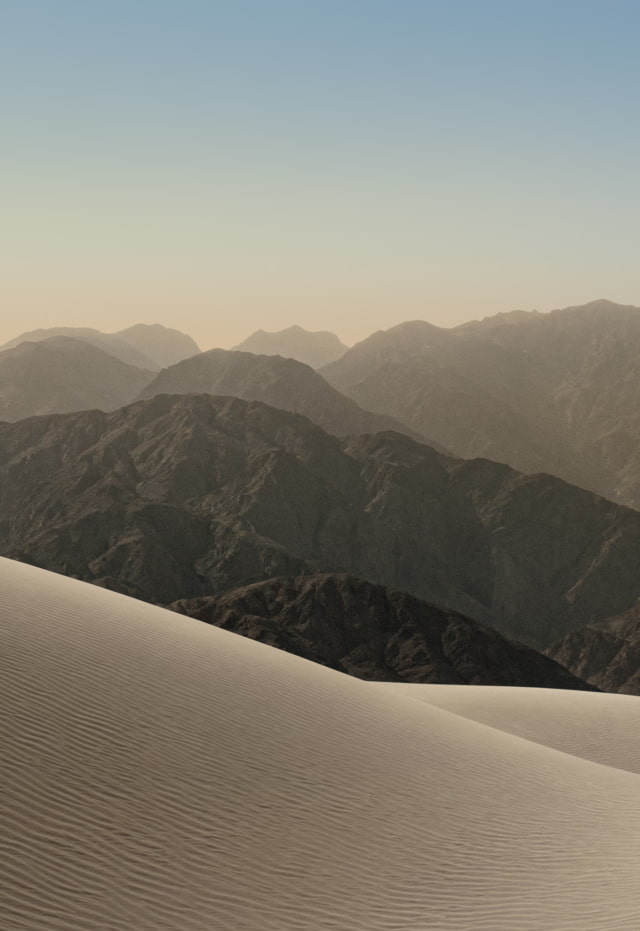
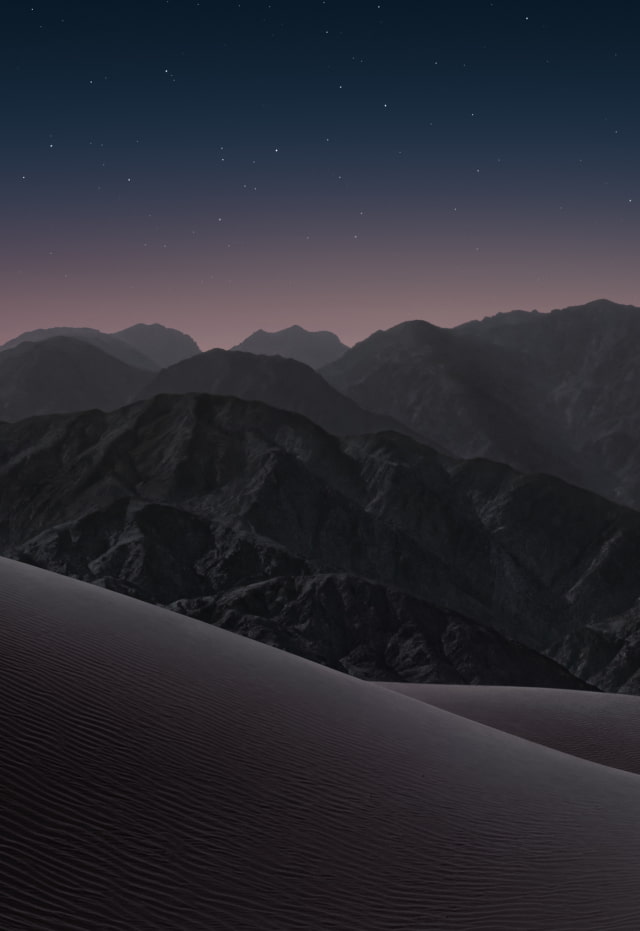
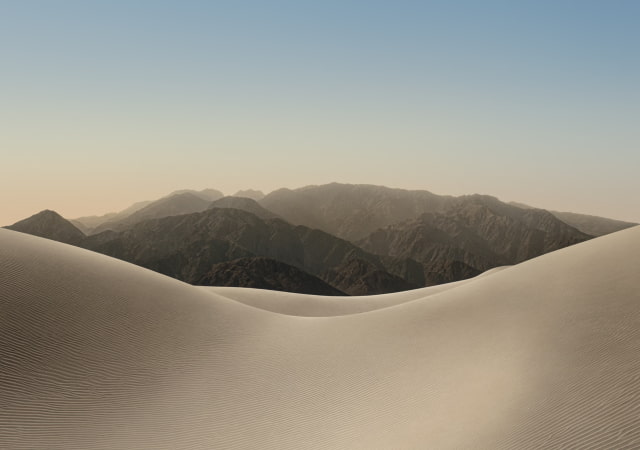
The iPhone Duo wallpaper pairs rippled sand dunes with layers of rocky mountains stretching toward the horizon. The light version shows daytime scenery with warm beige tones beneath a pale blue sky, while the dark version shifts to deep shadows and a star-filled night sky with a soft glow along the horizon.
These are official Apple wallpaper assets. The outer-display JPGs are 1398 x 2034 pixels, and the inner-display JPGs are 2670 x 1878 pixels in landscape. We may be able to obtain higher-resolution versions closer to the iPhone Duo's release next month and will update this page if they become available.
You can download the iPhone Duo wallpapers individually below or grab all four by downloading the ZIP file we've created. If you share these, please be sure to link back to this page as the source.
You don't need an iPhone Duo to use these images. The outer-display versions are a natural starting point for a phone, while the wider inner-display versions give you more room to crop for a tablet or desktop.
Download Process
Tap the download link below your chosen wallpaper to open the full-size JPG. On iPhone, touch and hold the image and choose Save to Photos, or use the Share menu to save it. On a computer, right-click the image and choose "Save Image As."
Applying the Wallpaper
Go to Settings > Wallpaper > Add New Wallpaper on your iPhone. Tap Photos, select the saved image, and adjust the crop. Tap Add, then choose Set as Wallpaper Pair to use it on both screens or Customize Home Screen to choose a different Home Screen look.
The official iPhone Duo wallpapers bring Apple's new desert scenery to your device, from sunlit dunes to a starry night sky. Choose a light or dark wallpaper for the inner or outer display, or save the four-image ZIP collection.
FREQUENTLY ASKED QUESTIONS
How many iPhone Duo wallpapers are available?
There are four downloads: light and dark wallpapers for the outer display, plus light and dark wallpapers for the inner display. All four JPGs are included in the ZIP file.
What is the resolution of the iPhone Duo wallpapers?
The outer-display wallpapers are 1398 x 2034 pixels, and the inner-display wallpapers are 2670 x 1878 pixels in landscape.
Are these official Apple wallpapers?
Yes. These wallpapers are official Apple assets.
Are light and dark versions included?
Yes. The light version shows sunlit dunes, while the dark version features a star-filled night sky. Both are available for the inner and outer displays. The JPGs are separate still images and do not switch appearance automatically.
Can I use the iPhone Duo wallpaper on my current iPhone or Android phone?
Yes. Save a JPG and select it in your device's wallpaper settings. You can also use these images on an iPad, Mac, or other device that supports photo wallpapers. Adjust the crop to fit your screen.
Can I use these on both the Lock Screen and Home Screen?
Yes. The images have no clock or controls baked into them, so you can use the same design on either screen. This collection does not include separately extracted Home Screen versions or the phone's animated wallpaper effects.



![Apple TV Shares 'Full Throttle' With F1 Drivers and Vince Young Ahead of U.S. Grand Prix [Video]](/images/news/103023/103023/103023-160.jpg "Apple TV Shares 'Full Throttle' With F1 Drivers and Vince Young Ahead of U.S. Grand Prix [Video]")
![MacBook Neo Helps Apple Gain PC Market Share Despite Shipment Decline [Report]](/images/news/103020/103020/103020-160.jpg "MacBook Neo Helps Apple Gain PC Market Share Despite Shipment Decline [Report]")
![iPhone Duo Teardowns Reveal Dual-Battery Design and Repair Challenges [Video]](/images/news/103014/103014/103014-160.jpg "iPhone Duo Teardowns Reveal Dual-Battery Design and Repair Challenges [Video]")


![How To Back Up Your iPhone to an External Drive on Mac [Video]](/images/tutorials/72786/72786/72786-160.jpg "How To Back Up Your iPhone to an External Drive on Mac [Video]")

![How To Find Your IP Address on iPhone [Video]](/images/tutorials/496/496/496-160.jpg "How To Find Your IP Address on iPhone [Video]")


![New Fire TV Stick 4K Drops to $29.99 (50% Off) [Deal]](/images/news/102984/102984/102984-160.jpg "New Fire TV Stick 4K Drops to $29.99 (50% Off) [Deal]")
![Apple's iPhone 18 Pro and Pro Max Cases Are Up to 37% Off [Deal]](/images/news/102978/102978/102978-160.jpg "Apple's iPhone 18 Pro and Pro Max Cases Are Up to 37% Off [Deal]")
![16-Inch MacBook Pro With M5 Pro Drops to $2,429 ($570 Off), Lowest Price We've Seen [Deal]](/images/news/102957/102957/102957-160.jpg "16-Inch MacBook Pro With M5 Pro Drops to $2,429 ($570 Off), Lowest Price We've Seen [Deal]")