

Apple Music has hidden an interactive version of the original iPod on its website, complete with a working scroll wheel, song previews, and a secret game. The Easter egg was spotted today, the 25th anniversary of the player's introduction.
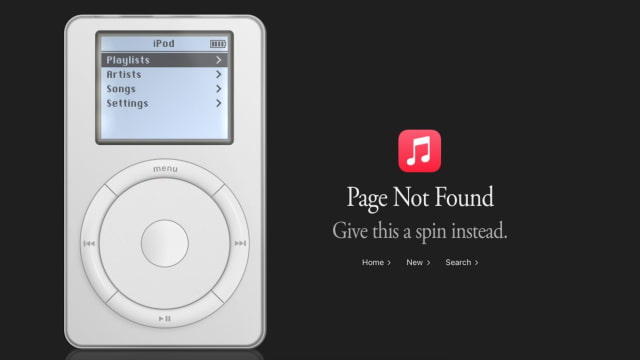
To find it, open music.apple.com/404 in a web browser. Instead of just an error message, the page displays a white iPod beside the words "Page Not Found" and "Give this a spin instead."
Click and drag around the scroll wheel to move through playlists, artists, songs, and settings, then use the center button to select an item. The surrounding buttons provide menu, playback, and track controls, recreating the interface of the original player rather than simply displaying a static image.
The U.S. version lists 1,029 songs, with playlists covering hits from 2001, music from iPod ads, and other selections from the 2000s. Artists include Coldplay, Alicia Keys, and Daft Punk. Selecting a track plays a preview rather than turning the page into a full Apple Music library.
There is another Easter egg inside the player. Open Settings, select About, and press and hold the center button for a few seconds to reveal Brick, a Breakout-style game. Press the center button to launch the ball and use the wheel to move the paddle.
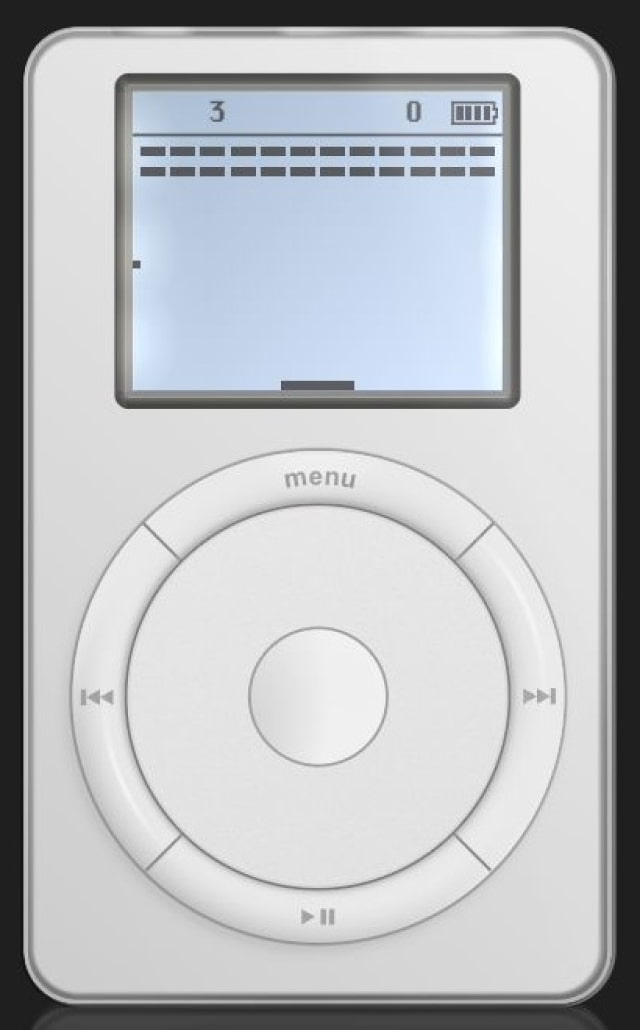
The iPod is part of the website, not the Music app. If the link opens the app on your device, copy the address and paste it into your browser instead.
Steve Jobs introduced the first iPod on October 23, 2001, with a 5GB hard drive and the promise of "1,000 songs in your pocket." The lineup continued until Apple discontinued the iPod touch in 2022.

![iPhone Duo Launches in Stores Worldwide [Photos]](/images/news/102993/102993/102993-160.jpg "iPhone Duo Launches in Stores Worldwide [Photos]")

![iPhone Duo's Initial 8 Million-Unit Order Extends Into 2027 [Gurman]](/images/news/102975/102975/102975-160.jpg "iPhone Duo's Initial 8 Million-Unit Order Extends Into 2027 [Gurman]")
![CT Scan Reveals How iPhone Duo's Hinge Works [Video]](/images/news/102981/102981/102981-160.jpg "CT Scan Reveals How iPhone Duo's Hinge Works [Video]")

![How To Back Up Your iPhone to an External Drive on Mac [Video]](/images/tutorials/72786/72786/72786-160.jpg "How To Back Up Your iPhone to an External Drive on Mac [Video]")

![How To Find Your IP Address on iPhone [Video]](/images/tutorials/496/496/496-160.jpg "How To Find Your IP Address on iPhone [Video]")

![New Fire TV Stick 4K Drops to $29.99 (50% Off) [Deal]](/images/news/102984/102984/102984-160.jpg "New Fire TV Stick 4K Drops to $29.99 (50% Off) [Deal]")
![Apple's iPhone 18 Pro and Pro Max Cases Are Up to 37% Off [Deal]](/images/news/102978/102978/102978-160.jpg "Apple's iPhone 18 Pro and Pro Max Cases Are Up to 37% Off [Deal]")
![16-Inch MacBook Pro With M5 Pro Drops to $2,429 ($570 Off), Lowest Price We've Seen [Deal]](/images/news/102957/102957/102957-160.jpg "16-Inch MacBook Pro With M5 Pro Drops to $2,429 ($570 Off), Lowest Price We've Seen [Deal]")

![16-Inch MacBook Pro With M5 Max Drops to $3,499 ($900 Off), Lowest Price We've Seen [Deal]](/images/news/102900/102900/102900-160.jpg "16-Inch MacBook Pro With M5 Max Drops to $3,499 ($900 Off), Lowest Price We've Seen [Deal]")
