

Perplexity Computer can now run entirely on a Mac, bringing its AI model, planning, reasoning, and task execution onto the device instead of relying on the cloud.

The new fully local mode builds on the company's Personal Computer Mac app, which can work across files and applications to complete tasks. Until now, its Hybrid Compute approach combined cloud-based research and reasoning with local models handling private information. The new option lets the Mac handle the whole task locally.
Users can choose Qwen3.6 or PPLX Pro, Perplexity's post-trained version of Qwen, as the local model. With permission, Computer can access local files and supported apps, including Notes, Messages, Mail, and Numbers.
One example is preparing a morning action list. Computer can review recent messages and email, pick out requests and deadlines, create a priorities list in Notes, find related documents, and draft follow-up replies for review. Another workflow turns a client brief, discovery notes, and an internal rate sheet into a proposal, an Excel budget, and an Outlook cover email.
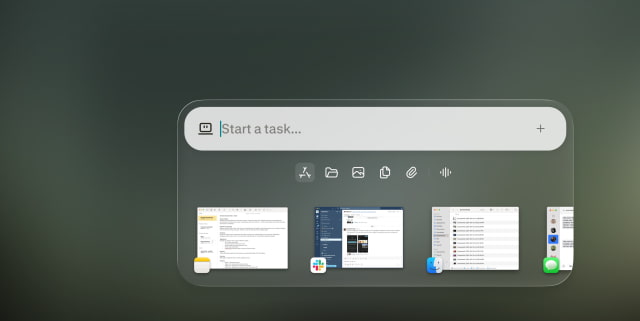
Fully local does not mean users have to give up cloud tools. They can authorize cloud access when a task needs current information, browser use, or connected apps. The local agent can also call on more than 15 frontier models for advanced reasoning. Those options are separate from keeping the model and private file processing on the Mac; tasks involving online services still need a network connection.
Perplexity says code and tool execution run in isolated sandboxes with controlled access to files and apps.
The fully local option is available now to Pro, Max, and Enterprise subscribers through the latest Perplexity Mac app. It supports Apple silicon Macs, with 36GB of memory or more recommended rather than listed as a minimum requirement. Setup includes downloading a local model and selecting the fully local mode.






![How To Back Up Your iPhone to an External Drive on Mac [Video]](/images/tutorials/72786/72786/72786-160.jpg "How To Back Up Your iPhone to an External Drive on Mac [Video]")


![How To Find Your IP Address on iPhone [Video]](/images/tutorials/496/496/496-160.jpg "How To Find Your IP Address on iPhone [Video]")

![16-Inch MacBook Pro With M5 Max Drops to $3,499 ($900 Off), Lowest Price We've Seen [Deal]](/images/news/102900/102900/102900-160.jpg "16-Inch MacBook Pro With M5 Max Drops to $3,499 ($900 Off), Lowest Price We've Seen [Deal]")
![Mac Studio With M5 Max Is $200 Off, Lowest Price We've Seen [Deal]](/images/news/102897/102897/102897-160.jpg "Mac Studio With M5 Max Is $200 Off, Lowest Price We've Seen [Deal]")
![14-Inch MacBook Pro With M5 Pro Drops to $2,069.10 ($429 Off) [Deal]](/images/news/102879/102879/102879-160.jpg "14-Inch MacBook Pro With M5 Pro Drops to $2,069.10 ($429 Off) [Deal]")
![Apple HomeView and New Apple TV 4K Get First Pre-Order Discount on Amazon [Deal]](/images/news/102867/102867/102867-160.jpg "Apple HomeView and New Apple TV 4K Get First Pre-Order Discount on Amazon [Deal]")
