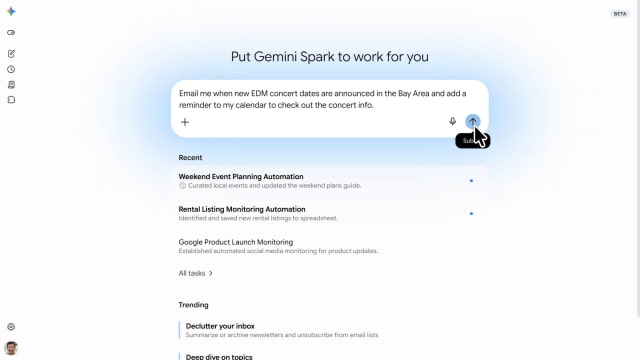
Google has started rolling out its Gemini Spark AI agent to the Gemini desktop app on macOS, allowing the assistant to automate desktop workflows and work directly with local files. The launch was announced on the company's official blog.
Gemini Spark can now move beyond the chat window and directly handle files on a Mac. It can automatically sort files, such as organizing PDFs in the Downloads folder into specific folders, and can use local files as the basis for new Google Workspace documents — for example, converting invoices into a budgeting spreadsheet. Access is permission-based, with Spark only able to use files users explicitly grant it access to.
Spark can also create schedules, such as regularly updating a spreadsheet generated from local invoices. Google says remote task execution is coming soon, allowing users to assign a multi-step request from their phone — such as finding a report on their Mac, extracting a sales figure, and emailing it — while the computer completes the work unattended.
Alongside the macOS launch, Spark is gaining connections to more third-party services, including Canva, Dropbox, Instacart, OpenTable, and Zillow Rentals, in addition to Google Tasks and Keep. Those integrations are rolling out first on web and mobile, with macOS support following in the coming weeks. Spark can also intelligently track topics and react to events in real time, such as sports scores, stock movements, or breaking news, and send updates as events occur. Google is also rolling out support for custom Model Context Protocol (MCP) integrations, allowing users to connect additional apps and build more tailored assistants.
Gemini Spark for macOS is available in beta to Google AI Ultra subscribers in the U.S., aged 18 and over, starting today.










![How To Change Wallpaper on Mac [Video]](/images/tutorials/90512/90512/90512-160.jpg "How To Change Wallpaper on Mac [Video]")
![How To Turn Off Always On Display on iPhone [Video]](/images/tutorials/87524/87524/87524-160.jpg "How To Turn Off Always On Display on iPhone [Video]")





![16-Inch M5 Max MacBook Pro Drops $900 to New Low of $3,499 [Deal]](/images/news/102438/102438/102438-160.jpg "16-Inch M5 Max MacBook Pro Drops $900 to New Low of $3,499 [Deal]")
![Magic Keyboard for iPad Air Drops to $200 on Amazon [Deal]](/images/news/102402/102402/102402-160.jpg "Magic Keyboard for iPad Air Drops to $200 on Amazon [Deal]")
