Lookout, an app that helps protect your iPhone from data loss and theft, is now available on the Apple Watch.
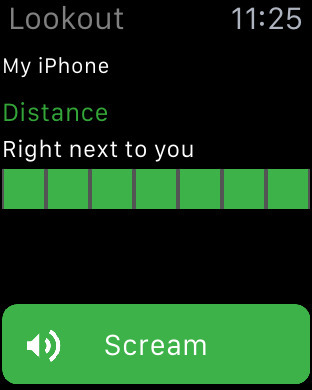
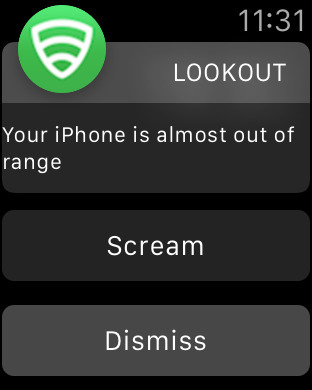
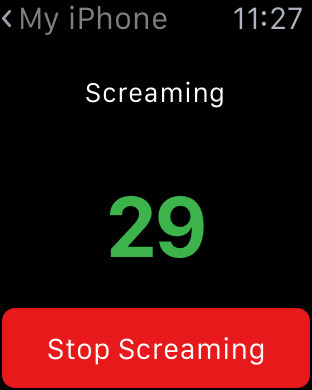
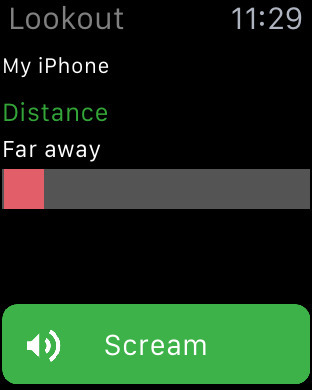
Lookout for Apple Watch enables useful new features. From the Apple Watch you can check the distance to your iPhone, receive alerts if you're about to leave your iPhone behind, make the iPhone scream (emit a loud alarm), and more.
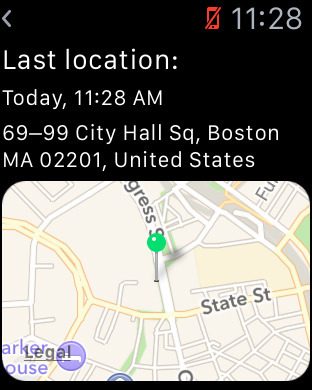
Features:: - Locates your lost iPhone or iPad from anywhere, on any Internet-connected device - Automatically saves your device's location before it runs out of battery - Backs up your contacts automatically - Notifies you if you have an out-of-date or insecure version of iOS - Shows you the distance between your iPhone and Apple Watch, and notifies you if they’re about to lose connection.
Log in to Lookout.com from any computer, tablet or phone to: - Locate your lost or missing device on a map from Lookout.com - Sound a loud alarm to find your lost device if you think it’s nearby (even if you left it on silent!) - Display a custom ‘lost’ message on your iPhone or iPad screen, complete with contact details, to get your device back faster! - Call your missing device over the web from any web browser, in case you don't have another phone nearby. Note: this feature is only available if you do not have a passcode on your device. - Access your backed up contacts - Download your contacts to transfer to a new device - Manage multiple devices from one account
Lookout Premium offers additional features at $2.99/month or $29.99/year: - Automatic Photo Backup – access your photos anytime at Lookout.com - Theft Alerts: Get an email with the location of your iPhone or iPad when we notice behavior that could mean it has been stolen
What's New In This Version: - Now on Apple Watch! Locate your iPhone from your Watch, and know when your devices are about to lose connection (compatible with watchOS 2). Visit the Watch App Store on your iPhone to install the Lookout Watch app.
You can download Lookout from the App Store for free.
Apple news, rumors, tutorials, price drop alerts, in your inbox every evening, free.
Unsubscribe at any time.
Success!
You have been subscribed.
Add Comment
Would you like to be notified when someone replies or adds a new comment?
Yes (All Threads)
Yes (This Thread Only)
No
Notifications
Would you like to be notified when we post a new Apple news article or tutorial?
Yes
No
Comments (4)
Comments are closed for this article.
0
Depender of Developers - March 9, 2016 at 6:36pm
Why do you people criticize the companies trying to make cool and useful apps? Do you really think Apple will ALLOW them to do an app that gives them the ability to have that type of security. Their hands are tied! This is a cool app that works well for what they are allowed!
0
Aiya1684 - March 9, 2016 at 7:56am
This is pretty much like find my phone, just costs money. But I agree, need answers to what type of security this has!
0
clown - March 9, 2016 at 6:45am
No passcode? They can just delete all your data and delete the App. If you loose your phone. The app should be like a account , so you can lock the data so it cant be changed.
0
clown - March 9, 2016 at 6:41am
Access photos anytime. Basically they store all your data like icloud. What protection do you get Aes or what. What happens if they sell the company do you get a refund , if they stop the service. How many devices does it support. Do you get extra accounts for multiple phones. Many more questions need ro be asked , ..







![Apple Debuts 'Nocturne' Trailer Ahead of October 30 Premiere [Video]](/images/news/102471/102471/102471-160.jpg "Apple Debuts 'Nocturne' Trailer Ahead of October 30 Premiere [Video]")



![How To Find Your iPhone IMEI Number [Video]](/images/tutorials/83557/83557/83557-160.jpg "How To Find Your iPhone IMEI Number [Video]")



![16-Inch M5 Max MacBook Pro Drops $900 to New Low of $3,499 [Deal]](/images/news/102438/102438/102438-160.jpg "16-Inch M5 Max MacBook Pro Drops $900 to New Low of $3,499 [Deal]")
![Magic Keyboard for iPad Air Drops to $200 on Amazon [Deal]](/images/news/102402/102402/102402-160.jpg "Magic Keyboard for iPad Air Drops to $200 on Amazon [Deal]")
![13-Inch M5 MacBook Air With 1TB Drops to $1,449 on Amazon [Deal]](/images/news/102345/102345/102345-160.jpg "13-Inch M5 MacBook Air With 1TB Drops to $1,449 on Amazon [Deal]")

