

These are instructions on how to find the UDID (unique identifier) of your Apple TV 4 (ATV4).
Step One
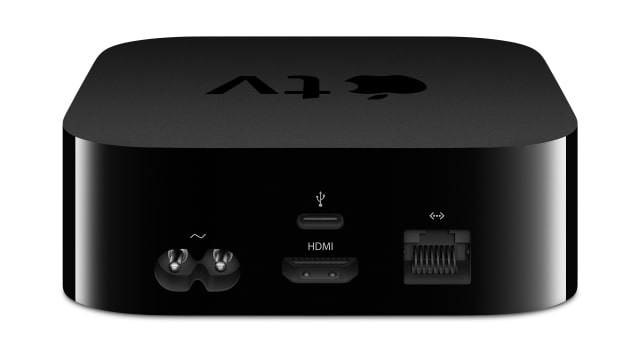
Connect the Apple TV 4 to your computer using a USB Type-C cable and make sure its power cable is plugged into the wall.
Step Two
Launch iTunes from your dock.

Step Three
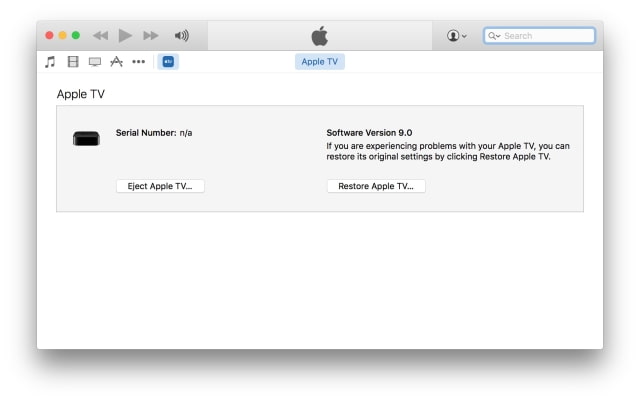
Click the Apple TV icon from list of connected devices at the top left of your iTunes window.
Step Four
Click the invisible button under the words Serial Number to unveil your UDID.

Hint: You can press Command+C on your keyboard to copy the UDID to the clipboard.
Step One
Connect the Apple TV 4 to your computer using a USB Type-C cable and make sure its power cable is plugged into the wall.
Step Two
Launch iTunes from your dock.
Step Three
Click the Apple TV icon from list of connected devices at the top left of your iTunes window.
Step Four
Click the invisible button under the words Serial Number to unveil your UDID.
Hint: You can press Command+C on your keyboard to copy the UDID to the clipboard.





![Apple Releases Official Trailer for 'Where's Wanda?' Season 2 [Video]](/images/news/102360/102360/102360-160.jpg "Apple Releases Official Trailer for 'Where's Wanda?' Season 2 [Video]")







![13-Inch M5 MacBook Air With 1TB Drops to $1,449 on Amazon [Deal]](/images/news/102345/102345/102345-160.jpg "13-Inch M5 MacBook Air With 1TB Drops to $1,449 on Amazon [Deal]")




