Dreamcatcher has released version 1.1.6 of iPhone Video Recorder which features video and audio recording capabilities.
iPhone Video Recorder records audio and video to the compressed mpeg4 format, so the recording is space saving, an-hour-high-quality recording will be a file as small as 60MB. iPhone Video Recorder boasts a frame rate up to 15fps which guarantees better recording performance . With iPhone Video Recorder, recording is easy and enjoyable, you may play back the video, download it to a computer, or send it out by email as you wish.
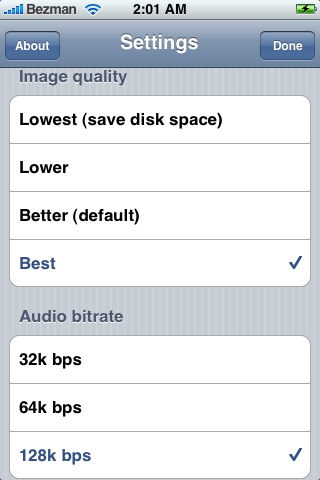
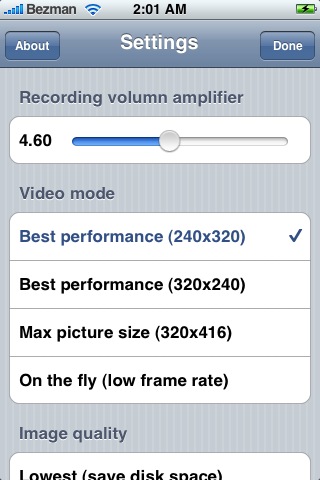
This update includes - Audio Bit Rate control, four image quality options, audio input amp and four different video size modes.
To install IPhone video Recorder add the following source to installer; http://www.iphone-recorder.com/install2
This update was first reported by Aaron Besson of MyTriniPhone.com
Get the iClarified Daily Newsletter
Apple news, rumors, tutorials, price drop alerts, in your inbox every evening, free.
Unsubscribe at any time.
Success!
You have been subscribed.
Add Comment
Would you like to be notified when someone replies or adds a new comment?
Yes (All Threads)
Yes (This Thread Only)
No
Notifications
Would you like to be notified when we post a new Apple news article or tutorial?
Yes
No
Comments (9)
Comments are closed for this article.
0
Macopoulos - May 31, 2008 at 7:32am
The program is now a part of the big repositories, search and you'll find it.. but.. it allows only 30 seconds per video clip and a total of 30 clips, then you must buy it.
0
raj - May 30, 2008 at 11:12pm
Can any body give step-by step how to install video recording on my iphone.. i have 1.1.4 jail braked version.
0
cscho0415 - April 27, 2008 at 4:50pm
so is it ok to install this now or is it still hacked and viral???
0
jeffcard - September 7, 2016 at 7:59am
It's not available now. You can do this for free using your computer and QuickTime Player.
Plug your iOS device into the computer with a cable, launch QuickTime and select menu File->New Movie Recording
You'll probably see yourself as it defaults to the web cam. On the right of the red circle record button on the video preview screen is a reversed ^ icon.
Click on it for a drop down menu allowing you to choose the video source. That's all.
To get better quality video like 4K or HD video, I'd recommend Acethinker iPhone Screen Recorder.
0
Oknoproblem - April 27, 2008 at 3:36am
that's ok no problem.
0
cscho0415 - April 26, 2008 at 9:10pm
sry... Thanks for lookin out man...
0
thania8 - April 26, 2008 at 3:03am
Very interesting program, worked fine with my configuration (full loaded iPhone 1.0.2OOTB with 1.1.4)! good quality and very good sound. Was able to mail the file to my Mac and even there found good sound and liable picture quality! Will go to buy it!
0
Macopoulos - April 26, 2008 at 1:17am
Is it better than pollarbears?
0
Naz - April 25, 2008 at 2:46pm
I did not jailbreak my iPhone but this sounds good. Hopefully, they will develop one using the iPhone SDK. I was worried that video recording was not possible with the iPhone camera.








![Samsung Display Flexible OLED Shipments Surge 34.5% on Strong iPhone Sales [Report]](/images/news/101835/101835/101835-160.jpg "Samsung Display Flexible OLED Shipments Surge 34.5% on Strong iPhone Sales [Report]")