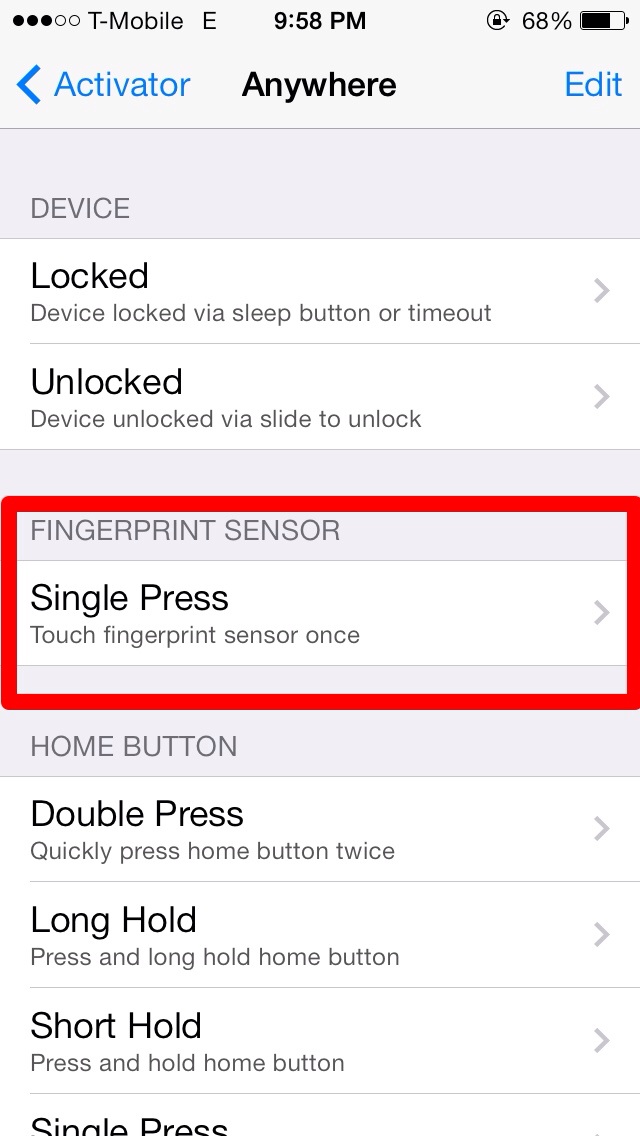
Activator has been updated by Ryan Petrich to allow iPhone 5s users to assign any Activator Action to their Touch ID sensor gesture. This means you can simply tap your home button/Touch ID sensor to take you home, launch an app, respring, or just about anything else that Activator allows you to.
We told you about Virtual Home, which let users touch the Home Button instead of pressing, however users are reporting that the latest version of Activator 1.8.3 is much quicker/efficient than Virtual Home (when you assign Touch ID sensor to Home Button). However, Virtual Home did support long pressing the home button which launched the multitasking switcher -- a feature which Activator does not support yet. On activator, you must double tap the home button to launch the multitasking switcher.
Version 1.8.3 of activator also brought some bug fixes and improvements. You can grab the latest update in Cydia for free.
Apple news, rumors, tutorials, price drop alerts, in your inbox every evening, free.
Unsubscribe at any time.
Success!
You have been subscribed.
Add Comment
Would you like to be notified when someone replies or adds a new comment?
Yes (All Threads)
Yes (This Thread Only)
No
Notifications
Would you like to be notified when we post a new Apple news article or tutorial?
Yes
No
Comments (4)
Comments are closed for this article.
0
Maciej - January 3, 2014 at 9:47pm
Does it scan finger or just detect touching the home button?
0
dmc - January 4, 2014 at 3:48am
It asks ios if the scan matches the saved authentication. If it does then it allows access... watch the video...
0
Red Light Runner - January 3, 2014 at 6:27pm
Actually...it does Activator does support multitasking. All you have to do is double tap the Touch ID. If you touch and hold the Touch ID, it brings you to the home screen, if you double tap the Touch ID, it will bring up multitasking.
0
mateen - January 3, 2014 at 7:05pm
Thanks! I meant to say it does not support long press. I added clarification though :)






![Apple Tests Microphones and a Remote Speaker for New Apple TV [Report]](/images/news/102729/102729/102729-160.jpg "Apple Tests Microphones and a Remote Speaker for New Apple TV [Report]")
![Apple's New 'HomeView' Hub to Launch Without an App Store [Gurman]](/images/news/102726/102726/102726-160.jpg "Apple's New 'HomeView' Hub to Launch Without an App Store [Gurman]")
![How To Turn Off iPhone [Video]](/images/tutorials/94999/94999/94999-160.jpg "How To Turn Off iPhone [Video]")
![How To Back Up Your iPhone to an External Drive on Mac [Video]](/images/tutorials/72786/72786/72786-160.jpg "How To Back Up Your iPhone to an External Drive on Mac [Video]")
![How To Forward Calls on iPhone [Video]](/images/tutorials/92926/92926/92926-160.jpg "How To Forward Calls on iPhone [Video]")






![Mac mini Drops to $779.99 for Prime Big Deal Days [Deal]](/images/news/102624/102624/102624-160.jpg "Mac mini Drops to $779.99 for Prime Big Deal Days [Deal]")
