Apple recently released iOS 8.1.1 which was supposed to bring performance improvements for the iPhone 4S and iPad 2. ArsTechnica put the firmware to the test, checking for enhancements to responsiveness and consistency. Unfortunately, the software update didn't perform as well as many hoped it would.
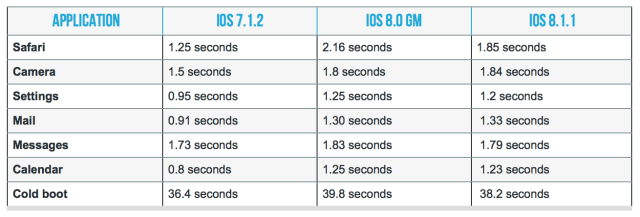
We loaded some apps on the phone three times each, manually closing them between runs and timing them with a stopwatch. We averaged the three times to get our final result. On this count, iOS 8.1.1 changes little for users with Apple A5-based devices. App load times are basically the same as they've been since the iOS 8 update, and they're still longer than they were under iOS 7.1—Safari is the only one that shows any sign of change that can't be explained by the margin of error, and it's still not a big one.
Noting the limitations of 512MB of RAM on the iPhone 4S and iPad 2, Ars also tested how fast Safari could reload tabs after they'd been purged from memory. In this test there were some minor improvements. Reload time was slighter faster and the site says it didn't run into crashes or instability.
The best we can say is that something about the process of loading and ejecting processes to and from the A5's 512MB of RAM could cause slowness and instability in iOS 8.1, and whatever the problem was has been at least partially addressed in iOS 8.1.1. The update doesn't help with the still-unimpressive performance of the UI, application launches, and lighter multitasking loads, but it does deliver some consistent and measurable improvements under certain circumstances.
After going through all their tests, Ars concluded that iOS 8.1.1 didn't hurt anything, helped sometimes, but isn't an 'iOS-7.1-on-the-iPhone-4-style shot in the arm'.
Let us know your experience with iOS 8.1.1 in the comments. Did it make an improvement?
Apple news, rumors, tutorials, price drop alerts, in your inbox every evening, free.
Unsubscribe at any time.
Success!
You have been subscribed.
Add Comment
Would you like to be notified when someone replies or adds a new comment?
Yes (All Threads)
Yes (This Thread Only)
No
Notifications
Would you like to be notified when we post a new Apple news article or tutorial?
Yes
No
Comments (34)
Comments are closed for this article.
0
humanextinction - November 23, 2014 at 7:59am
That's why they purposely prevent you to downgrade firmwares and not make it optional by consumers to make your couple of year old hardware run sluggish on an operating system optimized for the current or latest hardware to date. That's how marketing work to force everyone to always buy their product every couple of years while the earlier products becomes more environmental waste.
0
gamerscul9870 - November 23, 2014 at 9:05am
Environmental waste? Do you not see old products get recycled into newer ones? Best buy does it, target does it, Apple does it, the list goes on.
0
gamerscul9870 - November 23, 2014 at 2:26pm
Last time I used android, God it was nightmare all over. It was like 2009.
0
n_n - November 25, 2014 at 3:34am
Mobile OS is different with Desktop/Laptop OS.... Also Microsoft doesnt lock OS upgrade/downgrade since it depends whether your hardware can run their latest OS on desktop while Apple purposely locks both your mobile/desktop/laptop(tpm).... Heck you can even install Linux platforms on any Windows based desktop/laptops without hacking it.
0
gamerscul9870 - November 25, 2014 at 3:44am
Yes but with newer windows version, there are less machines making use of the older versions. Hence the old models of macs you get will not automatically install the latest version.
0
Grammar Depression - November 27, 2014 at 2:20am
And that's why you can opt to install Linux or just use the latest WIndows version since Win 8.1 or maybe even Win 10 Desktop OS are optimized to run computers that are capable of running Vista which was a bloated piece of OS 7 years ago. You can even dual,tri,quad.... Win 95,98,2000,XP,Vista,7,8,10,Linux,Ubuntu,Fedora,any Mac modded version,etc boot those said OS disregarding vmwares to you liking of course you need hardware drivers for it which is the only problem. Mac's??? Bleh.... that's why it wont ever ever dominate the pc market. High priced with limited/locked functionality and now with soldered RAM like wtf!!!
0
gamerscul9870 - November 22, 2014 at 12:35pm
Not without trying out those tips to make it faster on ios 7/8.
0
Inspector Gadget - November 21, 2014 at 5:30pm
It sucks on the iPad 2
0
Ketan naik - November 21, 2014 at 5:30pm
I have iPhone 4s the ios8.1.1 has done little improvement to my iPhone. Although some time when I open my mail app it just disappear from the screen completely untill I press the home button again. There are some issues still I hope apple will resolve in next update.
0
Techno - November 22, 2014 at 12:08am
Restore your phone clean and don't use the back up from the computer. Simply reinstall your files from the back up you have from the cloud. I've seen this in many people with minor to major issues with their Computer.
0
David - November 21, 2014 at 4:44pm
Unfortunately it did very little to improve the 5S performance either. Still very glitchy.
0
Alex - November 21, 2014 at 4:43pm
Just upgrade slow software performance is done on purpose to force you to upgrade.
0
iBrick - November 21, 2014 at 1:24pm
I know that there's no reason for iPhone 4s owners to complain about performance, it's so old device tho, but if there was a possibility to downgrade back to iOS 6/5, THAT would be really awesome. It was back then so snappy.
0
David - November 21, 2014 at 4:46pm
Well I like 8 very much but 7 was much more stable and less glitchy. They should focus on stabilizing this one before it turns into that other operating system. Hardware alone won't cut it.
0
gamerscul9870 - November 21, 2014 at 6:02pm
If you stayed on iOS 6/7 after it was discontinued then you would still be happy.
0
Phil Simpson - November 21, 2014 at 11:36am
Owner of a 4s & ipad 2. After being so disappointed by the performance of my devices after going to ios8 I was glad to see Apple trying to address the problem. For me the latest update cured all of the issues I was experiencing. No more crashes and a general speed improvement on both my phone and my iPad. Prior to ios 8.1.1 it would take 5 to 6 seconds from a double click to be able to see my running apps... now it's more or less instant. Can't remember the last crash... both devices are stable and reliable and hopefully I'll get another year out of them before upgrading.
0
AppleGuy299 - November 21, 2014 at 12:41pm
Your devices are from 2011. I had the iPod touch 4, made the same year, and support was dropped for that after iOS 6. What do you expect from a 3 year old device?
0
Guest - November 21, 2014 at 7:11am
still using iPad 2...thought upgrade to iOS 8.X.X would made improvement from 7.X.X but since upgrading to the latest POS iOS version, my tablet became lag&crash world. Now, since they have specifically targeted iPad 2 and iPhone 4S for this new update, I thought okay, FINALLY! a fix...but lo and behold...lag&crash world remained with added Wi-Fi drop off...BRILLIANT!
0
AppleGuy299 - November 21, 2014 at 12:39pm
Your device is from 2011, what do you expect?
0
iProService - November 21, 2014 at 6:39am
Is it not plausible that 8.1.1 was actually released to block Pangu and anything else is just a cover story?
0
Kornmehl - November 21, 2014 at 11:55am
As far as anyone can tell, Apple has NEVER released an update solely to black an exploit used for Jailbreaking. Perhaps to prevent the so-called Masque Attack, but not the Jailbreak. Apple simply doesn't care about Jailbreaking, one way or the other.
0
hamood_d10 - November 21, 2014 at 6:28am
yes apple people they let people like iphone 4 to upgrade to ios 7 it fucked up the device and u cant go back to old ios so people cant use the device since its slow. so people had to upgrade to new iphone, this is how apple do it. now i have iphone 6 ios 8.1.1 in the futre in ios 11 the iphone 6 will be super slow and i have to upgrade to new iphone
0
Sunny_ - November 21, 2014 at 5:14am
Of course upgrading to iOS 7 itself was a big mistake. But anyway when I upgraded to iOS 8.1 I saw a noticeable improvement in battery life. Had to charge at least twice a day to survive the entire day. Now starting 100% in the morning I easily make it through to the night. And when iOS 8.1.1 release I instantly upgraded to it because it mentioned that there were specific improvements for 4s only to notice that battery life again got hit. So I immediately downgraded to iOS 8.1 before apple stops signing it.
0
Gambino - November 21, 2014 at 3:09am
I feel like apple somehow slows down the device. Even if they didn't add anything to make it slow down. Maybe to make old device owners upgrade?
0
MoneyMaking - November 21, 2014 at 1:49am
Whats there to improve but to buy next next years iPhone 7?
0
Random - November 21, 2014 at 1:32am
Iphone 4s on ios6 was super duper fast! My mistake was upgrading to ios 7 because there was no jb for ios 6 at that time. Only ios7. Thank god i did not upgrade to ios 8. To all iPhone 6 owners out there, in the future, don't update to ios 9 if ever Apple releases it! Or else you will be forced to upgrade to a newer device again.!
0
Technology Freak - November 21, 2014 at 2:53am
I agreed!! I should have kept my Pentium 2 on Windows 98, got it up to Windows 2000 and damn thing was so slow!! Then I invested on XP and thought Windows 7 would be great, damn slowed down my Dell 610. Never again!!!!! Will I update my 10 year old laptop..Oh hells no!!!!! LOL
0
Ashish - November 21, 2014 at 12:46am
Very disappointed... No sign of improvements
0
JohnWayne - November 21, 2014 at 12:21am
How about the iPhone 6 Plus? Any noticeable difference?
0
iHA69 - November 21, 2014 at 12:23am
Nope.
0
What142 - November 21, 2014 at 12:20am
This is exactly why Apple doesn't upgrade the RAM on devices the way they should, because that way if they have little RAM they can continue to get you to buy new products and pay their exuberant prices for subpar and out of date hardware! It not about maximizing software for the Ram.
0
gamerscul9870 - November 21, 2014 at 1:45pm
What does ram have to do with this? Besides it's part of the power yet it won't matter because the chips power it anyway! Take a hint!!
0
Lakh Jhajj - November 21, 2014 at 12:01am
I made a big mistake myself updating to iOS 8.1 on my iPad 3. If Pangu would have not released a iOS 8 jailbreak I would not be that tempted to update.
0
Lakh Jhajj - November 21, 2014 at 12:06am
Since the update to iOS 8.1 my iPad 3 freezes during swiping screens. Freezes or hesitates a bit while rotating from landscape to portrait or vice versa. It's not good experience not enjoyable at all. If on iPad 3 with 1gb ram I feel slow than I can totally feel the pain of iPad 2 and 4s owners on iOS 8.1. Apple should stop updating older devices if they know that will cause issues in day to day use.





![Touchscreen OLED MacBook Pro Could Debut as Early as October [Gurman]](/images/news/102519/102519/102519-160.jpg "Touchscreen OLED MacBook Pro Could Debut as Early as October [Gurman]")
![iPhone 18 Pro Sales Rise 12% in China as Apple Leads Weekly Smartphone Market [Report]](/images/news/102522/102522/102522-160.jpg "iPhone 18 Pro Sales Rise 12% in China as Apple Leads Weekly Smartphone Market [Report]")
![Apple TV Shares Trailer for 'Awkwafina: The Unlikely Cook' [Video]](/images/news/102513/102513/102513-160.jpg "Apple TV Shares Trailer for 'Awkwafina: The Unlikely Cook' [Video]")




![How To Find Your iPhone IMEI Number [Video]](/images/tutorials/83557/83557/83557-160.jpg "How To Find Your iPhone IMEI Number [Video]")




![16-Inch M5 Max MacBook Pro Drops $900 to New Low of $3,499 [Deal]](/images/news/102438/102438/102438-160.jpg "16-Inch M5 Max MacBook Pro Drops $900 to New Low of $3,499 [Deal]")
![Magic Keyboard for iPad Air Drops to $200 on Amazon [Deal]](/images/news/102402/102402/102402-160.jpg "Magic Keyboard for iPad Air Drops to $200 on Amazon [Deal]")
![13-Inch M5 MacBook Air With 1TB Drops to $1,449 on Amazon [Deal]](/images/news/102345/102345/102345-160.jpg "13-Inch M5 MacBook Air With 1TB Drops to $1,449 on Amazon [Deal]")
