Posted September 29, 2009 at 1:39pm by
Yoav Levytam
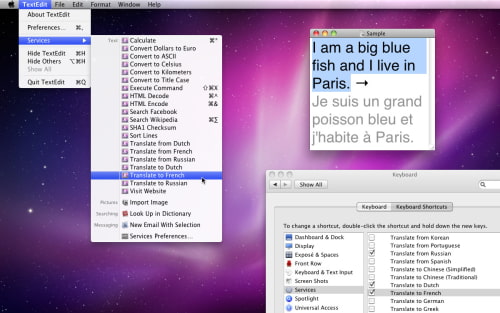
KavaSoft has released KavaServices 4.1, a collection of useful commands that transforms the Services menu in Mac OS X Snow Leopard. KavaServices can translate, search the web, encode for HTML, calculate, convert units, sort, change case, execute commands, and much more. KavaServices 4.1 adds file management tools that help simplify your workflow in the Finder.
KavaServices 4.1 can now move and copy files to your favorite folders. For example, you can click on an application in the Finder and choose "Copy to Applications" to install it. Click on a movie in your Downloads folder and choose "Move to Movies" to put it where it belongs. KavaServices comes with handy pre-defined destinations so you can easily move and copy files to your Desktop, Documents, Downloads, and other folders in your home folder. You can also customize your workflow by adding your own folder destinations.
Snow Leopard's redesigned Services menu is context-sensitive and fully customizable. You can choose exactly which commands you'd like to include in System Preferences, keeping the menu tidy and clutter-free. Your favorite KavaServices features are now right in the Services menu, rather than buried in submenus.
Services replace the selected text in place, without the need to switch to a different program or copy and paste. They're also available from the contextual menu, whenever you need them. KavaServices translates text from one language to another, and is fluent in English, French, German, Japanese, Italian, Spanish, Chinese, Dutch, Greek, Korean, Portuguese, and Russian.
KavaServices can search a variety of websites. You can pull up a Wikipedia article, search Google or Yahoo, buy things on Amazon or eBay, locate a place on a map, connect on Facebook or MySpace, or watch a video on YouTube. The Visit Website command goes to the main website for whatever you've selected, just like magic.
KavaServices helps webmasters prepare content for the web by encoding special characters into HTML entities. It can convert accented letters, characters in other alphabets and special punctuation marks for display on the web. It can also encode URL links and convert accented text to plain ASCII.
KavaServices can calculate mathematical expressions, including basic arithmetic, trigonometry, arithmetic with scientific units, base conversions, and more. It can also convert currencies, area, energy, power, pressure, speed, temperature, time, volume and weight.
Text processing commands let you convert text to lowercase, uppercase or title case. You can sort lines alphabetically, with the option to remove duplicates, and remove blank lines. KavaServices also offers a gateway to the Terminal in any application. Select a command, hit a keystroke, and the command will be replaced by its result as if you had typed it in the Terminal.
Pricing and Availability: KavaServices costs $25 (USD), and can be purchased using PayPal or Kagi. You can try all of the features for free for seven days.
Get the iClarified Daily Newsletter
Apple news, rumors, tutorials, price drop alerts, in your inbox every evening, free.
Unsubscribe at any time.
Success!
You have been subscribed.
Add Comment
Would you like to be notified when someone replies or adds a new comment?
Yes (All Threads)
Yes (This Thread Only)
No
Notifications
Would you like to be notified when we post a new Apple news article or tutorial?





![Mac mini With M6 and M5 Pro Review Roundup [Video]](/images/news/102318/102318/102318-160.jpg "Mac mini With M6 and M5 Pro Review Roundup [Video]")
![Apple Releases macOS 27.2 Golden Gate Beta 2 to Developers [Download]](/images/news/102327/102327/102327-160.jpg "Apple Releases macOS 27.2 Golden Gate Beta 2 to Developers [Download]")









![Apple Studio Display XDR Hits All-Time Low of $2,969.99 ($329 Off) [Deal]](/images/news/101976/101976/101976-160.jpg "Apple Studio Display XDR Hits All-Time Low of $2,969.99 ($329 Off) [Deal]")
