Apple has posted several tips for developers to help them design websites that look good on the iPhone X.
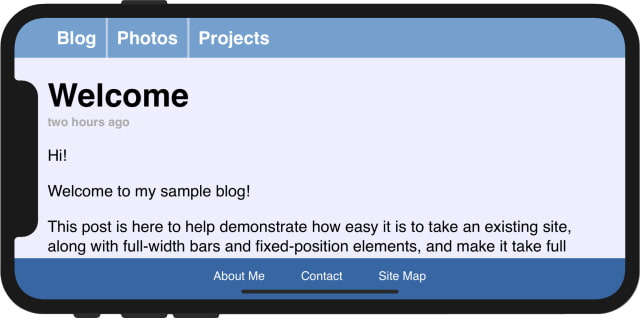
Your website can make use of a few similar new pieces of WebKit API introduced in iOS 11 to take full advantage of the edge-to-edge nature of the display.
The first new feature is an extension to the existing viewport meta tag called viewport-fit, which provides control over the insetting behavior. viewport-fit is available in iOS 11.
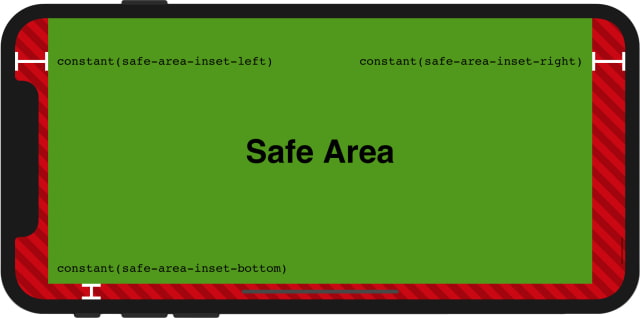
After adopting viewport-fit=cover, the next step is to selectively apply padding to elements that contain important content, in order to ensure that they are not obscured by the shape of the screen. To achieve this, WebKit in iOS 11 includes a new CSS function, constant(), and a set of four pre-defined constants, safe-area-inset-left, safe-area-inset-right, safe-area-inset-top, and safe-area-inset-bottom. When combined, these allow style declarations to reference the current size of the safe area insets on each side.
To deal with a safe area inset of 0px when the iPhone is held vertically, Apple suggests using brand-new CSS functions min() and max() which will be available in a future Safari Technology Preview release.
in portrait orientation, constant(safe-area-inset-left) resolves to 0px, so the max() function resolves to 12px. In landscape, when constant(safe-area-inset-left) is larger due to the sensor housing, the max() function will resolve to that size instead, ensuring that the important content within is always visible.
Apple news, rumors, tutorials, price drop alerts, in your inbox every evening, free.
Unsubscribe at any time.
Success!
You have been subscribed.
Add Comment
Would you like to be notified when someone replies or adds a new comment?
Yes (All Threads)
Yes (This Thread Only)
No
Notifications
Would you like to be notified when we post a new Apple news article or tutorial?
Yes
No
Comments (3)
Comments are closed for this article.
0
Duster - September 26, 2017 at 6:00pm
As a graphic designer, I think this notch is standing in the way of good design.
0
MyOpinionCounts - September 26, 2017 at 6:47am
The notch was and is a terrible idea, plain and simple. It’s an engineering failure to implement new functionality in a way that respects the basic principals of good design. So engineering failed and now expects software to provide a stupid “patch” to make the phone usable. This goes against one of Apples core principles of providing visual and functional harmony between hardware and software. The iPhone X notch is an embarrassment and Apple’s top priority should now be to get rid of it. This is what happens when you “chase” instead of “lead” in this industry. Other companies forcing Apple to ship half baked ideas just to keep pace with the competition who are innovating at the pace of market demands instead of following slowly behind the pack as Apple has done in recent years.
0
Me - September 23, 2017 at 9:28pm
I dislike lots of things that Apple does and how it does them. Still it's ways better than anything out there. The Notch and round bezels actually are hate-cute things for me. And since I'm not even considering 8/8 they can have my money today.





![Mac mini With M6 and M5 Pro Review Roundup [Video]](/images/news/102318/102318/102318-160.jpg "Mac mini With M6 and M5 Pro Review Roundup [Video]")
![Apple Releases macOS 27.2 Golden Gate Beta 2 to Developers [Download]](/images/news/102327/102327/102327-160.jpg "Apple Releases macOS 27.2 Golden Gate Beta 2 to Developers [Download]")
![Apple Seeds Second Betas of watchOS 27.2, tvOS 27.2, and visionOS 27.2 to Developers [Download]](/images/news/102324/102324/102324-160.jpg "Apple Seeds Second Betas of watchOS 27.2, tvOS 27.2, and visionOS 27.2 to Developers [Download]")
![Apple Releases iOS 27.2 Beta 2 and iPadOS 27.2 Beta 2 to Developers [Download]](/images/news/102321/102321/102321-160.jpg "Apple Releases iOS 27.2 Beta 2 and iPadOS 27.2 Beta 2 to Developers [Download]")









![Apple Studio Display XDR Hits All-Time Low of $2,969.99 ($329 Off) [Deal]](/images/news/101976/101976/101976-160.jpg "Apple Studio Display XDR Hits All-Time Low of $2,969.99 ($329 Off) [Deal]")
