Posted January 20, 2010 at 12:11pm by
Yoav Levytam
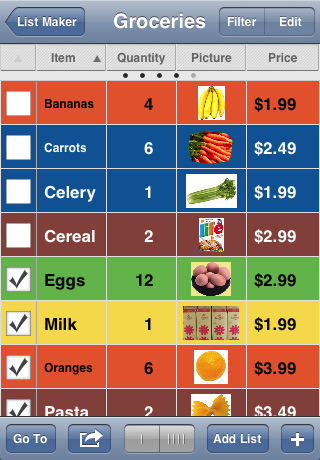
List Logic Software has released List Master 1.5 for iPhone and iPod Touch users. The all-in-one organizer lets users manage their data, add photos and customize all aspects of their lists, by simply tapping the screen. List Master is an easy to use, intuitive and versatile app that allows for complete customization of lists. All list data is viewable in a single screen, portrait or landscape, eliminating the need to flip between screen pages to read.
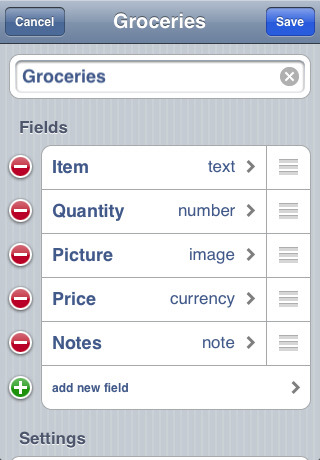
There is virtually no limit to the number of columns a user can create and the field types are extensive, covering all types of data. The app also offers an easy data sorting feature. Merely tapping a column heading displays the list in a new format to correspond with that column. List Master developers have built in an extensive array of features while keeping the interface very user-friendly.
List Master Features: * Create lists made up of virtually any number of columns * Column types include: text, note, number, decimal, currency, date, time, date&time, phone, email, website, image, switch, line number, counter * View as many or as few columns as you like * Swipe left or right to view other columns * Sort items any way you want easily - manually or alphabetically by any column/color/checked/selected * Due Date option * Check Mark option * Color-code items * Total Row option * Picklists - The values from one column can be used as a picklist/dropdown for values of a column in another list * Calculated Columns - The value for one column can be the result of a calculation of values of other columns * Screen Rotation lock option * Row Height option * Include pictures using camera or photo library * Folder colors * Default Item Placement - Sorted, Bottom, Top * Copy, move or delete multiple items at a time * Filter/Hide items * Jump from one list to another with ease * Add lists within lists within lists * Create one list by copying from another * Check/Uncheck all * Import/Export * Email lists * Passcode protection * Customizable default list settings * Works in Portrait or Landscape orientation * Fully documented help section * Includes many sample lists * Great customer support
To help users get started with List Master, sample templates and help tabs are provided in the app.
Pricing and Availability: List Master 1.5 is only $4.99 (USD) and available worldwide exclusively through the App Store in the Productivity category. Promo codes are available for qualified reviewers. Please specify the website or blog you represent when making your request.





![Apple Tests Microphones and a Remote Speaker for New Apple TV [Report]](/images/news/102729/102729/102729-160.jpg "Apple Tests Microphones and a Remote Speaker for New Apple TV [Report]")
![Apple's New 'HomeView' Hub to Launch Without an App Store [Gurman]](/images/news/102726/102726/102726-160.jpg "Apple's New 'HomeView' Hub to Launch Without an App Store [Gurman]")

![How To Force Restart iPhone [Video]](/images/tutorials/95012/95012/95012-160.jpg "How To Force Restart iPhone [Video]")
![How To Turn Off iPhone [Video]](/images/tutorials/94999/94999/94999-160.jpg "How To Turn Off iPhone [Video]")
![How To Back Up Your iPhone to an External Drive on Mac [Video]](/images/tutorials/72786/72786/72786-160.jpg "How To Back Up Your iPhone to an External Drive on Mac [Video]")






![Mac mini Drops to $779.99 for Prime Big Deal Days [Deal]](/images/news/102624/102624/102624-160.jpg "Mac mini Drops to $779.99 for Prime Big Deal Days [Deal]")
