The MHA has released the first version of Airlock, a smarter kind of Mac security solution that allows a Mac to automatically lock and unlock itself as a user comes and goes. Airlock uses advanced Bluetooth proximity detection that interacts with a user's iPhone or iPod Touch to determine the approximate distance between the user and his or her Mac. When the user leaves the preset range, Airlock locks the Mac's screen, and upon the user's return, Airlock automatically unlocks the screen. As a fallback for when the user's iPhone or iPod Touch's battery is dead, Airlock can be configured to accept the user's account password to unlock the screen.
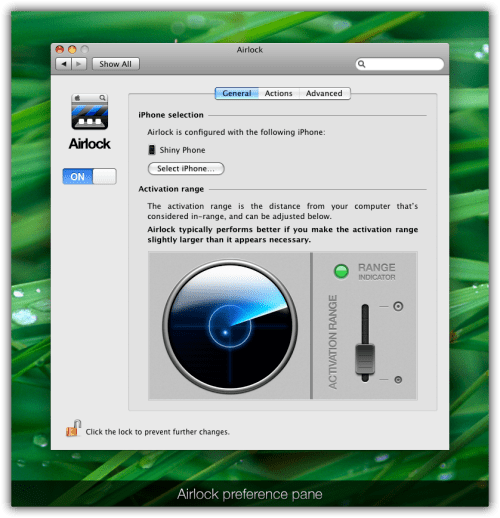
Airlock runs completely in the background and is configured through the System Preferences. From the Airlock preference pane, users can configure many aspects of Airlock to suit their needs. For example, the Airlock preference pane features a radar screen which allows users to easily configure the distance that Airlock considers in-range, while displaying the location of the user's iPhone or iPod Touch in realtime.
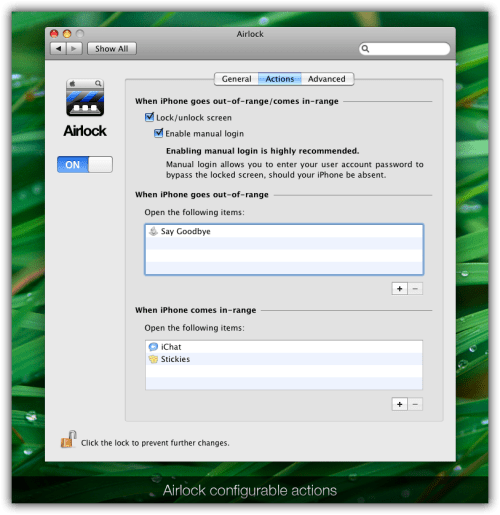
In addition to locking the screen, Airlock can be configured to perform custom actions as the user comes and goes. For example, when the user comes in-range, he or she could automatically be logged-in to iChat, a favorite news site could be refreshed, or a daily snapshot could be taken of the Mac's surroundings. On the other hand, when the user goes out-of-range, he or she could be logged-out of iChat, or an email could be sent logging the time and date that the user left.
Pricing and Availability: A free, full-featured demo of Airlock is available. Airlock can be purchased for $7.77 (USD).
Apple news, rumors, tutorials, price drop alerts, in your inbox every evening, free.
Unsubscribe at any time.
Success!
You have been subscribed.
Add Comment
Would you like to be notified when someone replies or adds a new comment?
Yes (All Threads)
Yes (This Thread Only)
No
Notifications
Would you like to be notified when we post a new Apple news article or tutorial?
Yes
No
Comments (7)
Comments are closed for this article.
0
Crazymex - December 1, 2009 at 7:19pm
Here is the link: themha.com/airlock/index.html?s=d
0
Mike - December 1, 2009 at 5:15pm
I tried this on both my MBP and Mac Mini...doesn't seem to work when I come back into range. Never unlocks. I'm sure glad I enabled the 'manual override' function or I'd have been locked out! Great idea...maybe needs some bugs worked out!
0
DistortedLoop - December 1, 2009 at 3:28pm
I'm going to check this out, but I can see all kinds of pitfalls with the concept.
I dock my iPhone within a few feet of the computer, so unless I don't keep the iPhone docked, then the computer is always unlocked when the iPhone is charging or syncing?
I have to take my phone with me at the office to go down the hall to the toilet to lock the computer, or can you force a screen lock even when the phone is in range?
I guess testing will answer those kind of questions.
At any rate, a really cool concept.
0
DistortedLoop - December 1, 2009 at 3:26pm
Yeah, yeah, I'll google it, but a link in the article to where to download it from would have been handy...
0
yiyopr - December 1, 2009 at 3:53pm
Agreed! It seems strange that they advertise software and don't tell you where to get it. Now i have to go all the way up to the google search bar and type...
0
Kevin R - December 1, 2009 at 8:36pm
um...if you click "Read More" at the bottom of the article it will take you exactly where you can download and purchase the software. So I don't know what your talking about???
Maybe try reading the full article before you start posting about it.
0
Sayam Aggarwal - December 1, 2009 at 2:20pm
I saw it here (like 5 mins ago), I bought it and I love it! :D





![Apple Releases iOS 26.4.1 and iPadOS 26.4.1 With Bug Fixes [Download]](/images/news/100492/100492/100492-160.jpg "Apple Releases iOS 26.4.1 and iPadOS 26.4.1 With Bug Fixes [Download]")

![Apple TV Debuts 'Criminal Record' Season 2 Trailer [Video]](/images/news/100488/100488/100488-160.jpg "Apple TV Debuts 'Criminal Record' Season 2 Trailer [Video]")






![13-inch MacBook Air M5 Drops to $949 in New All-Time Low [Deal]](/images/news/100466/100466/100466-160.jpg "13-inch MacBook Air M5 Drops to $949 in New All-Time Low [Deal]")




