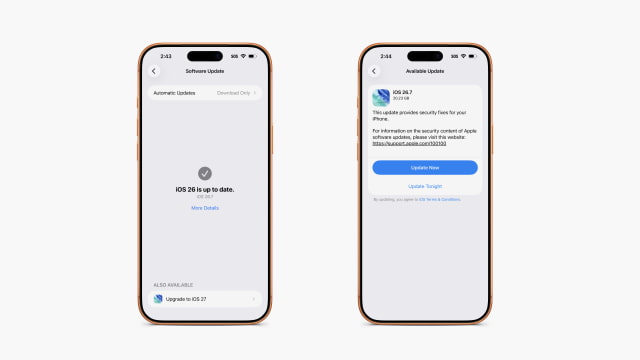
A widespread bug in Apple's iOS 27 rollout is causing Software Update to display iOS 26.7 after users tap "Upgrade to iOS 27," making it appear that the wrong software will be installed.
The problem is affecting numerous iPhone owners and is now trending on X. Users can see iOS 27 listed under "Also Available," but selecting it opens a presentation card labeled iOS 26.7 instead.
We encountered the same behavior while attempting to install iOS 27. After updating the device to iOS 26.7 to see whether that would resolve the problem, Settings reported that iOS 26 was up to date and continued to offer "Upgrade to iOS 27." Tapping the button again opened an iOS 26.7 update with a 20.23 GB download.
It is unclear whether affected devices are receiving another iOS 26.7 package or the correct iOS 27 firmware with the wrong name and icon. Given the conflicting information shown by Software Update, users may prefer to install iOS 27 through Finder.
First, confirm that your device appears on the iOS 27 supported-device list and create a current backup. Connect the iPhone to a Mac, open Finder, and select the device in the sidebar. Under General, click Check for Update. Finder may detect and download iOS 27 automatically.
Once the IPSW has downloaded, return to Finder and select the iPhone. Hold the Option key while clicking Check for Update, choose the downloaded IPSW file, and confirm the update. Use Check for Update rather than Restore iPhone, as restoring the device erases its contents.
Users who do not want to install iOS 27 manually can wait for Apple to correct the Software Update presentation and try again later.
Get the iClarified Daily Newsletter
Apple news, rumors, tutorials, price drop alerts, in your inbox every evening, free.
Unsubscribe at any time.
Success!
You have been subscribed.
Add Comment
Would you like to be notified when someone replies or adds a new comment?
Yes (All Threads)
Yes (This Thread Only)
No
Notifications
Would you like to be notified when we post a new Apple news article or tutorial?
Yes
No
Comments (4)
Comments are closed for this article.
0
ricktemme - September 14, 2026 at 7:05pm
I had the bug. Updated cus I thought I maybe had to do it before. Installed IOS27 instead anyways
0
cleverguy10 - September 14, 2026 at 7:34pm
So does that mean iOS 26.7 isn’t a software update it’s just a bug?
0
cleverguy10 - September 14, 2026 at 7:36pm
Wait, is it a software update or is it a bug?
0
iClarified - September 14, 2026 at 7:55pm
There is an iOS 26.7 software update. The bug is that users are presented with that when they tap to install iOS 27 (even if they are on iOS 26.7).






![Apple HomeView Could Double as a HomeKit Security Camera [Leak]](/images/news/103224/103224/103224-160.jpg "Apple HomeView Could Double as a HomeKit Security Camera [Leak]")

![iPhone 18 Pro Sales Rise 29% in China, Fall in U.S. and Japan [Report]](/images/news/103215/103215/103215-160.jpg "iPhone 18 Pro Sales Rise 29% in China, Fall in U.S. and Japan [Report]")


![How To Back Up Your iPhone to an External Drive on Mac [Video]](/images/tutorials/72786/72786/72786-160.jpg "How To Back Up Your iPhone to an External Drive on Mac [Video]")
![How To Find Your IP Address on iPhone [Video]](/images/tutorials/496/496/496-160.jpg "How To Find Your IP Address on iPhone [Video]")


![Apple Watch Ultra 4 Drops Back to All-Time Low of $699.99 ($99 Off) [Deal]](/images/news/103218/103218/103218-160.jpg "Apple Watch Ultra 4 Drops Back to All-Time Low of $699.99 ($99 Off) [Deal]")
![AirTag 2 4-Pack Hits All-Time Low of $69.99 ($29 Off) [Deal]](/images/news/103203/103203/103203-160.jpg "AirTag 2 4-Pack Hits All-Time Low of $69.99 ($29 Off) [Deal]")

![Beats Headphones, Earbuds, and Pill Speaker Are Up to 41% Off [Deal]](/images/news/103026/103026/103026-160.jpg "Beats Headphones, Earbuds, and Pill Speaker Are Up to 41% Off [Deal]")

