

Apple Watch Ultra 4 offers three meaningful reasons to move on from an Ultra 2: longer battery life, a new health-sensing system with Readiness, and built-in satellite communication. The familiar 49mm titanium case makes the update look smaller than that list suggests.
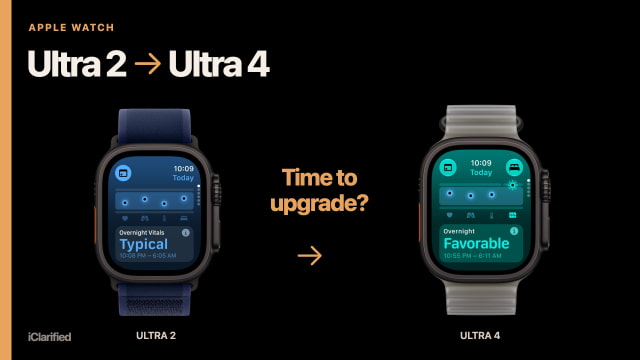
The Ultra 2 still has much of what makes an Ultra useful, including dual-frequency GPS, the Action button, a sapphire display, and recreational diving support. If yours is working well, the question is whether the new capabilities solve a problem you actually have.
Battery Life Is the Clearest Everyday Upgrade
Apple rates Ultra 4 for up to 50 hours of normal use, compared with up to 36 hours for Ultra 2. Low Power Mode raises those figures to 84 and 72 hours, respectively.
That extra room is useful even if you never enter an endurance event. It gives you more flexibility around overnight tracking, travel, or a missed charging session. Apple's tests use different activity profiles, so those ratings are not a promise that every owner will gain exactly 14 hours.
Ultra 4 also reaches 80 percent in about 45 minutes, versus about an hour for Ultra 2. Apple says a 15-minute top-up on Ultra 4 provides up to 18 hours of normal use, while five minutes can cover up to 10 hours of sleep tracking. Those short charging windows matter more when you want the watch on your wrist day and night.
For outdoor workouts, Ultra 4 is rated for up to 18 hours. Its Extended Workout and Max Extended Workout modes raise that to 25 and 45 hours with reduced functionality. The longest mode also turns off alerts and splits, so it is worth checking the trade-offs before planning an event around the headline number.

Readiness Comes With the New Sensors
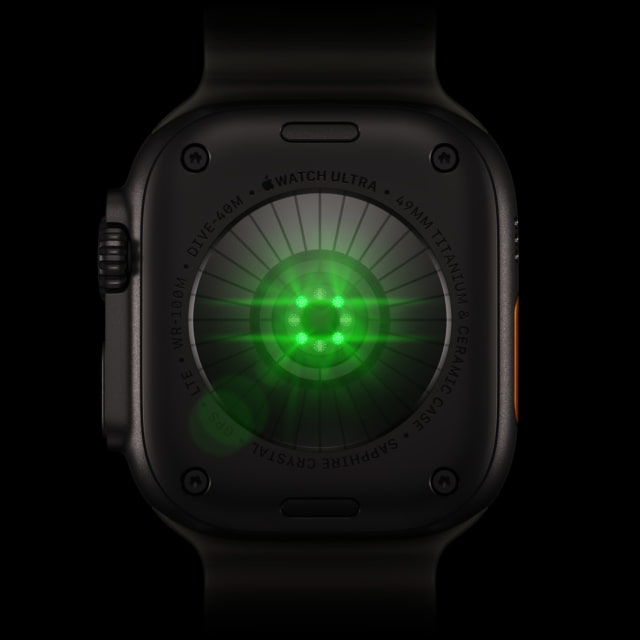
Ultra 4's S11 chip and Health Sensing System bring an always-on optical heart sensor and a second-generation electrical heart sensor. Ultra 2 uses the S9 chip, a third-generation optical sensor, and its earlier electrical heart sensor.
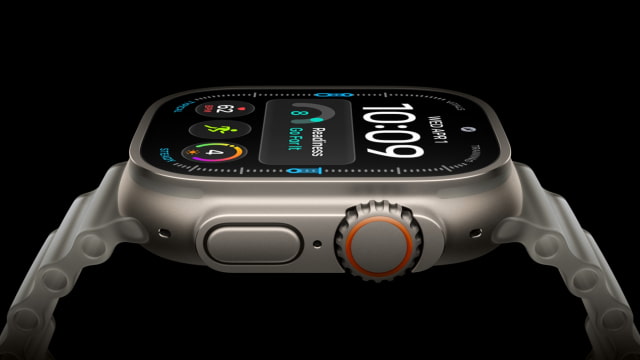
The new optical sensor measures heart rate every five seconds during the day, while more frequent heart-rate variability measurements support Recovery HRV. Ultra 4 uses its new sensing system for Readiness, a 0–10 score combining recent activity, vitals, and sleep. Readiness and Recovery HRV are available on Ultra 4, but not Ultra 2.
Readiness requires some time to learn about you. Apple says to set up Activity, Sleep, and Overnight Vitals and wear the watch to bed for at least seven nights. The score can then change during the day, rather than remaining fixed at its morning value.
Ultra 2 already supports ECG, sleep stages, sleep apnea notifications, and other established health features, subject to eligibility. If you mainly use those capabilities, you do not need to replace the watch just to keep using them. Readiness is extra context for activity and recovery, not a medical clearance to exercise.
Satellite Is a Bigger Change for Time Off the Grid
Ultra 4 can use satellites for Emergency SOS, Messages, and Find My when an appropriate cellular or Wi-Fi connection is unavailable. Ultra 2 has no built-in satellite service.
For someone who spends time outdoors without their phone, that can be a stronger reason to upgrade than another performance increase. Satellite connections still need suitable conditions and an available service region. Messages and Find My via satellite also require a carrier plan, and Apple includes satellite service for two years after activation of Ultra 4.
Ultra 4 adds 5G RedCap alongside LTE, while Ultra 2 uses LTE and UMTS. Both have precision dual-frequency GPS, Bluetooth 5.3, Wi-Fi 4, and a second-generation Ultra Wideband chip.
A Little More Screen in the Same Size Case
Both watches measure 49 × 44 × 12 mm, but Ultra 4 has 1,245 square millimeters of active display area versus 1,185 on Ultra 2—about 5 percent more. Resolution rises from 410 × 502 to 422 × 514 pixels.
Ultra 4 also moves to wide-angle OLED and LTPO3 display technology. Peak brightness stays at 3,000 nits, with a one-nit minimum on both watches. The gain is more screen space and the newer display design, not a brighter headline specification.
Ultra 4 is slightly heavier. Natural titanium weighs 63 grams without a band, compared with 61.4 grams for natural-titanium Ultra 2. The black versions weigh 63.1 and 61.8 grams, respectively. The difference is small beside the weight of the whole watch and band, but there is no reduction in case size to make Ultra 4 an easier fit on a small wrist.
What You Keep by Staying With Ultra 2
The Action button, siren, sapphire front crystal, 100-meter water-resistance rating, IP6X dust resistance, and recreational scuba support to 40 meters are present on both models. Diving requires a suitable app and the appropriate precautions; the resistance rating is not a 100-meter scuba rating.
Ultra 2 also remains eligible for Siri AI on watchOS 27 when paired with an Apple Intelligence-enabled iPhone that has Siri AI turned on. The beta's language and regional restrictions apply to both watches.
Ultra 4's separate Live Rewind and Siri Recap features are planned for beta in late 2026. Those S11-specific Audio Intelligence features are distinct from Siri AI, and require a compatible iPhone 16 or later, excluding iPhone 16e. They will initially support English outside the EU.

Apple Watch Ultra 4 vs. Ultra 2 Specifications
| Feature | Apple Watch Ultra 2 | Apple Watch Ultra 4 |
|---|---|---|
| Case | 49mm titanium; natural or black | 49mm titanium; natural or black |
| Case H × W × D | 49 × 44 × 12 mm | 49 × 44 × 12 mm |
| Case weight, without band | 61.4 g natural / 61.8 g black | 63.0 g natural / 63.1 g black |
| Display | LTPO2 Always-On OLED | LTPO3 Always-On wide-angle OLED |
| Resolution / display area | 410 × 502; 1,185 mm² | 422 × 514; 1,245 mm² |
| Brightness range | 1–3,000 nits | 1–3,000 nits |
| Display cover | Sapphire | Sapphire |
| Chip / storage | S9; 64GB | S11; 64GB |
| Heart sensors | Electrical; third-generation optical | Second-generation electrical; always-on optical |
| Readiness / Recovery HRV | Not supported | Supported |
| Normal-use battery rating | Up to 36 hours | Up to 50 hours |
| Low Power Mode rating | Up to 72 hours | Up to 84 hours |
| Charge from 0–80% | About 60 minutes | About 45 minutes |
| GPS | Precision dual-frequency | Precision dual-frequency |
| Cellular | LTE / UMTS | 5G RedCap / LTE |
| Wi-Fi / Bluetooth | Wi-Fi 4 / Bluetooth 5.3 | Wi-Fi 4 / Bluetooth 5.3 |
| Ultra Wideband | Second generation | Second generation |
| Built-in satellite | Not supported | Emergency SOS, Messages, Find My |
| Action button / siren | Both included | Both included |
| Water resistance / diving | 100 m rating; recreational scuba to 40 m | 100 m rating; recreational scuba to 40 m |
| Dust resistance | IP6X | IP6X |
Is It Worth Replacing Your Ultra 2?
Upgrade if you want longer stretches between charging, plan to use satellite communication without your phone, or specifically want the new Readiness and Recovery HRV features. Those are concrete changes you can build a buying decision around.
Keep Ultra 2 if its battery still suits your routine and you mostly use its existing workout, navigation, and health capabilities. A similar case, the same peak brightness, and plenty of shared outdoor hardware make this an easier upgrade to skip than the generation numbers might imply.
Ultra 4 starts at $799 in the U.S. Check the iClarified Apple Watch Price Tracker for current retailer offers, including the natural-titanium Ultra 4 with Trail Loop. Our Ultra 4 vs. Ultra 3 comparison covers the smaller, one-generation jump.

![All 2027 iPhones Expected to Use Apple Modems [Gurman]](/images/news/102447/102447/102447-160.jpg "All 2027 iPhones Expected to Use Apple Modems [Gurman]")

![Apple Tests New Vision Headset Designs Amid Uncertain Launch Plans [Gurman]](/images/news/102444/102444/102444-160.jpg "Apple Tests New Vision Headset Designs Amid Uncertain Launch Plans [Gurman]")



![How To Find Your iPhone IMEI Number [Video]](/images/tutorials/83557/83557/83557-160.jpg "How To Find Your iPhone IMEI Number [Video]")


![16-Inch M5 Max MacBook Pro Drops $900 to New Low of $3,499 [Deal]](/images/news/102438/102438/102438-160.jpg "16-Inch M5 Max MacBook Pro Drops $900 to New Low of $3,499 [Deal]")
![Magic Keyboard for iPad Air Drops to $200 on Amazon [Deal]](/images/news/102402/102402/102402-160.jpg "Magic Keyboard for iPad Air Drops to $200 on Amazon [Deal]")
![13-Inch M5 MacBook Air With 1TB Drops to $1,449 on Amazon [Deal]](/images/news/102345/102345/102345-160.jpg "13-Inch M5 MacBook Air With 1TB Drops to $1,449 on Amazon [Deal]")


