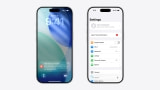
Apple Explains How HomeView Protects Camera and Microphone Data
Apple has explained how HomeView recognizes people while keeping the camera and microphone data used for recognition isolated from apps and the operating system. In a new security research post, the company details the Secure Exclaves technology behind that protection.
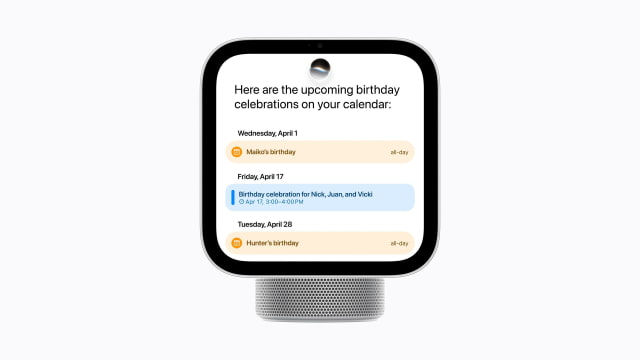
The system lets HomeView recognize up to six enrolled people by face and voice, then personalize features such as Calendar, Messages, and Apple Music. Apple says the raw audio and video used for this background recognition are processed inside isolated environments and discarded after processing.
What reaches the main operating system is much more limited: an identifier for the person, their position, and a confidence level. Apps do not need the underlying camera frames or microphone recordings to know whose calendar to display.
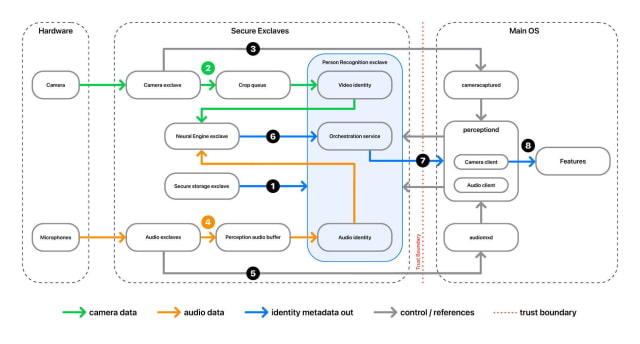
Background Recognition vs. Active Use
Apple separates this background, or ambient, sensing from active use of the camera and microphone. A Siri conversation or FaceTime call can send fuller sensor data to the main operating system, but only after the appropriate privacy indicator is visible.
That distinction also explains why a camera light cannot simply stay on whenever HomeView is recognizing someone. An always-lit indicator would not tell you when an app actually starts receiving a camera feed. HomeView instead uses a securely controlled LED to signal active access.
The protection is enforced below the main operating system. An Exclave Indicator Controller gates the transfer of sensor data until the indicator has been visible for long enough. On supported iPhones, hardware checks verify that the on-screen indicator has the correct shape and color, meets a minimum brightness, and is not obscured.
What Happens When You Say "Hey Siri"
Apple illustrates the process with Siri on iPhone 18 Pro. A low-power processor listens for a possible wake phrase, then isolated audio and Siri components perform further processing and a more accurate wake-word check. Initially, the main operating system receives only a flag indicating that Siri may have been invoked.
Once an active session is approved and the indicator is displayed, Siri can receive the audio, including the wake phrase and the rest of the request. The isolation protects background listening without preventing Siri from hearing a request you want it to handle.
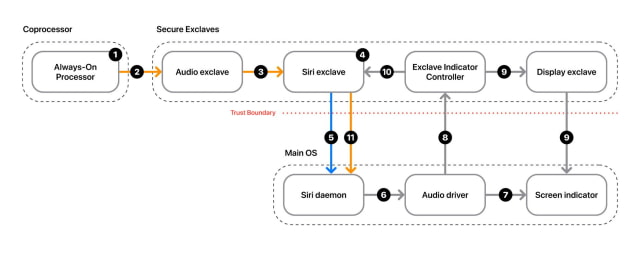
Despite the similar name, Secure Exclaves are separate from the Secure Enclave processor. They run on the device's main processor cores with their own microkernel and operating system, called exclaveOS. Hardware-backed memory protections are designed to keep the main operating system, including its kernel, from reading their memory.
Apple says Secure Exclaves also support Siri Recap and Live Rewind, along with camera and microphone indicators on iPhone 18 Pro, iPhone 18 Pro Max, and iPhone Duo, and camera indicators on MacBook Neo and HomeView.