Google Translate App Gets Hebrew and Arabic Voice Input, Other Improvements
Posted March 13, 2013 at 2:43pm by
Shalom Levytam
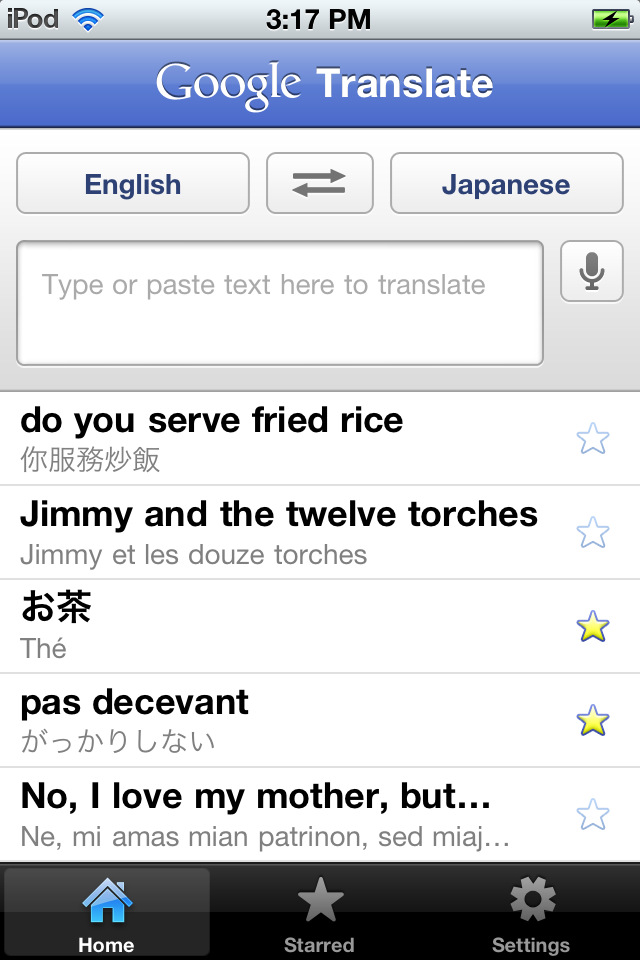
The Google Translate app for iOS has been updated with Hebrew and Arabic voice input, Slovak and Thai text to speech, Esperanto translation, and Tap to Copy.
Translate words and phrases between more than 60 languages using Google Translate for iOS. For most languages, you can speak your phrases and hear the corresponding translations.
Features:
• Translate text between 64 languages
• Translate by speaking the text instead of typing it (17 languages)
• Listen to your translations spoken aloud (24 languages)
• Display translations in full screen mode to make it easier for others nearby to read
• Star your favorite translations for quick access even when you’re offline
• Access your translation history even when you’re offline
• Spell out the translation of non-Latin script languages (e.g. Chinese, Japanese, etc..) in Latin characters to read it phonetically (e.g. Pinyin, Romaji)
Translations between the following languages are supported:
Afrikaans, Albanian, Arabic, Armenian, Azerbaijani, Basque, Belarusian, Bengali, Bulgarian, Catalan, Chinese (Simplified), Chinese (Traditional), Croatian, Czech, Danish, Dutch, English, Esperanto, Estonian, Filipino, Finnish, French, Galician, Georgian, German, Greek, Gujarati, Haitian Creole, Hebrew, Hindi, Hungarian, Icelandic, Indonesian, Irish, Italian, Japanese, Kannada, Korean, Latin, Latvian, Lithuanian, Macedonian, Malay, Maltese, Norwegian, Persian, Polish, Portuguese, Romanian, Russian, Serbian, Slovak, Slovenian, Spanish, Swahili, Swedish, Tamil, Telugu, Thai, Turkish, Ukrainian, Urdu, Vietnamese, Welsh, Yiddish
What's New In This Version:
Esperanto translation
Tap to copy translation
Added Thai and Slovak text to speech
Added Arabic and Hebrew voice input
You can download Google Translate from the App Store for free.
Read More


Translate words and phrases between more than 60 languages using Google Translate for iOS. For most languages, you can speak your phrases and hear the corresponding translations.
Features:
• Translate text between 64 languages
• Translate by speaking the text instead of typing it (17 languages)
• Listen to your translations spoken aloud (24 languages)
• Display translations in full screen mode to make it easier for others nearby to read
• Star your favorite translations for quick access even when you’re offline
• Access your translation history even when you’re offline
• Spell out the translation of non-Latin script languages (e.g. Chinese, Japanese, etc..) in Latin characters to read it phonetically (e.g. Pinyin, Romaji)
Translations between the following languages are supported:
Afrikaans, Albanian, Arabic, Armenian, Azerbaijani, Basque, Belarusian, Bengali, Bulgarian, Catalan, Chinese (Simplified), Chinese (Traditional), Croatian, Czech, Danish, Dutch, English, Esperanto, Estonian, Filipino, Finnish, French, Galician, Georgian, German, Greek, Gujarati, Haitian Creole, Hebrew, Hindi, Hungarian, Icelandic, Indonesian, Irish, Italian, Japanese, Kannada, Korean, Latin, Latvian, Lithuanian, Macedonian, Malay, Maltese, Norwegian, Persian, Polish, Portuguese, Romanian, Russian, Serbian, Slovak, Slovenian, Spanish, Swahili, Swedish, Tamil, Telugu, Thai, Turkish, Ukrainian, Urdu, Vietnamese, Welsh, Yiddish
What's New In This Version:
Esperanto translation
Tap to copy translation
Added Thai and Slovak text to speech
Added Arabic and Hebrew voice input
You can download Google Translate from the App Store for free.
Read More