These are instructions on how to view the location history of your iPhone. You may be surprised to learn that iOS stores the time and place of locations you've visited, even pinpointing the locations on a map for you.
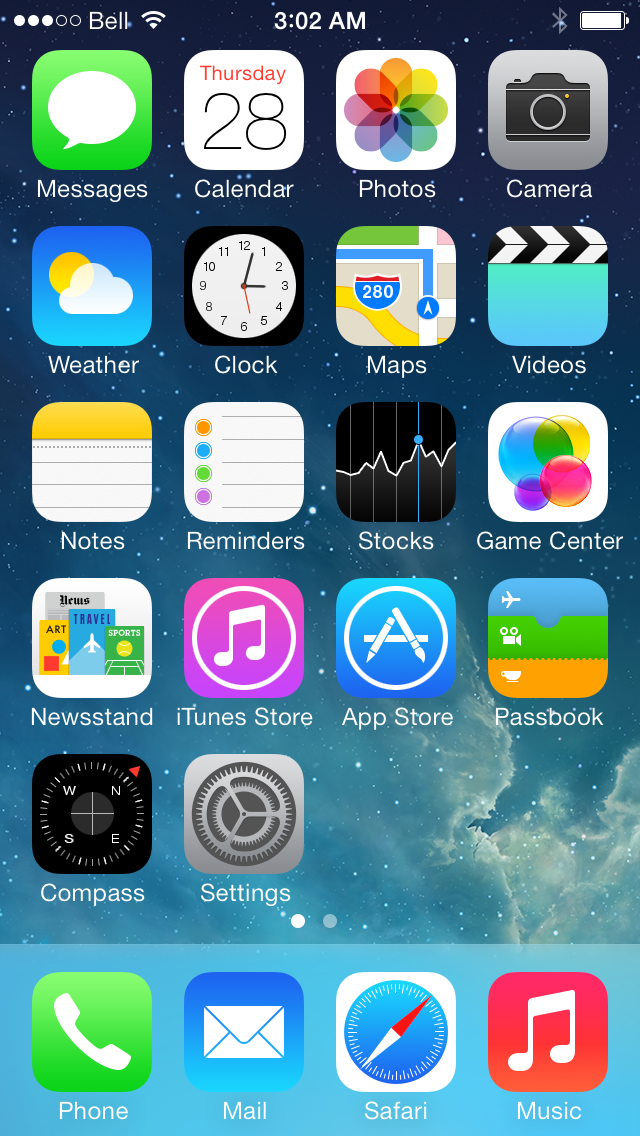
Step One: Tap Settings from your SpringBoard.
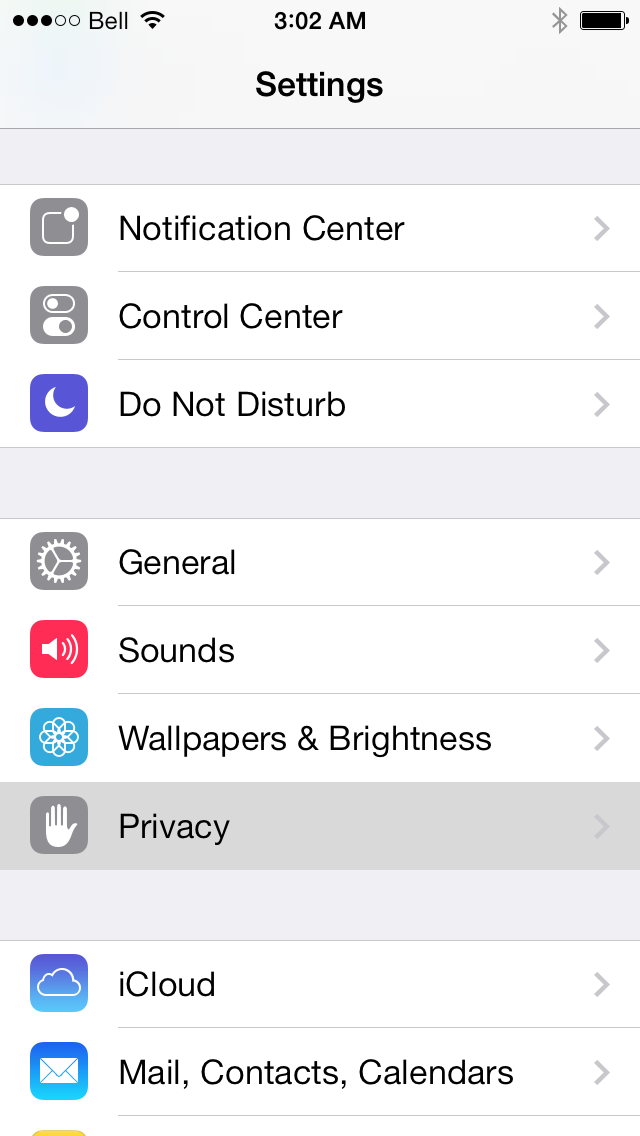
Step Two: Choose Privacy from the Settings menu.
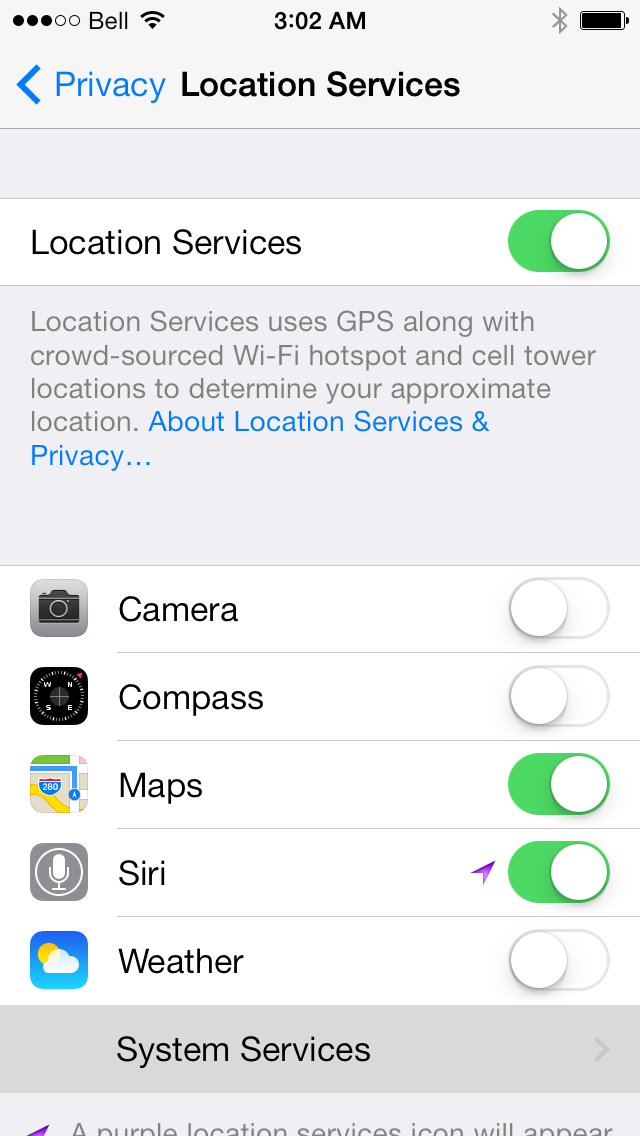
Step Three: Select Location Services from the Privacy menu.
Step Four: Tap System Services: from the Location Services menu.
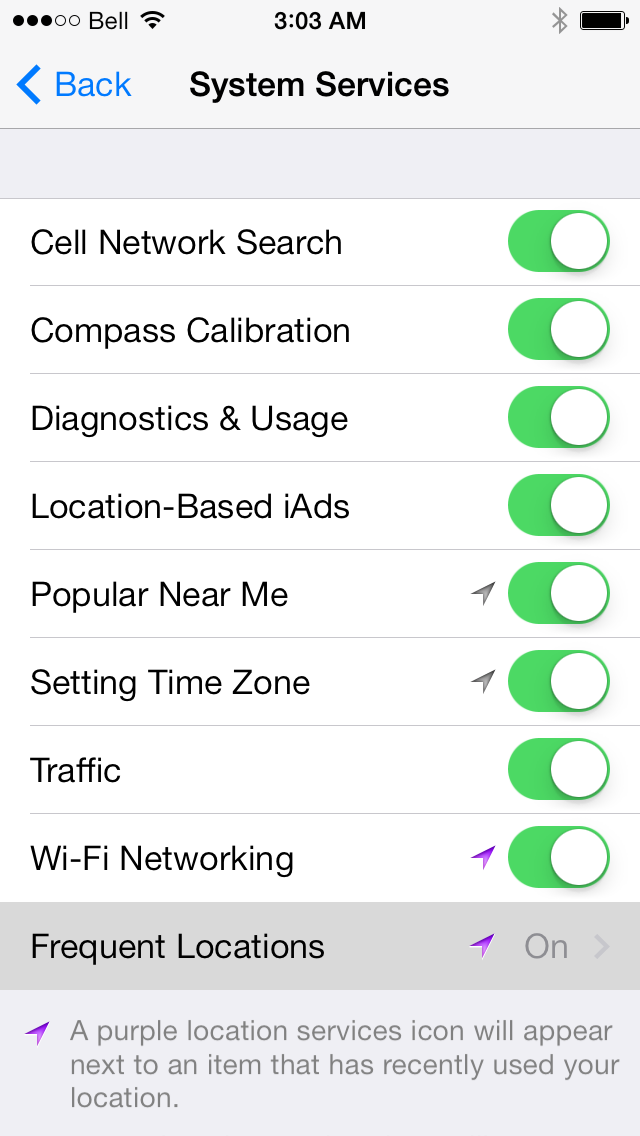
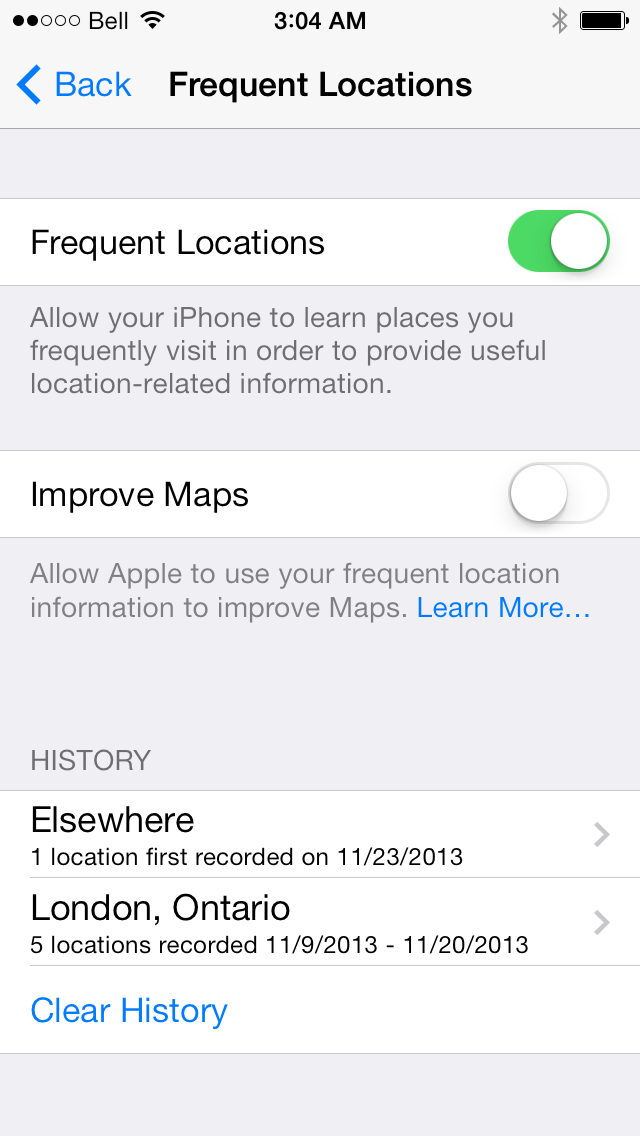
Step Five: Choose Frequent Locations from the System Services menu.
Step Six: At the bottom of the Frequent Locations page you will notice a section called History.
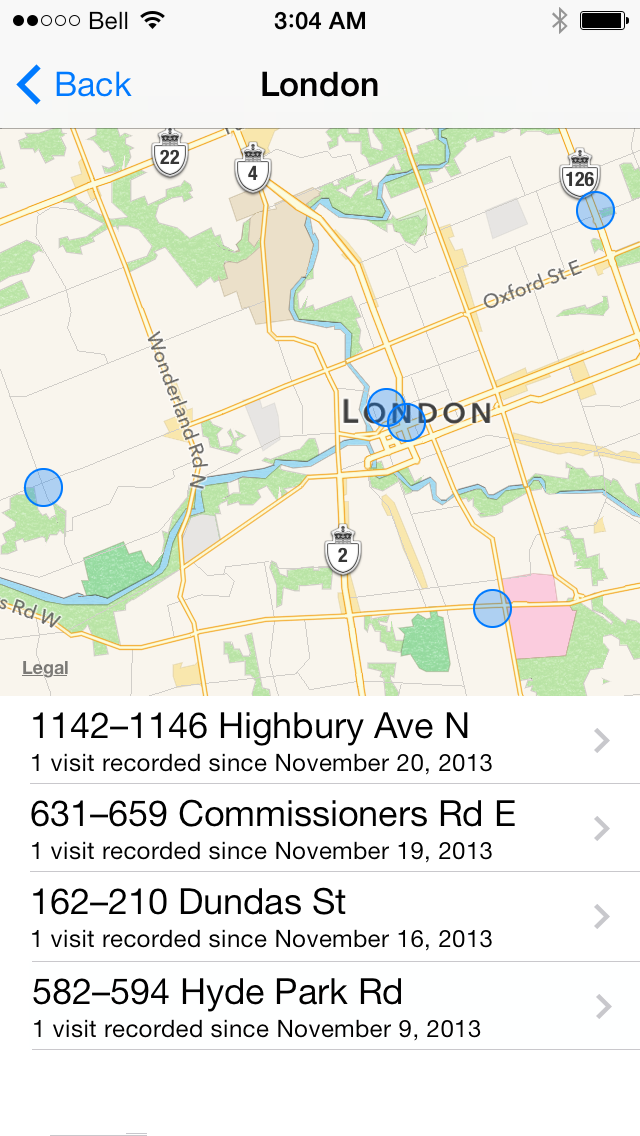
Tap to select an area.
Step Seven: You will now be presented a with a map and list of specific locations visited with within that area.
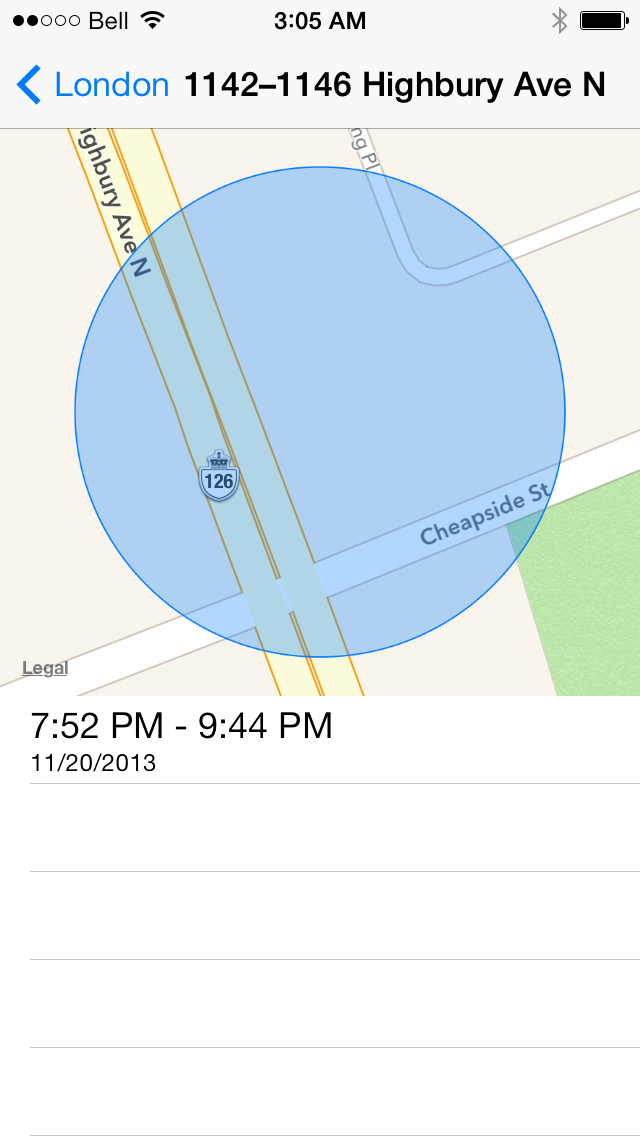
Tap to select a location.
Step Eight: You can now see a close-up of your selected location on the map along with a list of times and dates you visited that location.
If you have privacy concerns over the use and storage of this location information, we suggest you toggle the Frequent Locations switch to OFF in Step Six.
Please follow iClarified on Twitter, Facebook, or RSS for more Apple News and Tutorials.
Get the iClarified Daily Newsletter
Apple news, rumors, tutorials, price drop alerts, in your inbox every evening, free.
Unsubscribe at any time.
Success!
You have been subscribed.
Add Comment
Would you like to be notified when someone replies or adds a new comment?
Yes (All Threads)
Yes (This Thread Only)
No
Notifications
Would you like to be notified when we post a new Apple news article or tutorial?
okay question! I want to know where I was a specific date on my phone but the I phone only goes back so much is there a way I can obtain that information?
I only see 5 line items in my frequent history. is that all I have or how do I view more history of past locations?
or does this clear out and update like one a month? i'm just looking for more past locations but only see the 5 line items in the history.
Hi,
Firstly thank you for your information. I have one question. I do all the steps and get to step 7 but cannot see a close-up of your selected location on the map along with a list of times and dates I visited that location. I tap the blue circle but nothing happens. Any ideas of what I should do??
thank you,
Sofia
My boyfriends iPhone says he was not at work, that he is telling me lies and so does his Facebook location history. They both say he was somewhere else. Could they both be wrong?
You're able to turn the locations off, I have an iPhone 5 ios7 and I have that feature turned off and it doesn't show any history of my locations, but it doesn't matter because any cellphone company can track and see what towers your phone is pinging off of and much more. Unfortunately with the technology these days we can't escape it, iPhone or not.
If you read this article you will learn that iPhones have been storing your location data for a loooong time, and still do
http://arstechnica.com/apple/2011/04/how-apple-tracks-your-location-without-your-consent-and-why-it-matters/
in that article there is a link to this app
http://petewarden.github.io/iPhoneTracker/
if you download it, you may be surprised to discover that there is a HUUUGE history file of where your phone has been.
Try it.
Just because Apple now has a switch you can turn off, does not mean the file does not exist.
And just because your IOS version does not have a switch for it, does NOT mean your phone location is not being logged.
Your iPhone logs your location.
Its an old case and it went to curt Apple used to keep 6 month of your location data at curt the judge made Apple cut it down to 2 weeks but when you say without our consent i disagree because we all agree to Apple terms when we activate the phone so yes I'm sure that somewhere in those 80 pages we consent and probably now that its on a contract there is no time limit.
1. download this app to the computer you sync your phone to
http://petewarden.github.io/iPhoneTracker/
2. run the app on the computer you (or your wife) sync your iphone to
you will now see all the locations you have been with your iphone, even iphone 1,2,3,4,5, with ANY ios.
only ios 7 lets you turn it off
but it has been tracking and logging your location since long before ios 7
if you are jailbroken, you can also use the Cydia app called
untracerd
and go back to my first post for the link with instructions on how to delete the location data that iTunes has been storing on your computer when you sync your iPhone
Jon1,
i copy the htt://p u provided but it say page cannot be found. my husband has location turned on his phone but it doesn't give all locations. how can i get AA locations.
Penny
Hi,
I'm being falsley accused of pushing my neighbor. Ironically I've been harassed by her for years. I saw a location history on my iphone but it only goes back a couple of weeks. I need to prove to the Judge that I didn't do it and I was out at stores the day she accused me of. Do you know how to view old locations history that's stored somewhere in my iphone?
I'd be so grateful if you could help me.
Jill
It's not on iPad 3 and I'm guessing why would it be on any iPad that option is not in there on iOS 7... Plus don't you guys know they're tracking us for lots of reasons but one reason is apps that let you know who's installing what software and what location its a pretty cool app, they would obviously get their information from that feature. Plus you can just look in Apple history and find this, and on Google history anywhere you can find even more of this location information!!!










![Apple Releases iOS 27, iPadOS 27, and macOS 27 Design Resources [Download]](/images/news/101173/101173/101173-160.jpg "Apple Releases iOS 27, iPadOS 27, and macOS 27 Design Resources [Download]")






![Save $50 on Beats Powerbeats Pro 2, Now Just $199.95 [Deal]](/images/news/101182/101182/101182-160.jpg "Save $50 on Beats Powerbeats Pro 2, Now Just $199.95 [Deal]")
![AirPods Pro 3 Drop to New All-Time Low of $179 ($70 Off) [Deal]](/images/news/101156/101156/101156-160.jpg "AirPods Pro 3 Drop to New All-Time Low of $179 ($70 Off) [Deal]")
![Apple Watch Series 11 is Back on Sale for Just $299 [Deal]](/images/news/101081/101081/101081-160.jpg "Apple Watch Series 11 is Back on Sale for Just $299 [Deal]")
![AirPods Max 2 Drop to New All-Time Low of $499 [Deal]](/images/news/101063/101063/101063-160.jpg "AirPods Max 2 Drop to New All-Time Low of $499 [Deal]")
![AirPods Max 2 Hit All-Time Low Price of $509 ($40 Off) [Deal]](/images/news/101039/101039/101039-160.jpg "AirPods Max 2 Hit All-Time Low Price of $509 ($40 Off) [Deal]")
