Twelve South has announced a redesigned version of the BookArc for MacBook that is tailored specifically for the newest generation of MacBooks.
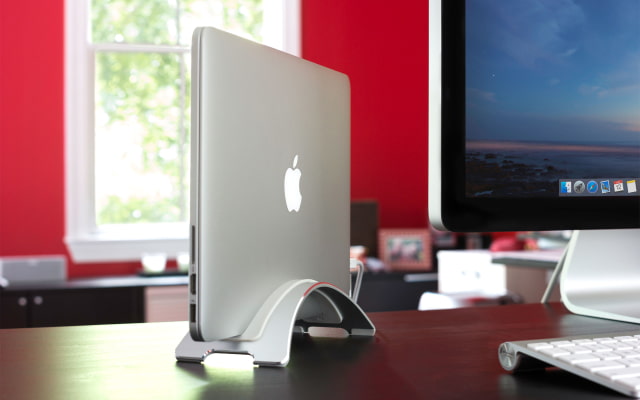
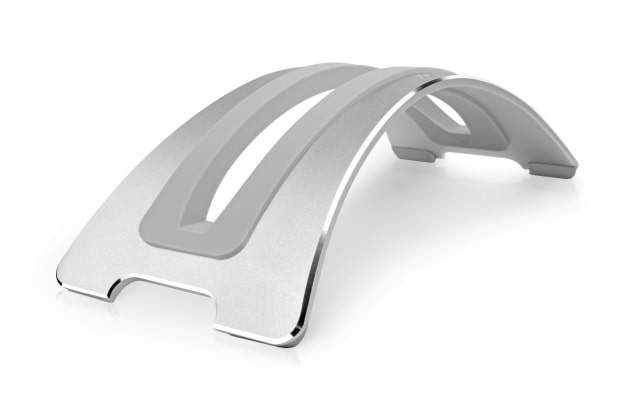
Inspired by the latest generation of MacBooks, the new BookArc is made from bead-blasted aluminum. A highly-polished chamfered edge and a refined shape creates a desktop sculpture worthy of the MacBook. Three interchangeable silicone inserts softly cradle all current MacBooks from the 11-inch Air to the 15-inch Pro with Retina Display - and now the 12-inch MacBook as well. BookArc’s new design includes a handy, integrated cable-catch feature to keep your power and connections from falling to the ground when you disconnect your MacBook.
“The original BookArc, released almost 7 years ago, supported a different era of MacBooks when 17-inches and 7 pounds was still considered small. The new BookArc is refreshed and ready for the next 7 years of MacBooks,” said Andrew Green, co-founder and creative director of Twelve South. “Given all the great new Apple mobile devices - for me and many others, my MacBook and BookArc are still what’s on my desk when I’m ready to work.”
Utilizing a little-known feature called closed-clamshell mode, BookArc inspires MacBook users to enjoy the best of both worlds: a laptop on the go, and a desktop at home. Connect and enjoy a bright 27-inch monitor for photo editing. Attach an extended keyboard with a number keypad. Reclaim vital desktop space with your MacBook stored upright in BookArc. Even dual-screen users often find refreshing focus by closing their MacBook and parking it in a BookArc.
BookArc is still $49.99 and is available now at the link below...
Apple news, rumors, tutorials, price drop alerts, in your inbox every evening, free.
Unsubscribe at any time.
Success!
You have been subscribed.
Add Comment
Would you like to be notified when someone replies or adds a new comment?
Yes (All Threads)
Yes (This Thread Only)
No
Notifications
Would you like to be notified when we post a new Apple news article or tutorial?
Yes
No
Comments (2)
Comments are closed for this article.
1
Guest - October 9, 2015 at 6:33am
Is there a better approach than this? Many studies show that working on a dual-monitor setup is more effective than a single one. This setup might waste screen space. I'd recommend using a stand that lifts the MacBook up so you can still use the screen. Also, regarding ventilation, I suspect it might get hotter when the lid is closed compared to when it's open.
0
zyalon - October 9, 2015 at 2:43pm
true, looks nice, but you gonna just don't know for what this piece of metal works





![Apple Cuts Fitness+ Jobs as It Rethinks the Service [Report]](/images/news/102306/102306/102306-160.jpg "Apple Cuts Fitness+ Jobs as It Rethinks the Service [Report]")

![Pro Photographer Austin Mann Tests iPhone 18 Pro Camera [Video]](/images/news/102297/102297/102297-160.jpg "Pro Photographer Austin Mann Tests iPhone 18 Pro Camera [Video]")

![Apple Releases Xcode 27.1 Beta With iPhone Duo SDKs and Simulator [Download]](/images/news/102276/102276/102276-160.jpg "Apple Releases Xcode 27.1 Beta With iPhone Duo SDKs and Simulator [Download]")









![Apple Studio Display XDR Hits All-Time Low of $2,969.99 ($329 Off) [Deal]](/images/news/101976/101976/101976-160.jpg "Apple Studio Display XDR Hits All-Time Low of $2,969.99 ($329 Off) [Deal]")
