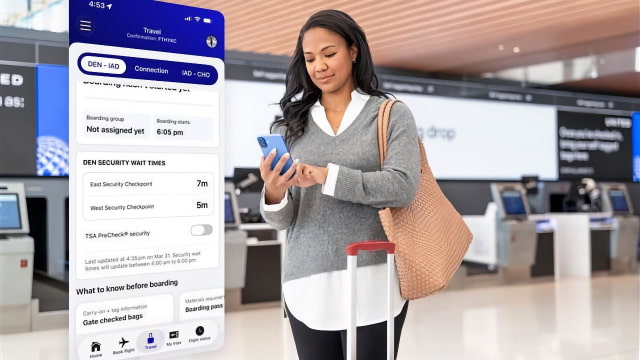
United Airlines has added estimated TSA security wait times to its mobile app and introduced support for Apple's Share Item Location feature, becoming the first major U.S. carrier to offer real-time line estimates alongside AirTag-based luggage tracking.
The wait time tracker is available within the "Travel" section of the app and currently covers United's hubs in Chicago, Denver, Houston, Los Angeles, New York/Newark, San Francisco, and Washington D.C. It breaks down estimates by lane type, so users can see specific wait times for standard security versus TSA PreCheck. United noted that the pilot program is intended to keep customers informed during the ongoing U.S. government shutdown, which has impacted airport staffing.
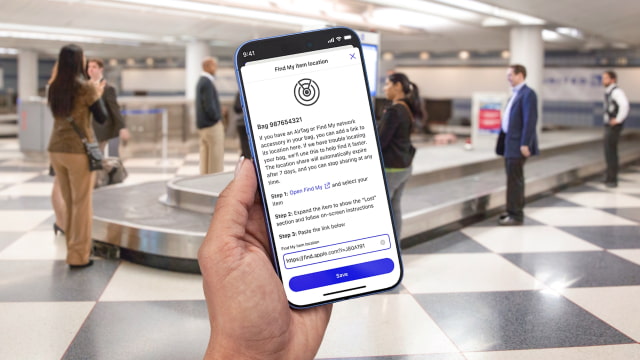
This update also deepens the app's integration with Apple's ecosystem. United is now using the "Share Item Location" feature that Apple introduced to help find lost luggage. If a bag goes missing, travelers can share the location of an AirTag 2 or Find My network accessory directly with United's customer service team to help locate it faster. Those looking to pick up trackers can check our AirTag Price Tracker for the latest deals.
Beyond security and bag tracking, the app is adding more personalized navigation tools. Passengers with tight connections will now see turn-by-turn directions to their next gate, complete with estimated walking times. The app can also notify users if the airline is able to hold a connecting flight for them. These features complement United's existing support for Live Activities, which provides flight updates on the iPhone Lock Screen and Dynamic Island.
Other changes include a new automated rebooking system and real-time weather alerts. When flights are disrupted, the app now offers self-service options for choosing new flights or claiming meal and hotel vouchers. United is also texting customers real-time radar maps showing how weather in one region of the country can impact their aircraft.
Get the iClarified Daily Newsletter
Apple news, rumors, tutorials, price drop alerts, in your inbox every evening, free.
Unsubscribe at any time.
Success!
You have been subscribed.
Add Comment
Would you like to be notified when someone replies or adds a new comment?
Yes (All Threads)
Yes (This Thread Only)
No
Notifications
Would you like to be notified when we post a new Apple news article or tutorial?









![How To Change Wallpaper on Mac [Video]](/images/tutorials/90512/90512/90512-160.jpg "How To Change Wallpaper on Mac [Video]")
![How To Turn Off Always On Display on iPhone [Video]](/images/tutorials/87524/87524/87524-160.jpg "How To Turn Off Always On Display on iPhone [Video]")




![16-Inch M5 Max MacBook Pro Drops $900 to New Low of $3,499 [Deal]](/images/news/102438/102438/102438-160.jpg "16-Inch M5 Max MacBook Pro Drops $900 to New Low of $3,499 [Deal]")
![Magic Keyboard for iPad Air Drops to $200 on Amazon [Deal]](/images/news/102402/102402/102402-160.jpg "Magic Keyboard for iPad Air Drops to $200 on Amazon [Deal]")
![13-Inch M5 MacBook Air With 1TB Drops to $1,449 on Amazon [Deal]](/images/news/102345/102345/102345-160.jpg "13-Inch M5 MacBook Air With 1TB Drops to $1,449 on Amazon [Deal]")
