Safari Gains Vertical Tabs, Adaptive Dark Mode, and New Siri Controls in 27.3 Betas
Safari is gaining Vertical Tabs, Adaptive Dark Mode, and new Siri controls in the first developer betas of iOS 27.3, iPadOS 27.3, and macOS Golden Gate 27.3. The changes add a different way to browse open tabs and a dark appearance for websites that do not provide one.
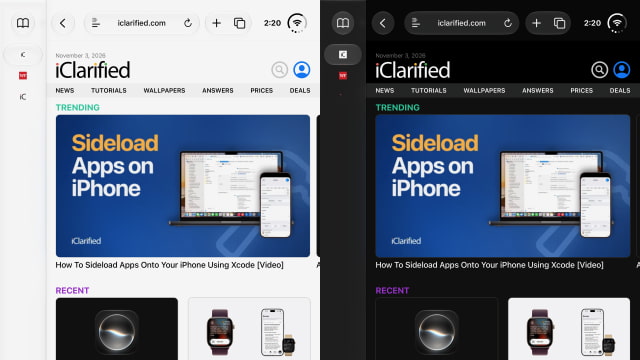
Vertical Tabs moves open tabs into a sidebar on the left instead of the traditional horizontal tab bar. The sidebar shows website icons by default to save space, but users can widen it to reveal page titles. The layout is available across iPhone, iPad, and Mac, rather than being limited to the larger display on iPhone Duo.
Tab Groups and automatically organized Topics continue to work in the new layout, along with features such as dragging to pin tabs. On iPhone, Vertical Tabs can be enabled under Settings > Apps > Safari. Mac and iPad users can also turn it on through Safari's View menu.
Adaptive Dark Mode addresses websites that remain bright when the device is set to Dark Mode. Safari offers a Try button on eligible pages, allowing users to preview a darker version before enabling it. The feature can be applied automatically or managed on a site-by-site basis.

The adjustments go beyond changing the background. Safari can tune text contrast, invert logos and graphics, recolor vector artwork, and adjust shadows as needed for the page. Sites with an existing dark appearance are left alone, and developers can add a tag to prevent Safari from adapting their design.
Siri AI is also gaining direct controls for browser tabs and windows, including moving, sorting, closing, and organizing them into Tab Groups. Users can ask it to clear browsing history for a particular website over a specified period, rather than removing their entire history.
Broader webpage awareness is still coming in a future update, not this first beta. That expansion will let Siri understand content beyond what is visible on screen, including information across other open tabs. The Siri features require an Apple Intelligence-capable device.
Developers can try the Safari changes in today's iOS 27.3 and iPadOS 27.3 betas and the macOS 27.3 Golden Gate beta.