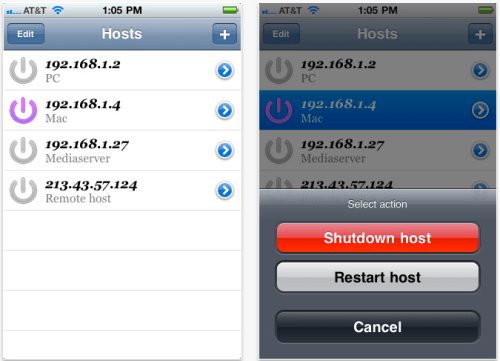
Black Box Studio has announced the release of iShutdown 1.0, a utility for iPhone, iPod touch, and iPad that allow you remotely shutdown or restart your PC or Mac. iShutdown is a Universal app that works on the iPhone, iPad and iPod touch.
iShutdown works with Wi-Fi or 3G. It will automatically scan your local networks to find available hosts. Now you don't need to stand up from your chair or bed to shutdown or restart your home mediaserver or any other host.
Available features: * Auto scan your local network for available hosts * Simple one tap shutdown or restart your hosts * Highlight running hosts * Works with both Mac and PC * Manual hosts addition
Upcoming features: * Wake-On-Lan. With this feature you will be able to run your hosts remotely from everywhere.
Pricing and Availability iShutdown 1.0 is only $0.99 (USD) and available worldwide exclusively through the App Store in the Utilities category. Promo codes are available for qualified reviewers. Please specify the website or blog you represent when making your request. All future updates are included with initial purchase of full version.
Get the iClarified Daily Newsletter
Apple news, rumors, tutorials, price drop alerts, in your inbox every evening, free.
Unsubscribe at any time.
Success!
You have been subscribed.
Add Comment
Would you like to be notified when someone replies or adds a new comment?
Yes (All Threads)
Yes (This Thread Only)
No
Notifications
Would you like to be notified when we post a new Apple news article or tutorial?
Yes
No
Comments (5)
Comments are closed for this article.
0
Solution - May 27, 2011 at 12:09pm
Only $0.99?? Check out "PC Monitor" app on the AppStore. You'll be surprised!
0
nixxez - May 27, 2011 at 10:05am
Same here, no go :(
0
David - May 26, 2011 at 6:12pm
Wonder how this will work. Installing a small app on the PC or Mac certainly takes care of the remote shutdown part, even traversing a NAT. However, such a service/daemon can't help with WOL and most routers will block a magic packet sent in broadcast mode to hit all machines on the other side. The only way I know is to use port forwarding, which means this will work for only one machine (unless they have a service/daemon that, once active after starting one machine, can retransmit a magic packet to another on the LAN).
0
Unfaced - May 27, 2011 at 3:47am
yeap.... Doesn't work. I have 2 pc's and 2 mac's at home. This app didn't find them, nor shutdown after adding them manually! waste of my dollar
0
Don - May 28, 2011 at 1:37am
It worked for me! Using iPhone iOS 4.3.3 all I needed to do was to edit the ip address and I got it working.
Maybe you can try that? Or you would have to open a port on your firewall/ router ?





![Apple-LG Home Accessories Could Offer Dynamic Island Proximity Controls [Leak]](/images/news/102711/102711/102711-160.jpg "Apple-LG Home Accessories Could Offer Dynamic Island Proximity Controls [Leak]")


![How To Force Restart iPhone [Video]](/images/tutorials/95012/95012/95012-160.jpg "How To Force Restart iPhone [Video]")
![How To Turn Off iPhone [Video]](/images/tutorials/94999/94999/94999-160.jpg "How To Turn Off iPhone [Video]")
![How To Back Up Your iPhone to an External Drive on Mac [Video]](/images/tutorials/72786/72786/72786-160.jpg "How To Back Up Your iPhone to an External Drive on Mac [Video]")






![Mac mini Drops to $779.99 for Prime Big Deal Days [Deal]](/images/news/102624/102624/102624-160.jpg "Mac mini Drops to $779.99 for Prime Big Deal Days [Deal]")
