Hashsoft has announced the release of Call U Later, their second application for iOS. Call U Later is a useful tool that helps people to remember to make a call or write an SMS.
"The idea for this app came from a real life need," said Tal Hashai, author of Call U Later. "I have several friends, who spend a lot of time in business meetings, that told me of all the times they have received a call from their spouse, told them they'll call back in half an hour and forgot all about it."
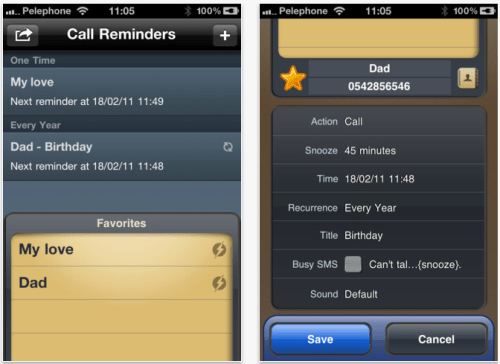
We've seen a lot of reminder apps before. What makes this one special is the fact that it is designated for the purpose of returning a call. When someone's at a meeting, or can't talk at the moment, he'd like to create a reminder in a very short time. Call U Later makes it possible to create a new reminder in only one click.
Call U Later offers highly intuitive user interface, designed by UI and graphic experts, with full Retina support for iPhone 4 users. The user may either return a call to a list of favorite contacts, or access the address book for full contact list.
If the user configures a reminder for thirty minutes and doesn't respond to the reminder, Call U Later will automatically snooze for another thirty minutes, until the user makes the call. After returning the call, a list within the app of recent calls will draw the item in green - or red for expired calls.
Supported Languages: * US English, Chinese, French, Hebrew, Japanese
Pricing and Availability: Call U Later 1.2 is available at the App Store, providing access to basic functionality for free. Extended features allows to define a recurring reminder, send an "Can't talk right now" SMS template, choose a custom alert sound and more. Extended features can be unlocked for $1.99 through in-app purchase.
Get the iClarified Daily Newsletter
Apple news, rumors, tutorials, price drop alerts, in your inbox every evening, free.
Unsubscribe at any time.
Success!
You have been subscribed.
Add Comment
Would you like to be notified when someone replies or adds a new comment?
Yes (All Threads)
Yes (This Thread Only)
No
Notifications
Would you like to be notified when we post a new Apple news article or tutorial?



![Apple Plans December Launch for Apple Intelligence in China [Report]](/images/news/102843/102843/102843-160.jpg "Apple Plans December Launch for Apple Intelligence in China [Report]")
![OpenAI Agrees Not to Use Allegedly Stolen Apple Trade Secrets [Report]](/images/news/102840/102840/102840-160.jpg "OpenAI Agrees Not to Use Allegedly Stolen Apple Trade Secrets [Report]")



![How To Forward Calls on iPhone [Video]](/images/tutorials/92926/92926/92926-160.jpg "How To Forward Calls on iPhone [Video]")
![How To Back Up Your iPhone to an External Drive on Mac [Video]](/images/tutorials/72786/72786/72786-160.jpg "How To Back Up Your iPhone to an External Drive on Mac [Video]")
![How To Install Homebrew on Mac [Video]](/images/tutorials/83695/83695/83695-160.jpg "How To Install Homebrew on Mac [Video]")


![14-Inch MacBook Pro With M5 Max Drops to $3,299 ($800 Off) [Deal]](/images/news/102828/102828/102828-160.jpg "14-Inch MacBook Pro With M5 Max Drops to $3,299 ($800 Off) [Deal]")