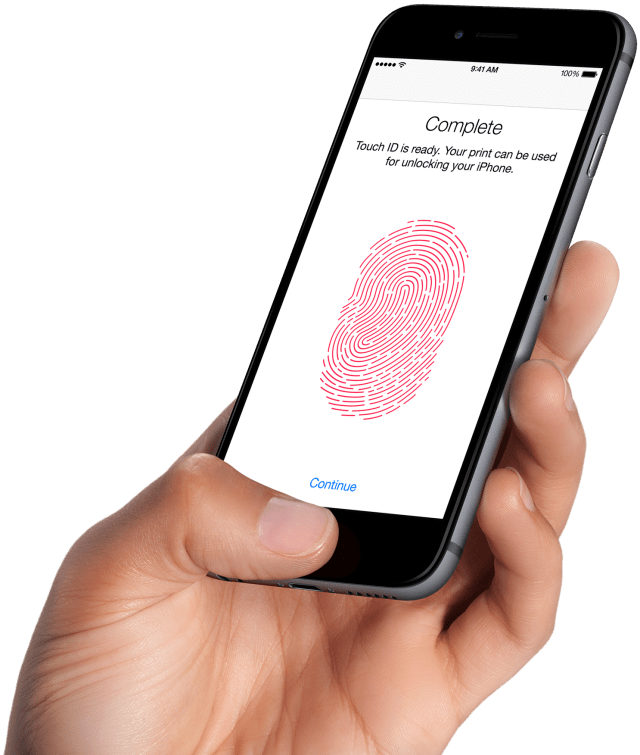
If you've noticed that you need to enter your passcode more often it may be because Apple has quietly added some new passcode requirements to Touch ID.
MacWorld discovered the change, documented in Apple's iOS Security Guide, after being asked a question by a user. The security measure disables Touch ID if "The passcode has not been used to unlock the device in the last six days and Touch ID has not unlocked the device in the last eight hours."
Users (including this reporter) began noticing this change in the last several weeks, even though an Apple spokesperson says it was added in the first release of iOS 9. However, a bullet point describing this restriction only appeared in the iOS Security Guide on May 12, 2016, according to the guide’s internal PDF timestamp. Apple declined to explain the rationale for this restriction.
It's unclear why Apple chose six days and eight hours but the change should increase security and perhaps protect users from court orders forcing them to unlock their devices using Touch ID. Recently, a judge ordered a Los Angeles area woman to use her fingerprint to unlock her iPhone for the FBI. Many feel that the act of compelling a person to unlock their iPhone via fingerprint breaches their 5th Amendment rights to protection against self-incrimination.
Here's the full list of situations in which a passcode is required...
--- Touch ID and passcodes To use Touch ID, users must set up their device so that a passcode is required to unlock it. When Touch ID scans and recognizes an enrolled fingerprint, the device unlocks without asking for the device passcode.
The passcode can always be used instead of Touch ID, and it’s still required under the following circumstances: • The device has just been turned on or restarted. • The device has not been unlocked for more than 48 hours • The passcode has not been used to unlock the device in the last six days and Touch ID has not unlocked the device in the last eight hours. • The device has received a remote lock command. • After five unsuccessful attempts to match a fingerprint. • When setting up or enrolling new fingers with Touch ID. ---
Apple news, rumors, tutorials, price drop alerts, in your inbox every evening, free.
Unsubscribe at any time.
Success!
You have been subscribed.
Add Comment
Would you like to be notified when someone replies or adds a new comment?
Yes (All Threads)
Yes (This Thread Only)
No
Notifications
Would you like to be notified when we post a new Apple news article or tutorial?
Yes
No
Comments (6)
Comments are closed for this article.
0
Cesar chavez nortel Cadillac Humphrey - May 21, 2016 at 1:29pm
This sounds like some sort of tricky way to do something fishy Apple is trying to do. I mean, why disable something in the first place? I don't care if I have not touched or restarted my phone. Who sits down and thinks the newest and most interesting thing we should do is disable Touch ID? Someone give me a reason why. Something else is going on here because I'm under the assumption it turns Touch ID off, right? Why would I want that? Who would be benefiting from that?
0
Noman - May 20, 2016 at 4:47am
Yes. That's absolutely the case. I've seen people forget their code the same day.
0
Noman - May 19, 2016 at 4:21pm
This is awesome. The amount of people who end up having to wipe their devices because they haven't put the passcode in since the initial setup is astounding. Most of them end up losing all of their data as well since they haven't backed up their phone
0
untitled - May 20, 2016 at 1:41am
Dude, you must type your passcode at every iphone restart. You're telling me someone hasn't restarted their phone in more than a month and forgot the passcode?
0
Ncl - May 20, 2016 at 3:45am
It's funny, cos I know a lot of people who don't even know to restart their iPhones.
0
INFOSEC - May 21, 2016 at 6:02pm
When did it become a requirement to restart your iPhone?




![Apple Targets October 13 for Smart Home Hub, New HomePod mini and Apple TV [Gurman]](/images/news/102501/102501/102501-160.jpg "Apple Targets October 13 for Smart Home Hub, New HomePod mini and Apple TV [Gurman]")
![Apple Debuts Trailer for Mackenzie Crook Comedy 'Small Prophets' [Video]](/images/news/102495/102495/102495-160.jpg "Apple Debuts Trailer for Mackenzie Crook Comedy 'Small Prophets' [Video]")


![How To Find Your iPhone IMEI Number [Video]](/images/tutorials/83557/83557/83557-160.jpg "How To Find Your iPhone IMEI Number [Video]")



![16-Inch M5 Max MacBook Pro Drops $900 to New Low of $3,499 [Deal]](/images/news/102438/102438/102438-160.jpg "16-Inch M5 Max MacBook Pro Drops $900 to New Low of $3,499 [Deal]")
![Magic Keyboard for iPad Air Drops to $200 on Amazon [Deal]](/images/news/102402/102402/102402-160.jpg "Magic Keyboard for iPad Air Drops to $200 on Amazon [Deal]")
![13-Inch M5 MacBook Air With 1TB Drops to $1,449 on Amazon [Deal]](/images/news/102345/102345/102345-160.jpg "13-Inch M5 MacBook Air With 1TB Drops to $1,449 on Amazon [Deal]")

