Posted November 26, 2009 at 11:57am by
Yoav Levytam
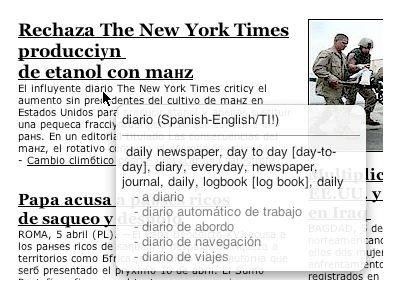
TranslateIt! Team has released TranslateIt! 11.2, an update to their multilingual dictionary for Mac OS X. TranslateIt! for Mac is a multilingual dictionary that allows you to look up words on the fly! Just hover the pointer over an unfamiliar word and you will see its translation in a pop-up window.
Changes list: * Pop-up window of translation has been completely remade, new function of pop-up window; - now you can move pop-up window - now you can pin pop-up window at any place of display - now there is a function of words voicing * Now on-the-fly translation consumes less CPU * Many internal components have been updated: DictBuilder, DictionaryAnalyzer, Widget * Some outdated Online Service profiles have been updated
Main features: * Translate words in any applications by just moving the pointer over them * Full text translation * Support for most widely known online dictionary/translation services * Lots of free dictionaries * Translation Methods: translation from clipboard, drag-and-drop translation, manual input of queries in the main window, double-click translation of words in dictionary entries displayed in the main window. * Morphology support * Built-in utility for easy creation of custom dictionaries * Words Quiz (a game for easy learning of new words) * Multilingual user interface
Pricing and Availability: The program has following licenses: 1 year ($25), 2 years ($35), 5 years ($50) and lifetime license ($100). Volume discount pricing is available. Additional discounts available as coupons (coupon codes entered while purchasing): Nonprofit - 15% for non-profit organizations. Education - 35% for educational organizations and students.
Read More
Get the iClarified Daily Newsletter
Apple news, rumors, tutorials, price drop alerts, in your inbox every evening, free.
Unsubscribe at any time.
Success!
You have been subscribed.
Add Comment
Would you like to be notified when someone replies or adds a new comment?
Yes (All Threads)
Yes (This Thread Only)
No
Notifications
Would you like to be notified when we post a new Apple news article or tutorial?









![How To Change Wallpaper on Mac [Video]](/images/tutorials/90512/90512/90512-160.jpg "How To Change Wallpaper on Mac [Video]")
![How To Turn Off Always On Display on iPhone [Video]](/images/tutorials/87524/87524/87524-160.jpg "How To Turn Off Always On Display on iPhone [Video]")





![16-Inch M5 Max MacBook Pro Drops $900 to New Low of $3,499 [Deal]](/images/news/102438/102438/102438-160.jpg "16-Inch M5 Max MacBook Pro Drops $900 to New Low of $3,499 [Deal]")
![Magic Keyboard for iPad Air Drops to $200 on Amazon [Deal]](/images/news/102402/102402/102402-160.jpg "Magic Keyboard for iPad Air Drops to $200 on Amazon [Deal]")
