Mac OS X Lion will be upgradeable to Mac OS X Lion Server via a Mac App Store download, according to a help document found by HardMac.
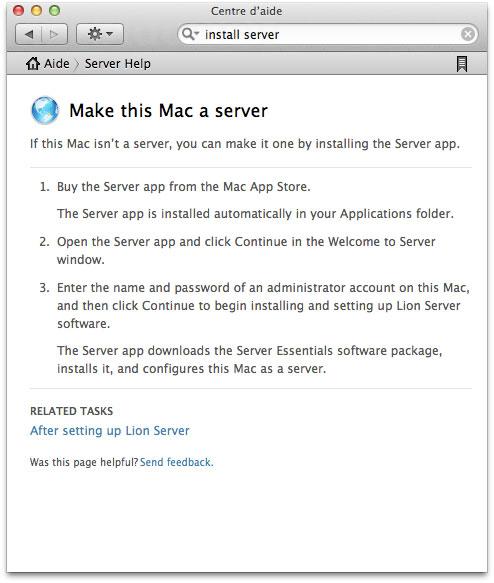
--- Make this Mac a server If this Mac isn't a server, you can make it one by install the Server app.
1. Buy the Server app from the Mac App Store. The Server app is installed automatically in your Applications folder.
2. Open the Server app and click Continue in the Welcome to Server window.
3. Enter the name and password of an administrator account on this Mac, and then click Continue to begin installing and setting up Lion Server software.
The Server app downloads the Server Essentials software package, installs it, and configures this Mac as a server ---
Its unclear how much Mac OS X Lion or this Server.app upgrade will cost. Hopefully, we'll find out more at the WWDC keynote on Monday.
Get the iClarified Daily Newsletter
Apple news, rumors, tutorials, price drop alerts, in your inbox every evening, free.
Unsubscribe at any time.
Success!
You have been subscribed.
Add Comment
Would you like to be notified when someone replies or adds a new comment?
Yes (All Threads)
Yes (This Thread Only)
No
Notifications
Would you like to be notified when we post a new Apple news article or tutorial?







![How To Turn Off iPhone [Video]](/images/tutorials/94999/94999/94999-160.jpg "How To Turn Off iPhone [Video]")
![How To Back Up Your iPhone to an External Drive on Mac [Video]](/images/tutorials/72786/72786/72786-160.jpg "How To Back Up Your iPhone to an External Drive on Mac [Video]")

![How To Find Your IP Address on iPhone [Video]](/images/tutorials/496/496/496-160.jpg "How To Find Your IP Address on iPhone [Video]")


![Beats Headphones, Earbuds, and Pill Speaker Are Up to 41% Off [Deal]](/images/news/103026/103026/103026-160.jpg "Beats Headphones, Earbuds, and Pill Speaker Are Up to 41% Off [Deal]")

![New Fire TV Stick 4K Drops to $29.99 (50% Off) [Deal]](/images/news/102984/102984/102984-160.jpg "New Fire TV Stick 4K Drops to $29.99 (50% Off) [Deal]")
![Apple's iPhone 18 Pro and Pro Max Cases Are Up to 37% Off [Deal]](/images/news/102978/102978/102978-160.jpg "Apple's iPhone 18 Pro and Pro Max Cases Are Up to 37% Off [Deal]")
