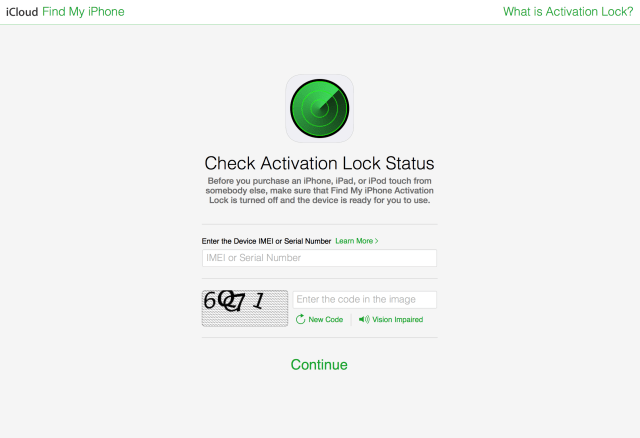
Apple has posted a new 'Check Activation Lock Status' page that lets you enter the serial number or IMEI of an iPhone, iPad, or iPod touch to check if activation lock is enabled or disabled. This is useful if you want to confirm that the device you are about to purchase is ready for you to use. ie. not stolen.
Check Activation Lock Status Before you purchase an iPhone, iPad, or iPod touch from somebody else, make sure that Find My iPhone Activation Lock is turned off and the device is ready for you to use.
iH8Snow notes that is also useful to check if the device has been doulci-activated.
Is actually incredibly useful for people wanting to buy an iDevice and not get tricked via doulci-activated devices.







![Apple Reports Q2 FY26 Earnings: $111.2 Billion in Revenue, $29.6 Billion in Net Income [Chart]](/images/news/100725/100725/100725-160.jpg "Apple Reports Q2 FY26 Earnings: $111.2 Billion in Revenue, $29.6 Billion in Net Income [Chart]")






![13-Inch M5 MacBook Air Drops to $949.99 on Amazon [Deal]](/images/news/100667/100667/100667-160.jpg "13-Inch M5 MacBook Air Drops to $949.99 on Amazon [Deal]")

![AirPods Pro 3 Drop Back to $199.99 on Amazon ($50 Off) [Deal]](/images/news/100545/100545/100545-160.jpg "AirPods Pro 3 Drop Back to $199.99 on Amazon ($50 Off) [Deal]")
![13-inch MacBook Air M5 Drops to $949 in New All-Time Low [Deal]](/images/news/100466/100466/100466-160.jpg "13-inch MacBook Air M5 Drops to $949 in New All-Time Low [Deal]")

