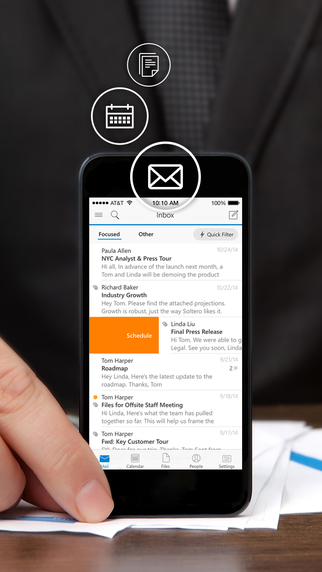
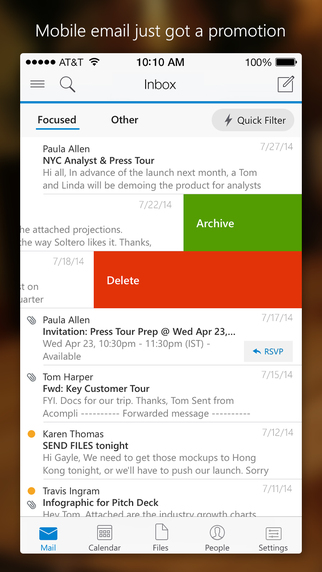
Microsoft has updated its Outlook app for iOS with small improvements to the UI, additional settings for disabling grouped emails by conversation and changing system folders, easier Box integration, and more.
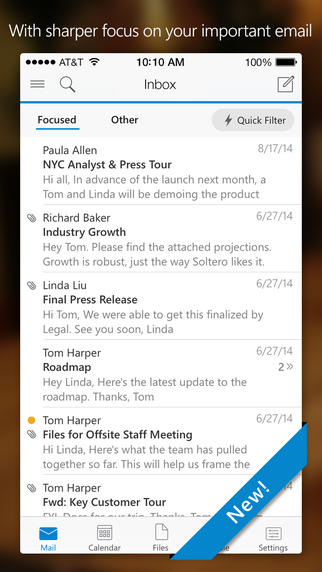
Outlook is a free email app that helps you get more done from anywhere with one unified view of your email, calendar, contacts, and attachments. Outlook automatically surfaces your most important messages – across all your email accounts. Swipe to quickly delete, archive, or schedule messages you want to handle later. Easily view your calendar, share available times, and schedule meetings. And attach files from your email, OneDrive, or Dropbox with just a few taps.
Manage your inbox • Outlook automatically triages your inbox for you, surfacing your most important email. Less relevant email is placed in your “Other” inbox. • Swipe to quickly delete, archive, or schedule messages. • Schedule emails and they will return to your inbox at a later time.
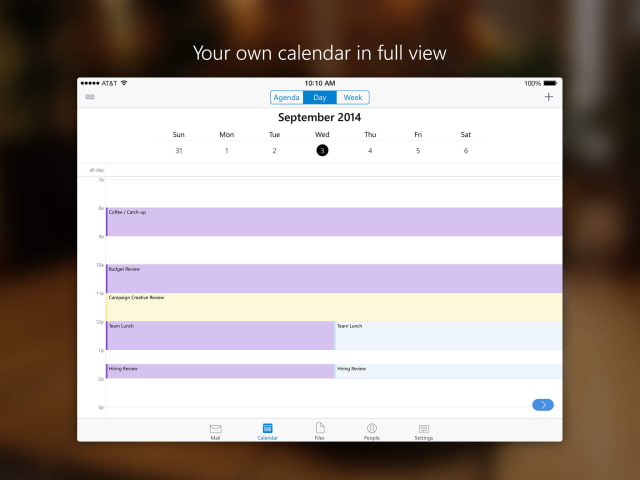
Your calendar built-in • Switching between your email and calendar apps is a thing of the past. Outlook includes your calendar and notifies you with appointment reminders. • Find available meeting times and share them in email or schedule a meeting.
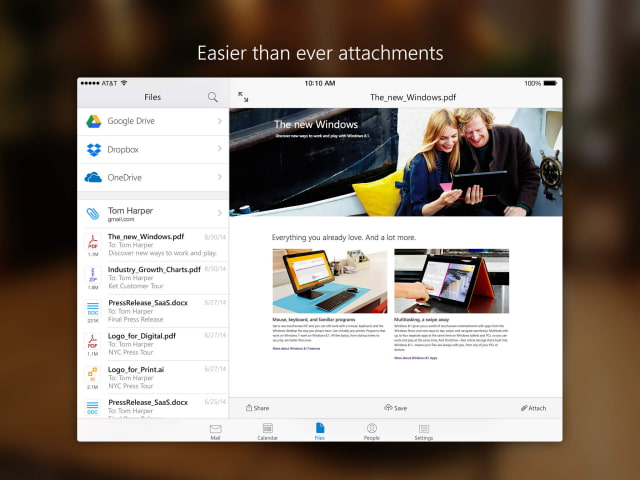
Attachments made easy • View and attach any file from your email, OneDrive, Dropbox, and other accounts with just a few taps. • Send large files even if you haven’t downloaded them to your phone.
Find anything fast • Filter your inbox to only show messages that are unread, flagged, or have attachments, with a single tap. • Quickly find the right messages, people and files by typing just a few letters. • Outlook shows people you communicate with most often, and lets you conveniently drill down to see all related emails, meetings and files.
What's New In This Version: - Added setting to disable grouping emails by conversation - Added advanced account settings to allow users to change their system folders - Small improvements to the UI throughout the app - Made it easier to add your Box account from the files screen - Bug fixes
You can download Microsoft Outlook from the App Store for free.
Apple news, rumors, tutorials, price drop alerts, in your inbox every evening, free.
Unsubscribe at any time.
Success!
You have been subscribed.
Add Comment
Would you like to be notified when someone replies or adds a new comment?
Yes (All Threads)
Yes (This Thread Only)
No
Notifications
Would you like to be notified when we post a new Apple news article or tutorial?
Yes
No
Comments (7)
Comments are closed for this article.
0
H. Michael Young - February 9, 2015 at 8:01pm
This is simply the Accompli app that has been rebranded. It is a good app, but time will telljust how good it is.
0
Rick Benveniste - February 8, 2015 at 5:10pm
Where's the push notifications for folders? No Active Sync for folders? Do I really have to use OWA to get this??
0
Rick Benveniste - February 8, 2015 at 3:06pm
Very good overall but does not sync folders. You must open folders to check for new mail. This is unacceptable. Btw I using it with outlook business exchange.
0
SteveSanders - February 8, 2015 at 3:19pm
I dont know how you dont get push notification, it has push like stock or Gmail app. Only thing that is missing is that it removes bubble and new mail notification when you read email on PC, now it removes only after you enter the app, hope they will solve that soon.
0
Rick Benveniste - February 8, 2015 at 4:03pm
Just downloaded OWA for iPhone which does sync all folders. It's from Microsoft and I believe it only works with business outlook.com
0
MT - February 7, 2015 at 10:21pm
Excellent app! I just wish they allow for the fonts to be bigger. On the iPhone 6 plus, I have a hard time reading the messages :-(
0
SteveSanders - February 7, 2015 at 7:49pm
Using it 3 days now, honestly this is the best mail app for iPhone ! Tried stock Mail, Mailbox and stupid Gmail app and this one is by far the best and the fastest. Using it for Gmail. Bravo Microsoft !!





![Apple Reveals First Look at '12 12 12' Heist Drama Starring Anthony Mackie and Jamie Dornan [Video]](/images/news/101904/101904/101904-160.jpg "Apple Reveals First Look at '12 12 12' Heist Drama Starring Anthony Mackie and Jamie Dornan [Video]")



![Apple AirTag 2 4-Pack Drops to New All-Time Low of $79 [Deal]](/images/news/101860/101860/101860-160.jpg "Apple AirTag 2 4-Pack Drops to New All-Time Low of $79 [Deal]")
![AirTag 2 (4-Pack) Hits All-Time Low of $85, Just $21.25 Each [Deal]](/images/news/101856/101856/101856-160.jpg "AirTag 2 (4-Pack) Hits All-Time Low of $85, Just $21.25 Each [Deal]")
![LG 27-Inch UltraGear OLED Monitor Hits All-Time Low of $467.97 [Deal]](/images/news/101851/101851/101851-160.jpg "LG 27-Inch UltraGear OLED Monitor Hits All-Time Low of $467.97 [Deal]")